cd “/volume*/@apphome/PlexMediaServer/Plex Media Server”
ls should show all the files of your existing PMS installation. If you see contents in “Plex Media Server” then your server is indeed still intact. I suspect it is.
Now, in VI, remove the following Name="value" sets from Preferences.xml:
a. PlexOnlineUsername
b. PlexOnlineToken
c. PlexOnlineMail
d. PlexOnlneHome (might not be there)
e. AcceptedEULA
Save the file.
Now the server is “pristine” and ready for claiming.
I FIGURED IT OUT!!! (sorry for the all caps, but it was one of these moments when I wanted to should it out to the World).
I had nothing to do with any of that actually.
It turns out DSM 7 changed the MAC address of the Synology DiskStation, messing up in the process my carefully crafted DHCP IP reservation on the router so every time Plex attempted to connect to the PMS, it led nowhere…
I corrected the UP reservation table to reflect the change, forced the disk station to use the proper IP and it all worked out (with a pristine setup where I have to re-configure everything, but that’s definitely the least of my concerns at this point!).
Now the weird thing is that /volume1/Plex is just as empty as before (so data must be stored elsewhere I guess), but at this point… I’m fine with it
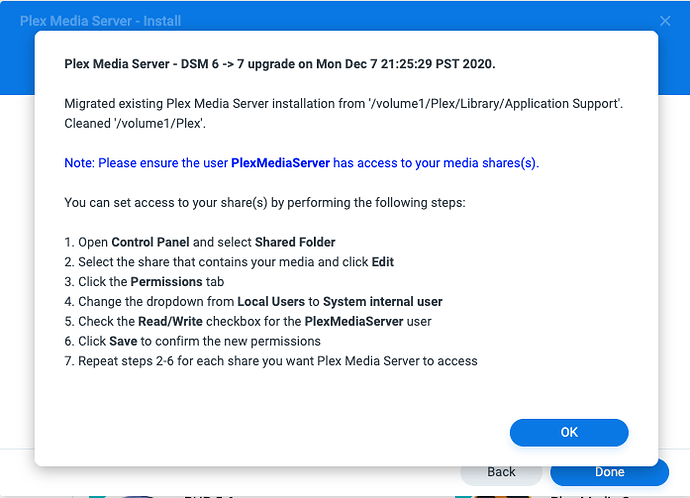
You are correct; /volume*/Plex no longer contains anything about Plex Media Server
Item 5 above.
The Plex share is now free for you to do as you wish.
Did all your existing server migrate?
If so, The only additional work for you to do now is, instead of granting user Plex permission to read your media, you grant permission for System Internal User “PlexMediaServer” to read that media.
Nothing at all, It all started as if I had never used Plex. I had already allowed PlexMediaServer to access the location where my media files are stored so all I had to do was to re-add the folders one by one (I have things split up between movies and TV shows and by language, etc, so a bunch of folders) and the MPS started re-indexing everything.
The only thing I am a bit worried about with the new setup is how to add new media and how to get it to delete from the Plex UI if I don’t want to keep it. I had issues a while back when I added media through the network under my own user account. The PMS wouldn’t delete them. I had to make sure I was adding them connecting through the LAN under the “Plex” account. It seems to be depreciated now, and I can’t connect through PlexMediaServer since it’s an internal account… We’ll see
I checked the permissions of the previous Plex volume :
/usr/syno/bin/synoacltool -get /volume1/Plex
ACL version: 1
Archive: has_ACL,is_support_ACL
Owner: [root(user)]
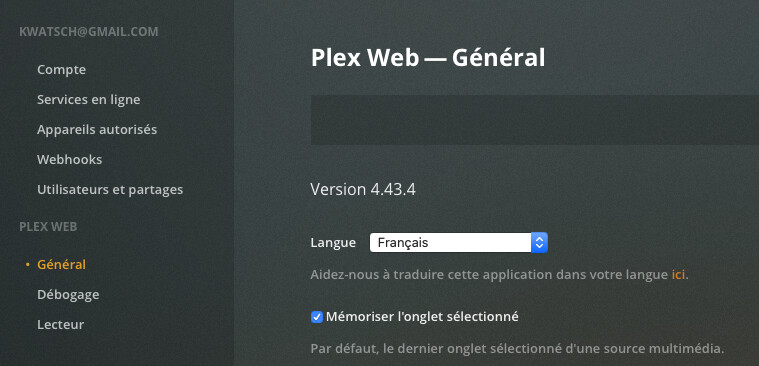
The page I was getting after the No Soup For You warning looked pretty much the same. When you look at the settings on this page (Réglages), can you see your PMS? Mine wasn’t showing up — hence the fact that I couldn’t add any media.
The MAC address of the Synology drive is different from the one I had been using for years in my DHCP reservation table on the router. The MAC address is not always as carved in stones as a lot of people think and it can sometimes be changed via CLI (through ifconfig eth1 hw ether). I also since found some threads that reported related issues when they upgraded to DSM 6 a while back when it came out. The fact is, once I corrected the MAC-based IP forwarding issues in the router, I immediately regained access to the PMS.
Regardless though, I tried to run your commands and ran into some weird issues…
bash-4.4# cd /volume1/@apphome/Plex*
bash: cd: too many arguments
bash-4.4# cd /volume1/@apphome/; ls -l | grep Plex
drwx------ 3 PlexMediaServer PlexMediaServer 4096 Dec 10 20:59 PlexMediaServer
drwx------ 2 root root 4096 Dec 10 13:45 Plex Media Server
As you can see, there are two PMS folders. One owned by PlexMediaServer and another one with spaces in its name and owned by root.
Inside the PlexMediaServer folder, there is a Plex Media Server subfolder with plenty of data. du -ms . runs forever on it… (I eventually gave up — but it implies there is data there).
bash-4.4# ls -la
total 44
drwxr-xr-x 10 PlexMediaServer PlexMediaServer 4096 Dec 11 14:57 .
drwx------ 3 PlexMediaServer PlexMediaServer 4096 Dec 10 20:59 …
drwxr-xr-x 5 PlexMediaServer PlexMediaServer 4096 Dec 11 13:26 Cache
drwxr-xr-x 3 PlexMediaServer PlexMediaServer 4096 Dec 10 20:59 Codecs
drwxr-xr-x 3 PlexMediaServer PlexMediaServer 4096 Dec 10 20:59 ‘Crash Reports’
drwxr-xr-x 3 PlexMediaServer PlexMediaServer 4096 Dec 11 15:17 Logs
drwxr-xr-x 3 PlexMediaServer PlexMediaServer 4096 Dec 11 12:31 Media
drwxr-xr-x 4 PlexMediaServer PlexMediaServer 4096 Dec 11 13:08 Metadata
drwxr-xr-x 3 PlexMediaServer PlexMediaServer 4096 Dec 10 21:01 Plug-ins
drwxr-xr-x 7 PlexMediaServer PlexMediaServer 4096 Dec 10 21:00 ‘Plug-in Support’
-rw-r–r-- 1 PlexMediaServer PlexMediaServer 774 Dec 11 14:57 Preferences.xml
“Plex Media Server” (the one owned by root) is empty though and 1. du -ms . returns 1.
Yep. On the capture of the Plex setting page you provided, the server doesn’t look like it’s listed (unless it’s further down and I can’t see it)… If that’s the case, it’s the same type of situation I was in.
Now that things are working again for me, it shows up.
In a way, it’s reassuring to see it wasn’t all wiped out
If I understand correctly, that’s the old data (and the new data lives elsewhere)?
The modifications dates on the folders imply that the data has recently been accessed and modified. If it’s no longer used, should I consider cleaning it up to regain disk space at some point? (no rush — I can run any test you want me to. I’m just wondering, for the long run).
thank you for your availability, honesty / sincerity … especially for the perseverance in reaching the goal “a new version for a new and substantially different operating system”


 LOL)
LOL)


 long enough,