DSM 7 - Plex Media Server - Release Info & Migration instructions

Plex Media Server for Synology DSM 7 - Release

This document is to share changes made with DSM 7 and resolve any unforeseen issues before you attempt migrating to DSM 7 for Plex use

YOU ARE URGED TO READ THIS THREAD COMPLETELY BEFORE PROCEEDING OR ASKING QUESTIONS

DO NOT INSTALL Synology BETA software UNLESS INSTRUCTED.

This thread is a LIVING document. Expect it to change.

Synology’s DiskStation Manager (DSM) has undergone significant changes in version 7.0.

Many of those changes affected how Plex Media Server operates. We have been working closely with Synology to ensure compatibility.

Please read carefully all which follows BEFORE upgrading to DSM 7 and upgrading or installing PMS for DSM 7.

  • DO NOT USE “Repair”

  • DO NOT CREATE ‘PlexMediaServer’ username. The package creates it for you.

  • DO NOT use the Package Center version. Package Center offers Beta which is no longer compatible. You must download Plex from Plex.tv/downloads.

  • Do Not Panic if something doesn’t work.

  • Ask if you have any questions BEFORE you start guessing or trying something.

  • Share any other concerns or suggestions.

Some known limitations and cautions to observe.

  1. Builds are are now available on the Plex Downloads page. Any changes needed to the package will be announced and supported in the “Issues” thread as necessary.

  2. Plex Media Server (the application) and its data (your metadata) must reside on the same storage volume. PMS itself is only 250 MB of storage requirement and should not be a factor.

  3. How PMS is administered on Synology has completely changed. We are working as quickly as possible to provide alternative methods for performing the same tasks as before (backup, restoration, migration, and database repairs).

  4. We’ve automated migrating existing DSM 6 installations to DSM 7 (upgrade). You will receive a message from Package Center if it was able to automatically upgrade you. Most storage upgrades are instantaneous.

Summary of Changes

  1. The Plex Media Server package name is now PlexMediaServer

  2. You will need to grant permission for System Internal User - PlexMediaServer just as you previously did for user Plex. This change was unavoidable.

  3. The user we run as is now is an internal system user called PlexMediaServer

  4. For each share that you wish Plex Media Server to access, you need to go and set read/write permissions for the PlexMediaServer system internal user.

  5. We have new install and uninstall options to assist with access to logs as well as starting over if required.

  6. We no longer store app data in the Plex share (more info below)

  7. If you had a previous Plex share we will guide you through the process of migration.

  8. Packages are only signed when installed from Synology’s servers.

  9. Plug-ins are not supported in DSM 7 at this time. Due to changes required for DSM, Plug-ins might never return. The known alternative method is to use Containers for applications like Tautulli

  10. The plex installer now provides a Synology-style GUI for providing installation options. This same menu system affords options during upgrades and when uninstalling.

  11. The GUI supports 8 different languages (based on your DSM configured language). We used the 8 most frequently used language by Plex’s customers. If your language is not listed and you feel it should be, please reach out to us and we’ll endeavor to add it (with your assistance)

New Package options during install

  • Normal Installation (default for most)

  • Install using Plex Claim Toke
    – Allows you to claim (or reclaim) the server should the credentials get damaged.
    – Also allows you to claim the server if it’s on a different network.

New Package options during uninstall

  • Uninstall Only. Keep all existing files for future re-installation. (this is the default and retains existing DSM 6 behavior)

  • Sign out and unclaim this server. Keep all existing files for future re-installation. This allows you to sign out/unclaim the server if you wish to reclaim it as another user.

  • Erase all of Plex Media Server from this system. (Not Recoverable) This allows you to start over as a clean setup. No libraries or preferences will be retained.

‘Plex’ shared folder changes

Because the DSM data area storage structure has changed, we were forced to make some decisions. After discussing all the possible configurations out there, we came up with what we think is the best for everyone.

  1. We’ve abandoned the Plex share. We access it one time, during installation, to migrate your existing Plex installation.

  2. Once migrated, you are free to use the shared folder as you wish. You are free to remove it entirely.

  3. PMS no longer is dependent on a Plex share and will no longer create one when installed on a system.

  4. Effective PMS 1.24.2.4973, PlexMediaServer presents a shared folder for the purpose of backing up your metadata and for emergency repairs ONLY.

STORE NO MEDIA IN THE PLEXMEDIASERVER FOLDER

User Plex is no longer needed.

DSM 7 required the username to change. We therefore decided to use PlexMediaServer to match the package name.

As such, you are free to delete user Plex.

The Installer would have done this for you but no longer has any system-level privileges to do so.

CAUTION

Pay Very Careful Attention to instructions

Updated migration instructions with screenshots in next post

  1. Uninstall the previous DSM package if still installed.

  2. If you have a failed migration with all data still in the Plex shared folder
    – Uninstall & ERASE DSM 7 Plex app.. Install the package again Fresh.

Upgrade Instructions

Please read my next post - DSM 6 Migration Process

AFTER UPGRADE IS COMPLETE

You will want to read this thread so you’re familiar with the updated structure which was released in PMS 1.24.2.4973

36 Likes
NAS DSM 7 and Plex
PMS under DSM 7.0 Beta
Plain and Simple what is required for Streaming 4K Media from your PLEX
Server removed, cannot set it up again, Synology NAS
Reinstalled PMS but can no longer claim/setup as server
Help! Install after upgrade to DSM 7 did not migrate my libraries
Plex Media Server won't load media
Migrating Plex from old hardware and software Synology (6.2) system to new (7.1)
Plex server for Synology Ds920+
App.plex.tv is unable to connect to “SERVERNAME” securely
PMS Manually Stopped on DSM7 (DS1513+)
Plex is NOT working on my Synology DS1618 since the upgrade of both NAS OS and Plex
Can't access some folders anymore - DSM7
DSM 7 + Plex Upgrade/Migration Issue
Multiple Plex folders after 1.24.2.4973-2b1b51db9 Synology 7 instal
Cannot locate Plex shared folder or plexmediaserver user on synology nas
Synology DS218+ Invalid file format on manual install
Can't acess PLEX
Could not find any plex folder on Synology
Synology: PMS not able to see files/subfolders
Synology DSM 7 SSL Problem
Synology - DSM 7 build 41882 - Breaking Changes
Reinstall from scratch DSM7
Plex User on my DSM7 invisible?
Mirroring Collections
Plex Media Server - Synology DSM 7 Preview - Issues ( Archive )
Another botched DSM6 to DSM7 upgrade
Plex Media Server - Synology DSM 7 Preview - Issues ( Archive )
Reinstall from scratch DSM7
Plex Media Server - Synology DSM 7 Preview - Issues ( Archive )
Synology - DSM 7.0 Release - Plex Installation (Not Operational) Issues
Plex Media Server - Synology DSM 7 Preview - Issues ( Archive )
Plex Libary Folders Empty
Unable to add DVR: Error — Subscription: Error refreshing sub: Could not find providers for subscription
Moving Plex Metadata from Win10 to DSM7
What's the best practice for updating Plex in Synology DSM7?
Plex shared folder doesn't show up
Synology - DSM 7.0 Release - Plex Installation (Not Operational) Issues
Plex not working properly after DMS7 Update
Plex can't find media after DSM 7 upgrade
DS1621+ DSM7 Plex Media Server Not Found
Cannot install PMS after upgrade to DSM 7
Plex server install on Synology DS218 DS7.0
DSM 7 files not available
Plex dead after upgrade to DSM 7.0 - 32400 port error
Plex stops immediately after starting (fresh install)
I have all kinds of problems since upgrading my nas
DSM 7 + Plex Upgrade/Migration Issue
Plex dead after upgrade to DSM 7.0 - 32400 port error
Install taking over an hour
Server is not showing al my files
Synology - How do I undo my botched DSM7 migration?
Plex & DSM 7.0 - What happened to my indivdual folders in 'add library' guys?
Plex server goes wild, consumes all memory then stops (database corruption?)
Plex Media Server - Synology DSM 7 Preview - Issues ( Archive )
Are there any new videos for upgrading to DSM 7 and reinstalling Plex?
Synology DSM 7
Movies will not play after update to DSM 7
DS418 Play upgraded to DSM 7 issues lost my media server
Synology NAS Not Authorized Error DSM7
Need help with DSM 7 and PLEX
Plex server does not see subfolders of Shared folder
Plex library missing / not starting after disk migration and DSM upgrade
DSM 7 and Plex update sort of successful
Plex Server Not Pointing to Media after upgrade
DSM 7 and Plex update sort of successful
Plex Media Server - Synology DSM 7 Preview - Issues ( Archive )
Fresh install : Server not found and Plex folder not created
[solved] DSMv7: How to update plugins (agents/scanners)?
Plex Media Server - Synology DSM 7 Preview - Issues ( Archive )
What is working DSM7 plex upgrade procedure to newer plex package (1.24 to 1.25)
Plex Media Server - Not Authorized You Do Not Have Access To This Server
Upgraded to DSM7 prematurely; how do I fully delete a PMS server after merely "uninstalling" it?
Komplizierter Upgrade von Plex mit DSM7
Got locked out of Media Server
Since PMS-1.25.0.5282-2edd3c44d-x86_64_DSM7 no new content found
Plex Playback Error "Please check that the file exists and the necessary drive is mounted"
New Plex Server on Synology DS920+
Synology DS1520+ Plex Server Setup Issues
Playback error Synology DSM 7
Can not install PMS on Synology DS3622xs+ (DSM7.2.2-72806)
Starting Over
Migration from Synology DSM 6 to DSM 7 Libraries Empty Issue
Plex not finding new media after updating to DSM 7 (Synology NAS Sever)
Server disappeared now any new servers say "Not authorized"
Desperate for help: Server was unreachable, then available but content unavailable. Now after trying to sign out and back in server is just gone
Plex erkennt Video im Serien-Ordner nicht
Segfault in transcoder process with ~2 min left in video
PMS not working after installation on Synology DSM 7 (no upgrade)
DSM 7 - Migration Not Starting
Plex no longer connects to my Plex Media Server on Synology NAS!
Upgraded 1515+ to DSM7 and Plex not working
NAS not seen by Plex DSM 7 synology update
Serien - Eigene Titelmusik funktioniert nicht mehr - theme.mp3
Music content is not found (Video is working fine)
Can i delete the "old" plex folder after dsm migration to plexmediaserver folder?
Various errors and warnings appearing about metadata and remote streaming
Plex / DSM7 Correct Package Not Available
Upgrading the storage on my Synology DS1520+, will reinstall everything from scratch, and migrate to DSM7
Server lost after updating to 7.1-42661
DSM 7 on DS214play
Can't Update PlexMediaServer To Newest Version On Synology DSM 7.1-42661 Update 3
All Files Unavailable After Updating Synology DSM - Not A Permissions Issue
PMS 1.25.8 not installing on DSM7
Migrating from DSM6 to DSM7.1 - Lost all Plex settings/libraries
I really F'ed this, and I need to totally nuke and can't find a clear answer
Synology DSM7 migration FAQ typos
Movies not getting added to Plex
/plex or /plexMediaServer
Get back libraries after update to DSM 7
Synology DSM7 --> welche Dateien sind jetzt regelmäßig zu sichern?
Synology - DSM 7.0 Release - Plex Installation (Not Operational) Issues
Synology: DSM 7 Installation Archive -- Archived from main thread
Had to post just to say thanks!
Remote access from web app issue "unable to connect ... securely"
Server update seriously messed up Plex
Reinstallation of PlexMediaServer does not work properly
Plex server disappeared from the console after DSM 6 upgrade to 7
No permission to access my mediaServer after updating Synology to DSM 7
Plex Media Server - Synology DSM 7 Preview - Issues ( Archive )
Synology DSM 7.0.1 update
Transition from Synology DSM 6 Plex to Syno DSM 7 but with Plex under Docker
Update ddm 7 and Plex Média Server not working
NAS DSM 7 and Plex
NAS DSM 7 and Plex
Plex doesn't find my directories
NAS DSM 7 and Plex
Upgrading to Synology DSM 7 without granting read/write to PlexMediaServer
NAS DSM 7 and Plex
Upgrading to Synology DSM 7 without granting read/write to PlexMediaServer
Remove old Plex Account After DSM 7 Upgrade
Content unavailable - version 7.0-41890
Synology: DSM 7 Installation Archive -- Archived from main thread
Plex on My Synsology DS220j
How much data can be shared with iTunes
Need to be compatible with synology DSM 7.0 beta
New plex install on docker (NAS)
Plex server does not see subfolders of Shared folder
Unable to setup Plex server on Synology NAS
Migrating from Plex Media Server Windows to Synology without loss?
Plex Server on Synology DS218+ OR Desktop with i7-4790K 4.0 GHz CPU
Sync doesn't work on Plex even with Plex Pass
Do Devs still actually work?
Plex Media Server - Synology DSM 7 Preview - Issues
DS415+ Upgrade to DSM7 No folder path
Where is my Plex Media files?
Synology DS218+ Invalid file format on manual install
NAS DSM 7 and Plex
DSM 7 upgrade borked everything
NAS DSM 7 and Plex
Synology DSM 7 won't accept file format, says invalid contact packet provider?
NAS DSM 7 and Plex
NAS DSM 7 and Plex
Permissions issues on DSM 7
Appli Android : tout les menus affichent la même bibliothèque
[Help] Coupure lors de la lecture à distance
Plexmedia auf Synology DSM 7
Permissions issues on DSM 7
Cant claim server
Need help after DSM 6 to 7 Migration
I bungled my DSM7 migration. How do I get my metadata back?
FAQ for Synology setup? Can't see movies in database
I bungled my DSM7 migration. How do I get my metadata back?
Synology DSM 7
Synology 7 Upgrade - Lost All History
Plex Media Server - Synology DSM 7 Preview - Issues ( Archive )
Plex app on Synology DSM7 not creating Plex share or user
Plex Media Server - Synology DSM 7 Preview - Issues ( Archive )

DSM 6 → DSM 7 Migration Process

NOTE: Use the Plex package from https://plex.tv/downloads ONLY. Package Center is no longer compatible with Official Release DSM 7.0-41890 and above.

Use the following steps then continue below as is appropriate for your configuration.

  1. Uninstall the DSM 6 Plex app

  2. Control Panel - Shared Folders -

  • Verify the Plex share is spelled “Plex”.
  • If not - Rename it to “Plex-temp” and then back to “Plex” (How DSM does it) if necessary
  • Certain older systems were created with the name “PLEX”.
  1. Control Panel - Security - Set the idle timer to 65536 minutes.
  • Restart DSM to make effective.
  1. Now upgrade to DSM 7
  • Setting the idle timeout ensures DSM will not disconnect you during the migration process. You can restore to the default value after migration completes.

  1. Restart DSM 7 one more time before starting installation. (yes, it does make a difference)

  2. Now begin installation.

Special consideration.

Due to a change which became effective in PMS 1.24.2.4973, once upgrading to PMS 1.24.2.4973 or above, lower versions of PMS for DSM 7 cannot be used.

  • The storage locations changed and are not backward compatible.
  • Sorry for any inconvenience this might cause.
  • We are working with Synology to get them to update the version available in Package Center to avoid future problems.

DO NOT SHUTDOWN OR RESTART during this migration process.

Begin Plex installation here

  1. DSM 7 required we change both the service username (Plex → PlexMediaServer) and the shared folder (Plex → PlexMediaServer).

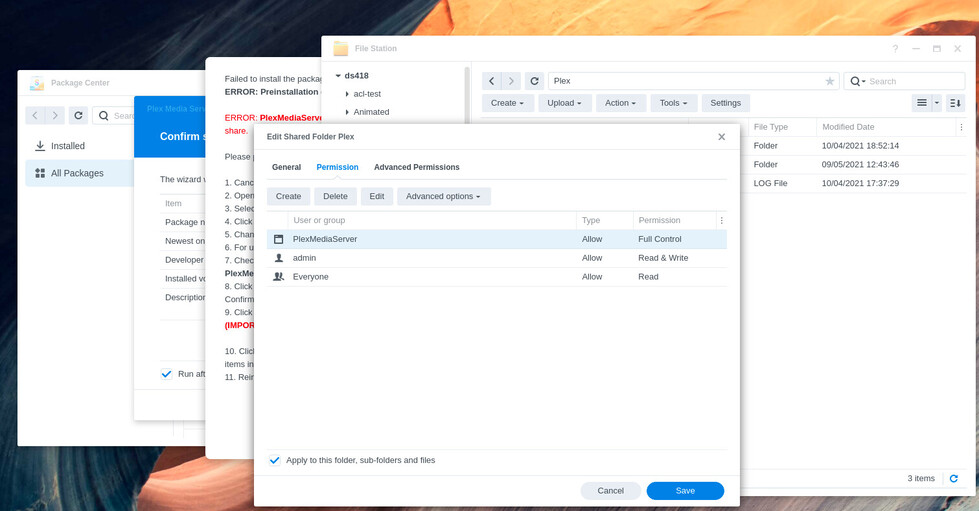
  2. The installer will expect the new username “PlexMediaServer” to already exist and have Full Control of the Plex share. It will not so the first attempt to install will fail.
    This is expected.

  1. We will now give PlexMediaServer Full Control of the “Plex” shared folder.
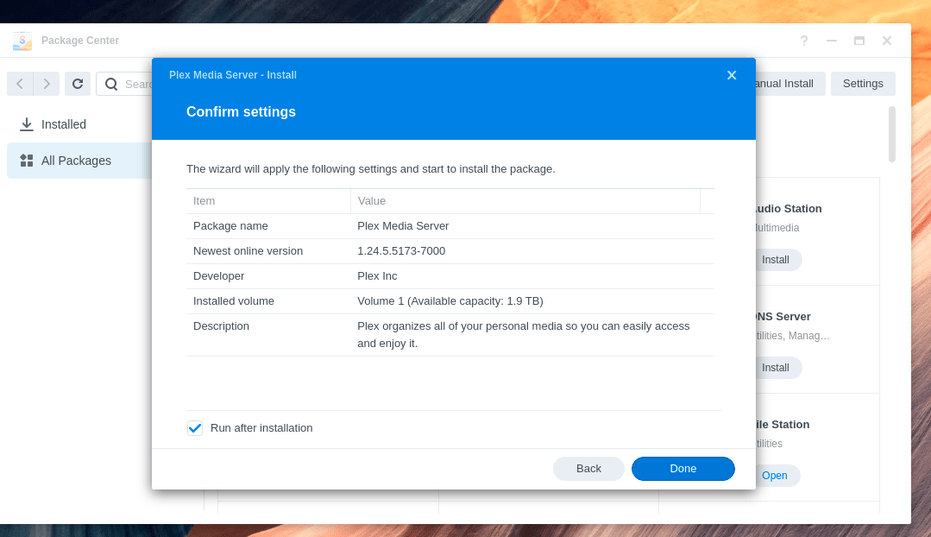
  1. When complete, close the windows to return the installer page

  2. Click DONE to start the installation.

  • If there are no errors, Observe the installer processing your files and “Installing”.

  • If the installer finds something it does not like, follow the instructions given in the popup window and try again.

NOTE: The amount of time required to complete “Installing” will be dependent on the amount of media indexed.

  • The installer will require approx 3 minutes for each 1000 items you have indexed.

  • The amount of time will increase if you’re installing PlexMediaServer on a different volume than it was installed on with DSM 6. This is because it must copy the files from one drive to another.

WARNING:

  • DO NOT restart the Synology until after migration is complete. You will end up with a broken installation which might not be recoverable.

  • DO NOT attempt to interrupt the installation unless you fully intend to start from scratch with your Plex installation. Interrupting will result in data loss.

MONITORING:

The installer keeps its status in the log file Plex/Migration.log

This is a sample of what you will find in Migration.log

Plex Media Server migration to DSM 7 started:  Sat Oct 30 15:26:16 EDT 2021
=== Sat Oct 30 15:26:16 EDT 2021 === Start: Change ownership
=== Sat Oct 30 15:29:45 EDT 2021 === Completed: Change ownership
=== Sat Oct 30 15:29:45 EDT 2021 === Start: Convert symbolic links
=== Sat Oct 30 15:34:41 EDT 2021 === Completed:  Convert symbolic links
=== Sat Oct 30 15:34:41 EDT 2021 === Start: Migrate Plex Media Server
=== Sat Oct 30 15:34:41 EDT 2021 === Completed:  Migrate Plex Media Server
=== Sat Oct 30 15:34:41 EDT 2021 === Start: Clean /volume1/Plex
=== Sat Oct 30 15:34:41 EDT 2021 === Completed: Clean /volume1/Plex

When Complete

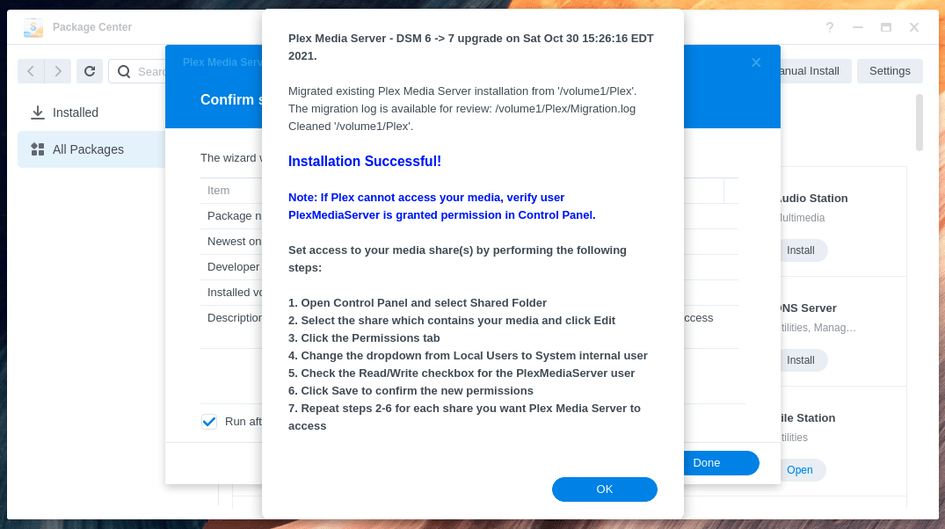
When installation and migration is complete, you will see a final popup similar to:

24 Likes
NAS DSM 7 and Plex
Cannot claim my server on Synology DSM7 after format
Synology NAS with DSM 7 & PLEX Beta - Plex doesn't see nas drive
Synology 7 Upgrade - Lost All History
Synology DS918+ - new storage pool, can't see movies in folder
Original Plex Server Missing after DSM 7 Upgrade (Claim Token didn't work)
Issues upgrading to DSM7
Synology DSM7 migration FAQ typos
Synology DSM 7 - Plex Media Server Installation Issue
Plex Media location
Update ddm 7 and Plex Média Server not working
Why is DSM 7 update STILL messing up Plex?
Again, "The operation failed. Please log in to DSM again and retry."
DS418 Play upgraded to DSM 7 issues lost my media server
Synology: DSM 7 Installation Archive -- Archived from main thread
Synology FAQ - Questions, Answers, and How-To's
Migration of Metadata from Windows to DSM 7.0 Plex
Migrating Plex from old hardware and software Synology (6.2) system to new (7.1)
Unable to install Plex after migration to DSM7
Synology 7 Upgrade - Lost All History
PS5 Plex cannot connect to synology NAS after updating to DSM 7.0
Plex Media Server - Synology DSM 7 Preview - Issues ( Archive )
Synology - DSM 7.0 Release - Plex Installation (Not Operational) Issues
Installed numerous times - will not recognise a single file
Plex No Longer Works - DS1817
Plex Media Server install on Synology DS916+ NAS running DSM 7
Are there any new videos for upgrading to DSM 7 and reinstalling Plex?
DSM 7 Plex Server not starting
Synology DSM 7 - Plex Media Server Installation Issue
Plex Media Server - Synology DSM 7 Preview - Issues ( Archive )
Komplizierter Upgrade von Plex mit DSM7
Upgrading Synology NAS hardware and migrating Plex content
Plex is NOT working on my Synology DS1618 since the upgrade of both NAS OS and Plex
Move Plex Server to NAS
NAS not seen by Plex DSM 7 synology update
Can i delete the "old" plex folder after dsm migration to plexmediaserver folder?
Synology - DSM 7.0 Release - Plex Installation (Not Operational) Issues
Server lost after updating to 7.1-42661
After migrating to DSM7 on DS920+ is VaapiDriver="i965" still needed?
Plex Media Server Nonfunctional After Migrating Server Folder on old Windows machine
Issues with plex migration from windows to synology dsm 7
Get back libraries after update to DSM 7
Migrating Plex from old hardware and software Synology (6.2) system to new (7.1)
Synology DS1815+ Died, moving to new DS1821+
Synology: DSM 7 Installation Archive -- Archived from main thread
Synology DSM 6 > 7 Upgrade
Synology - DSM 7.0 Release - Plex Installation (Not Operational) Issues

Please refer all issues here:

13 Likes

DSM 7 - Set permissions for (Media) Shared Folders.

Often, when upgrading, changing permissions from Plex to PlexMediaServer is overlooked.

Sometimes, folders have mismatched permissions within them.

Here is how you remedy the problem.

That message you see at the end of installation is a reminder to you to go check and provides the instructions how to remedy it.

It may not address all problems but does address the vast majority.

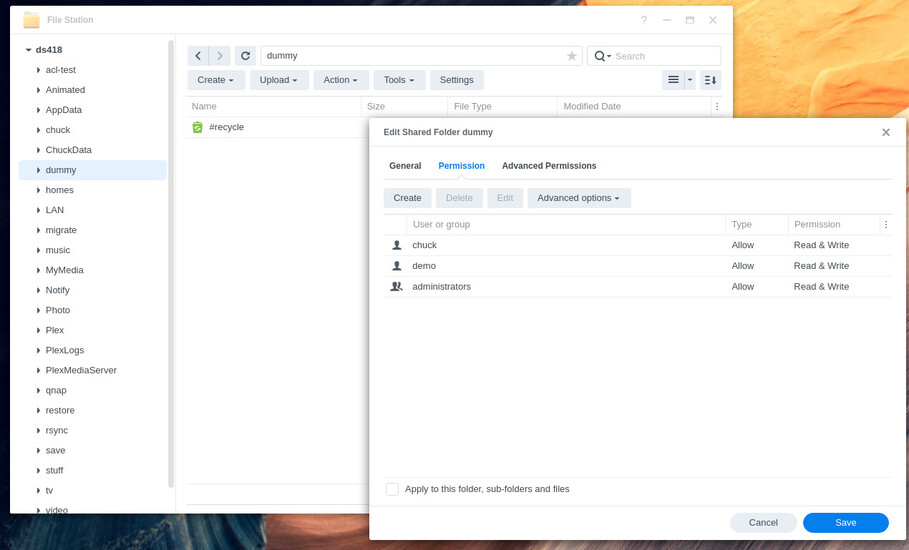
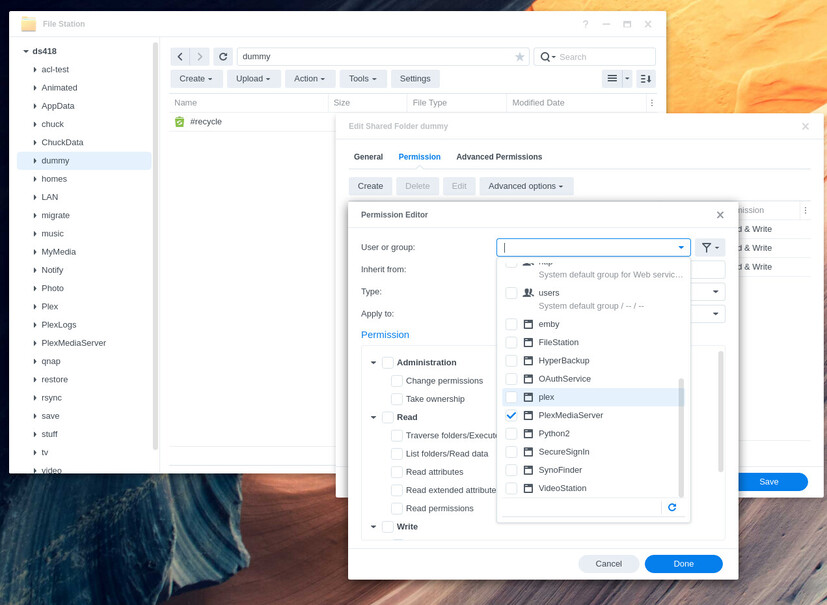
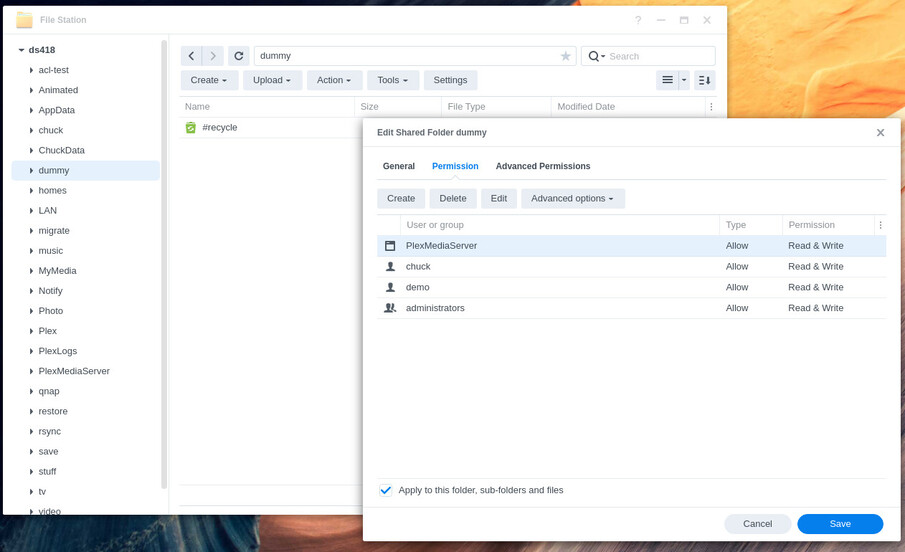
  1. File Station → Right-click the shared folder → Properties → Permissions tab

  2. Create a new permissions rule for PlexMediaServer

  3. Scroll down and select PlexMediaServer

  4. Set Read & Write permissions

  5. Apply to top level folder (the share) and all sub-folders & files.

  6. SAVE

2 Likes

DSM 7 - Set Plex shared folder permissions

IF migration fails with System error: 0, perform these steps

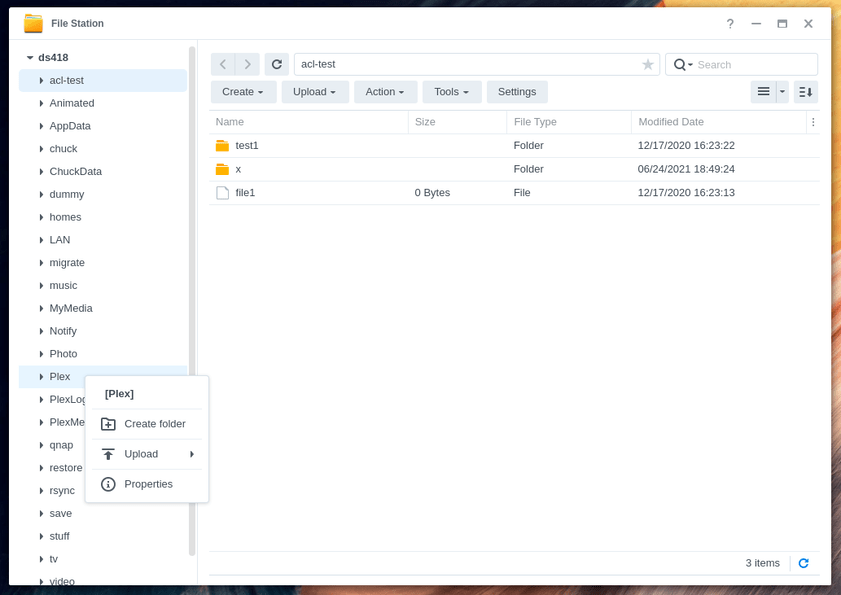
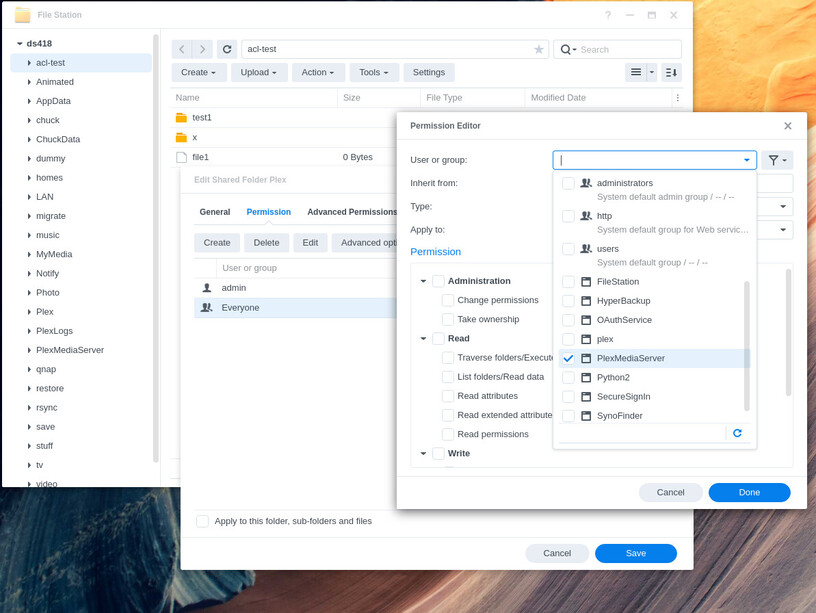
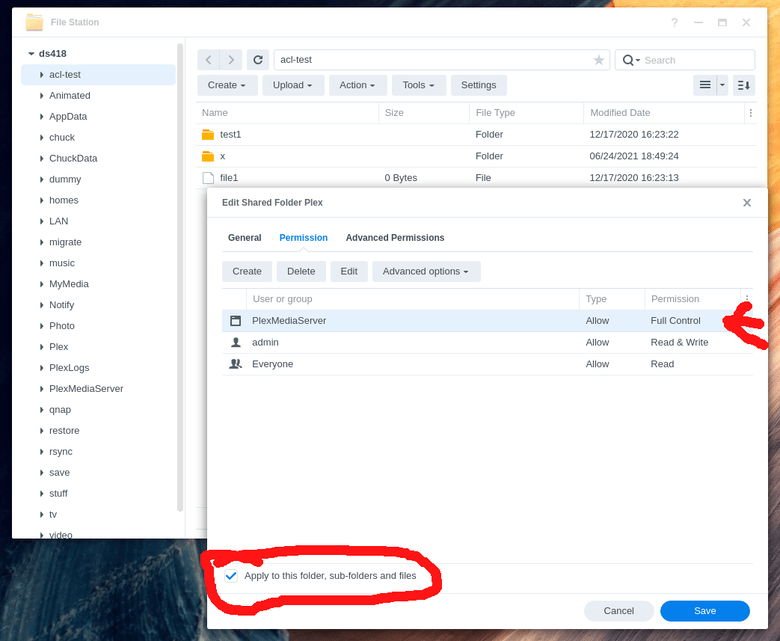
  1. File Station → Right-click the “Plex” shared folder → Properties → Permissions

  2. If no “PlexMediaServer” user is listed, Click CREATE

  3. Scroll down the list of normal and system internal users to find PlexMediaServer

  4. Give all Administration, Read, and Write permissions (Full Control)

  5. Confirm “Full Control” and Apply to this folder, sub-folders and files.

  6. Click SAVE. This may take a long time. Wait for it.

4 Likes