root@DS916:/# /usr/syno/bin/synoacltool -get /volume1/Plex
(synoacltool.c, 488)It’s Linux mode
Thank you…
DSM 7 BUG
It is not possible for a shared folder to be in Linux Mode AND have ACLs assigned by DSM 7
I can work with this now the problem is fully identifed.
Let us try this workaround?
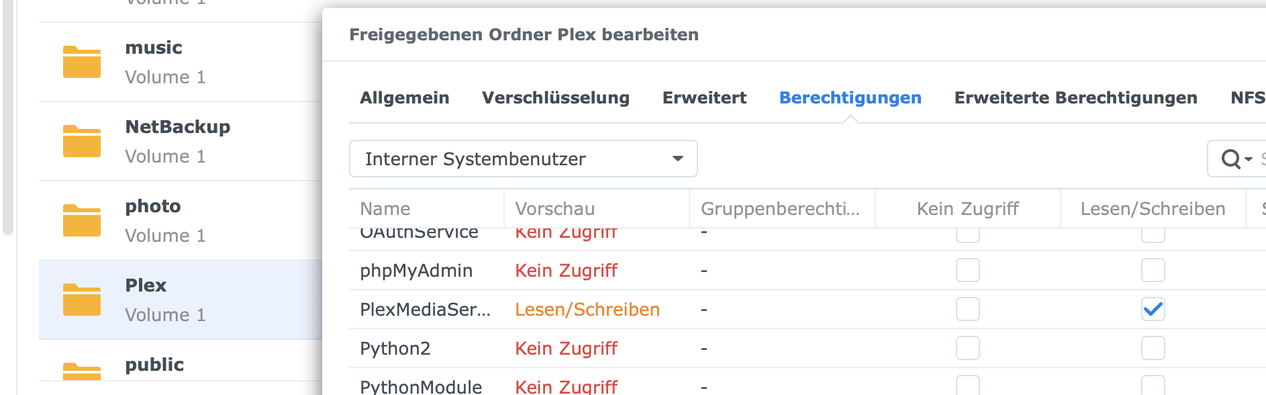
- Please manually set any other permissions for /volume1/Plex in the Shared Folder permission. (select any normal username)
- Keep existing permissions for “System Internal User” PlexMediaServer
- Save
Now, from SSH command line, query the ACLs
/usr/syno/bin/synoacltool -get /volume1/Plex
Hypothesis:
- New software to handle “System Internal User” type is faulty.
- It cannot handle case where shared folder is in “Linux Mode”
- If true, Setting a normal user ACL should restore ACL.
- NEXT – turn off & Save then grant PlexMediaServer user access again .
- Query one last time to see if ACL updated
The alternative is I give commands to run as FIX for DSM bug
Chown for share Plex ?!
No sir.
- Control Panel - Shared Folder - EDIT the Plex share - Permissions tab
- Give R/O permission to any other normal user (add something) & Save
- Now query the
synoacltoolcommand again to see if it still reportsLinux Mode
If it does, then, as root, use the following commands to FORCE the ACLs
/usr/syno/bin/synoacltool -del /volume1/Plex
/usr/syno/bin/synoacltool -add /volume1/Plex group:administrators:allow:rwxpdDaARWc--:fd--
/usr/syno/bin/synoacltool -add /volume1/Plex user:admin:allow:rwxpdDaARWc:fd--
/usr/syno/bin/synoacltool -add /volume1/Plex user:PlexMediaServer:allow:rwxpdDaARWcCo:fd--
Query again:
/usr/syno/bin/synoacltool -get /volume1/Plex
Now it should show username PlexMediaServer
If it does, please uninstall the broken Plex package you have now and install again.
Migration will work for you this time 
This is clearly a DSM 7 bug.
I hope the above commands allow us to work around it.
If so, I will formalize a letter to Synology informing them of the bug and how it manifests.
We will know how to manage this until they repair DSM 7 in their next update.

Hello,
thank you very much for your help.
The Plex Server could be installed with the new ACLs.
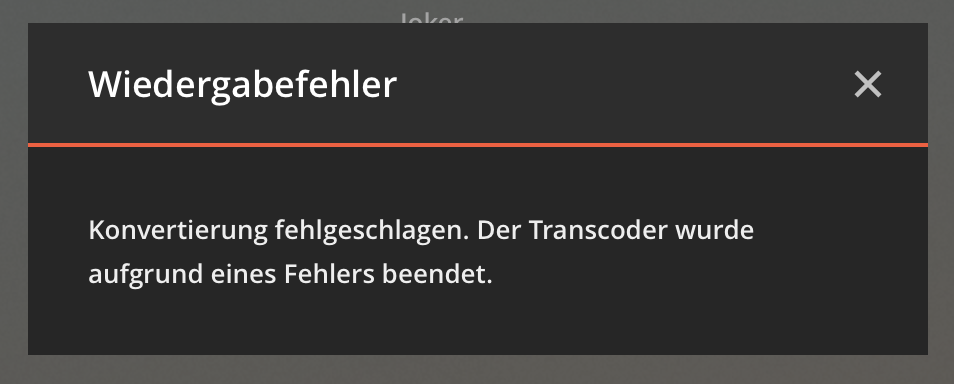
Update. OK Server is online but video not start. Transcode error…

Hello I updated but it does not start I got a message
I would like you to delete the SPK file you have.
Please download fresh. I think you might have gotten the defective build.
Then, if you still have errors, Please apply the ACL I gave to @megabyte0469 above
Hallo
install is ok, but video playback not work.
Not work with Transcoder on or off. HDR is disable.
Here the error from Playback.
Here the log File from Server (Debug on)
(File removed)
Check Transcoder settings.
Turn off HDR
It is enabled by default because most Linux platforms have it already.
Synology and QNAP do not.
@megabyte0469 I got the same problem using Plex trough internal IP address, try use app.plex.tv. That works for me. Only have this problem trough browser, all media players work AFAIK
To all following here
We have discovered the root cause of some of the migration problems.
These problems come from two sources:
- Plex installations from older DSM (before version 6)
-and- - Manual permissions were set on the “Plex” shared folder.
The manual permissions changes might have been made from the SSH command line or by a third-party script running as ‘root’.
We are testing our changes to the package now.
I will advise as soon as testing is completed and new SPK files have been posted.
Hello, look my post HDR is off !!
Hello ChuckPa,
I have the same issue exactly, could you send me by email the full procedure please.
sorry for the delay, I was busy with my job.
Thx you
/usr/syno/bin/synoacltool -del /volume*/Plex
/usr/syno/bin/synoacltool -add /volume*/Plex group:administrators:allow:rwxpdDaARWc--:fd--
/usr/syno/bin/synoacltool -add /volume*/Plex user:admin:allow:rwxpdDaARWc:fd--
/usr/syno/bin/synoacltool -add /volume*/Plex user:PlexMediaServer:allow:rwxpdDaARWcCo:fd--
- Run these commands from command line window – as root
- Uninstall package
- Install package
In my case, I never get to claim it. It’s really weird… The package is up and running according to DSM 7 but I get " No soup for you! You do not have access to this server” when I attempt to connect.
I suspected that the migration didn’t go well, so after making sure the media folder and the /volume1/Plex folder were properly shared with PlexMediaServer, I tried uninstalling the package and reinstalling, but it didn’t help.
I even tried the second uninstallation option to sign out and unclaimed the server, but no soup for me either. (I haven’t tried there third option yet, but I’m really tempted… The phrasing scares me a bit though since I sure don’t want to erase all of my media files :-> ).
I started peeking around in the Plex folder and I’m wondering whether the PMS actually created any support file there. I can’t see a Library or Application Support folder.
When I play around with he CLI, I can see:
$ /usr/syno/bin/synoacltool -get /volume1/Plex
ACL version: 1
Archive: has_ACL,is_support_ACL
Owner: [root(user)][0] group:administrators:allow:rwxpdDaARWc–:fd-- (level:0)
[1] user:PlexMediaServer:allow:rwxpdDaARWc–:fd-- (level:0)
[2] user:me:allow:rwxpdDaARWc–:fd-- (level:0)
[3] user:plex:allow:rwxpdDaARWc–:fd-- (level:0)
(I had a dedicated “plex” used before and for good measures I made sure it still had access)
$ ls -la /volume1/Plex
total 20
drwxrwxrwx+ 4 root root 4096 Dec 11 09:03 .
drwxr-xr-x 36 root root 4096 Dec 10 20:56 ..
drwxrwxrwx+ 3 root root 4096 Dec 10 20:56 @eaDir
drwxrwxrwx+ 2 root root 4096 Dec 10 20:56 '#recycle’
There’s barely anything in there!
Now again, if I have to wipe out all setting from my previous install and start over reconfiguring it all, I’ll be fine — as long as I know it’ll get the PMS up and running again :-\
I tried to re-create it all:
/usr/syno/bin/synoacltool -del /volume*/Plex
/usr/syno/bin/synoacltool -add /volume*/Plex group:administrators:allow:rwxpdDaARWc–:fd–
/usr/syno/bin/synoacltool -add /volume*/Plex user:admin:allow:rwxpdDaARWc:fd–
/usr/syno/bin/synoacltool -add /volume*/Plex user:PlexMediaServer:allow:rwxpdDaARWcCo:fd—
and now I have:
$ /usr/syno/bin/synoacltool -get /volume1/Plex
ACL version: 1
Archive: has_ACL,is_support_ACL
Owner: [root(user)]
[0] group:administrators:allow:rwxpdDaARWc–:fd-- (level:0)
[1] user:PlexMediaServer:allow:rwxpdDaARWcCo:fd-- (level:0)
[2] user:admin:allow:rwxpdDaARWc–:fd-- (level:0)
$ ls -la /volume1/Plex
total 20
drwxrwxrwx+ 4 root root 4096 Dec 11 09:48 .
drwxr-xr-x 36 root root 4096 Dec 11 09:48 ..
drwxrwxrwx+ 3 root root 4096 Dec 11 09:48 @eaDir
drwxrwxrwx+ 2 root root 4096 Dec 11 09:48 '#recycle’
Simpler for sure, but not all that different. Uinstalling and reinstalling Plex made no difference after that.
Are you familiar with VI ? (the text editor)
If you are then give you what’s needed to clear the lingering ownership.
I am sorry for what is happening here.
For all our preparation with DSM 7, when it finally became public there were even more changes (firmware change from 40850 -> 41222)
I will be finishing changes for the packaging this weekend and will have a new updated set.
1 Like
I can find my way around VI.
No need to feel sorry as far as I am concerned. DSM 7 is β. I knew bad things could happen (I didn’t think I’d loose my PMS in the process, but it always was a possibility…)
