Please look at my previous post here.
See if this condition also applies to you?
Looking more promising - installing page spinning
Monitor, in a separate tab/window, the Migration.log file (Syno Text Editor)
You can follow the steps
worked a treat! thanks!
We all good here?
Hi
No, not all good here.
I installed DSM7 without knowing about the issues
So, then came the issues, I thought it was mainly the permission thing. So I think I had that solved, then I saw the extra option of copying/deleting the old libary folder. I just did that, Install did seem to migrate something (because it took a lot longer). However plex shows up empty, so no good. I did actually make an extra backup of the libary just in case.
I am not sure if claim thing during the install is needed in my case. But I would like some help retaining my old PMS data.
So my current situation is that the PMS runs on DSM7, I can reach it but its empty. It has cleared out the old Plex share folder, so to me that sounds like a migration (nothing was mentioned during install). But why is no media visibly?
What to do?
(I’m going to sleep now though)
“copy & delete” ? not sure WHAT you’re copy from or where to but NO. you can’t do that blindly.
Kindly get your files BACK in the Plex share where they belong and we’ll address it when you’re back.
Hello,
Well I thought I followed the directions exactly. Some how my nas/libraries didn’t seem to port over. When I went into Plex after the reinstall and updating permissions I now see my NAS listed twice. I have a yellow triangle with an exclamation mark next to my server that had my libraries in it. I do see a second NAS entry with the same name as the first. I am able to add libraries to this from the NAS.
Anyway I can fix this to use my older data? I don’t have a ton compared to some folks so it would not be the end of the world if I needed to redo things but it would be nice to know if I can.
If I cannot rescue the older nas entry how to I take off the one that is no longer working?
you missed a step somewhere long the way.
If you had not missed a step
That said,
Let me know what you find please.
@ChuckPa Thanks for the reply. Yes it appears that I do still have data in that folder.
Edit: I just wanted to add that I read over everything many times prior to install. I guess I did mess something up but I am not sure how. I appreciate you looking at this for me. I am hoping there is a way to migrate my data and get rid of the duplicate NAS entry that is not working.
Again appreciate your assistance.
I just upgraded from DSM 6.x to 7.x. Plex Web General says I’m running 4.59.2 and I’m trying to install 1.24.1.4931-1a38e63c6-x86_64_DSM7.spk. When I try to manually install it I get the attached error. I have validated that PlexMediaServer System Internal user has Read/Write permissions on my Synology. But even after doing that I’m still getting the error. I contacted synology and they told me to have a “plex” share, but not a “Plex” share - that lower case was required. Am I missing anything else? Why can’t I install this upgrade? I have a DS918+
If I may add to Trumpy,
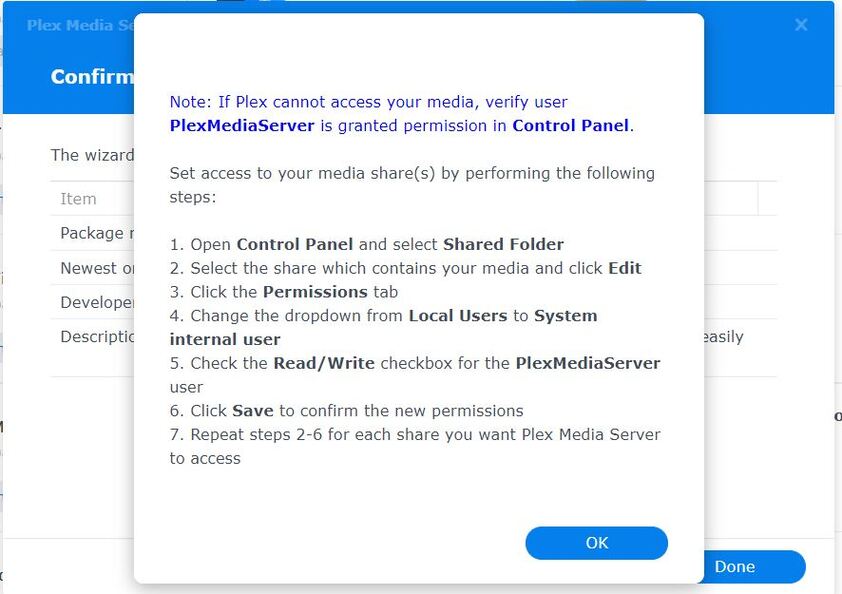
I print that message as a helpful reminder to all who are new to DSM 7 about how to give PlexMediaServer (the new username) permission to read your media.
FYI about the Syno folks?
That support person is about 9 months behind the times. (since DSM 7) and It’s been a “Plex” share in the installer for almost 2 years now.
He might not know that because Synology only updates our app when it suits them
Thank you very much, that looks to have done the trick.
Really struggling myself here.
Followed the guide to a T. Deleted old package prior to upgrading. Migrated to DSM7. Downloaded package from Plex website. Verified correct package. Confirmed followed the double install method to set permissions on first try, uninstall keeping files, and then install second try. Confirm I have “Plex” shared folder on same volume with Application Support/Plex Media Server/Library and all the files.
It just doesn’t seem to see the folder for purposes of migrating. When I open PMS through web, I can see the server in my server list, but it says not responding.
The one interesting thing is that on my first attempt at installing, I didn’t actually get the warning that there was the permissions issue. Just went right through install ignoring there is a Plex shared folder and gave me the prompt with blue writing about setting permissions on media folders. I still followed instructions to install twice and set the permissions after first install just to do it as written, but that was where my install didn’t look like the screenshots.
Any idea why it might not be seeing that I have the old install to migrate?
Let me go look. BRB.
In your account, There’s a server from DSM 6.2.4. Sound about right?
(you upgraded to DSM 7 then upgraded Plex)?
Next question:
In Control Panel → Shared Folders, do you see a “PlexMediaServer” shared folder ?
Yes. 1.82mb in size.
Good, I think I know what happened.
Let’s double check?
What’s the actual name of your Plex share?
Is it Plex or plex ? or might it be all capitals PLEX ?
“Plex” (no quotes)
weird… No problem.
Let’s see if this will remedy it.
Uninstall the PMS 1.24.2 app – use the ERASE option. (to get rid of the contents of PlexMediaServer. ‘Plex’ is kept sacred.
After that’s done, Install again.
Screenshot the final message for me?
— or if it actually starts Installing …