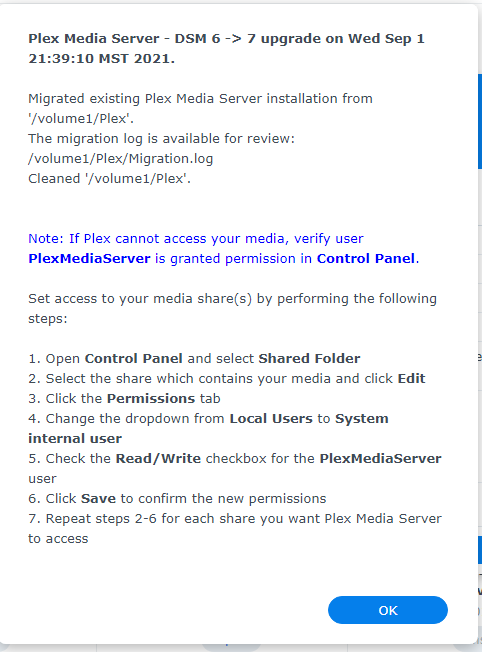
I have no idea why it worked when you asked me to try, but I solemnly swear I actually tried a full erase and reinstall as part of my troubleshooting and it gave me the other install complete screen (the one I assume you get when installing without an existing Plex share).
Thanks @ChuckPa for whatever magic you just pulled.
Is this just another problem between keyboard and chair and I must have F’d something up, or were you able to do something from your end? I genuinely am at a loss since I did follow those exact steps you recommended, but I’ll happily take the fix either way.
Here’s what I often see happen – which is EASY AS SIN to do
Upgrade to DSM 7
DSM 6 Plex app still installed.
User hits “Repair” thinking it will fix it (which is normally the right answer)
On DSM 7, because of all the Syno-imposed changes, repair won’t work.
What happens is: It creates an errant DSM 7 server instance off in the hidden app area.
You come along, uninstall the DSM 6 app,
You install the DSM 7 app
It is blazing quick
You wonder where your server went and why metadata is still in the Plex share.
Answer is:
It migrated what it found in the hidden area first (which is how I wrote it).
DSM 7 → DSM 7 upgrade takes priority over DSM 6 → DSM 7 migration (aka… import)
I know I can safely move around something already running on DSM 7.
That’s what I take advantage of in PMS 1.24.2.4973 and above
PS: I did nothing on my end. I can’t touch your actual server data. I can only see what entries it makes on Plex.tv
I’m assuming step 5 happened, but can definitely confirm I didn’t try any repair (nor was I ever presented with a repair option). Did the uninstall through package manager in DSM6, so had no active package installed when DSM7 upgrade went ahead (unless somehow that uninstall failed without any indicators), and then only ever manually installed through package manager in DSM7. Weird, but again, happy to have it solved.
Server Version: DSN 7.0-41890
PMS Version: 1.24.1.4931-7000
Wait a minute…I noticed this yesterday. Hmm…from what I recall on the instructions there would be nothing left in the “Plex” folder and a new “Plex Media Server” folder would be created. I followed the instructions…at least I thought I did? The Plex Media Server folder is nested within the Plex folder.
My PMS has been working fine aside from a crash this morning about 12 minutes into the scheduled maintenance that was scheduled at 12AM. I’ve attached the log files in case there’s something there to that occurrence and relation to the Plex / Plex Media Server folders. Hmmm…
Thanks ChuckPa. Maybe I didn’t make it clear on my initial note - I have given PlexMediaServer Read/Write access to all of my media shares. I am going to rename plex back to Plex. Do you have any idea what I’m missing? I’m looking for this document that Trumpy so kindly recommended I read and as far as I can tell - Plex is working fine, I’m just trying to upgrade it to the latest Plex version and it won’t let me do to a permission situation as far as I can tell.
Yes, media files present, but only under the folder “Plex Media Server”. Under the “Plex” folder it has the Library with the “Plex Media Server” folder and all the related PMS library information. See below.
Hmmm…so which folder should I delete? If I delete “Plex” everything under it goes with it including the library information, about 28GB.
When I ask about media files – I am referring to any of your media files you might have placed in the old Plex directory structure. Do you have any media in there?
Secondly,
Using whatever it created, are all your existing library sections and history present or did you have to manually recreate it?
Oke I’m back, hope you can help to get it fixed.
With the copy delete I meant the instructions from your post Synology - DSM 7 Release - Plex Installation Issues - #1828
On top of that I made an extra copy to somewhere else because I was afraid I might lose data. Which I still am. Yesterday it did feel like something migrated. There is even a migration.log file in the old Plex folder and I think the install moved everything over to the new PlexMediaServer folder.
I am copying this backup library back into the old Plex folder now so we could do it again.
When uninstalling plex in your instruction you mention Erase, which number option is that in Synology, sadly mine is set to Dutch so the wording is confusing me a bit. Yesterday I used the 3rd most invasive option, was that too much?