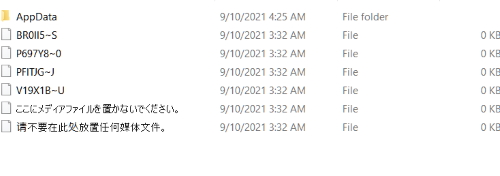
I think i worded it incorrectly. What I mean is my files were not in THE plex installation folder (before or after update), but instead this: \NAS\SHARE\Plex\ with 2 subfolders, Movies and TV.
So I can just keep them in there since they are already a folder i use for the library?
@ChuckPa , hypothetically, if someone was drinking whisky and pushed out the DSM 7 update to their DS918+ and then clicked the “REPAIR” button, as instructed here NOT to do, how screwed would they be?
@Ashmai - Not very, it seems. That’s exactly what I did (with assistance of an Islay malt), on my DS916+
I discovered the ‘repair’ did creat a system user called PlexMediaServer, (but not a shared folder in my case. I had to create that separately.). I was able to set the permissions for the PlexMediaServer user and then I uninstalled the Plex package and reinstalled it again, a couple of times, before the browser-based server page came up at the default ip:32400/web/index.html#!/. All the libraries were present. Then I noticed a prompt in the sever settings to manually install version 1.24.2.4973. When I did that, it took half an hour or so saying “updating” in the package manager, but finally all seems to be working. I still have to manually delete the original /Plex folder
It will create a rogue server, which will confuse Plex.tv and all the apps.
It will also create a ‘Plex Media Server’ location inside DSM and waste space. You cannot clean that up from the GUI.
SHOULD you happen to do that.
Verify all the metadata still exists in the Plex shared folder. It should because “Repair” is incapable of settings the required permissions to migrate with.
Uninstall with the ERASE option (this removes build 3744 – which is now grossly obsolete BETA and does not work)
Install PMS 1.24.2.4973 and begin the normal migration process.
a. Set permissions for the Plex share as instructed so it can move your metadata (PMS has no privileges in DSM 7)
b. Allow it to change the ownership of files and fix all the metadata to be DSM 7 compliant.
c. Perform the final move.
d. Clean up the old “Plex” shared folder.
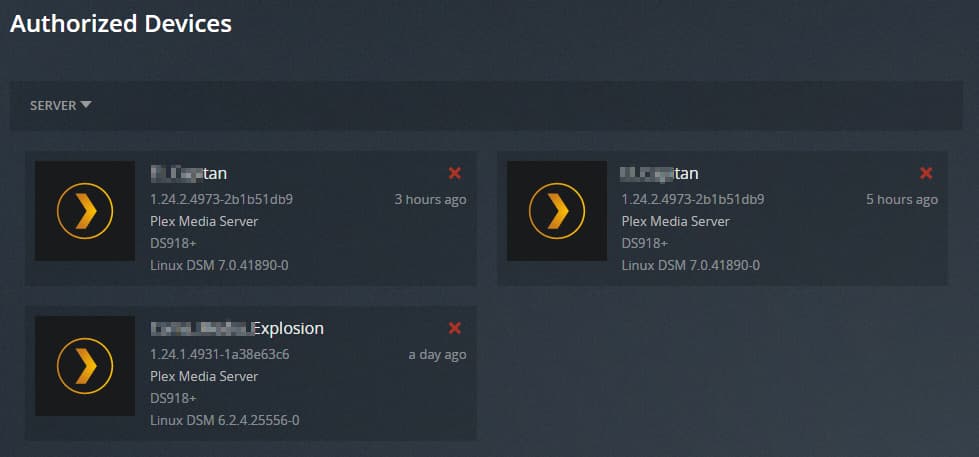
Should you also have hit repair, you might lose contact with your server (because there’s a duplicate entry now by the same name.
a. Settings - Authorized Devices - Server (dropdown)
b. REMOVE the erroneous one
c. Close the browser tabs and open again fresh
Lastly, if the server still cannot be found
a. Uninstall 1.24.2.4973 with the “Keep” (default) option.
b. Reinstall the same package.
c. Click the “Use Plex Claim Token” option
d. Click “Get Plex Claim token”
e. Browser opens to Plex.tv and shows a claim token
f. Click COPY
g. Return to the installer window
h. PASTE that into the window
i. NEXT → it starts installing
j. It will require an additional 15-20 seconds while the installer communicates with Plex.tv for a fresh set of credentials to give to your servr.
k. When complete, the final popup message will show the server is now claimed to your Plex username.
Can you point me to where you have the steps listed for “normal migration process” on step 3? There are so many posts on this subject lol
I ERASED the build, and did steps 1, all my movies / tv shows / configs are in a share called “PLEX” (as was before the DSM upgrade).
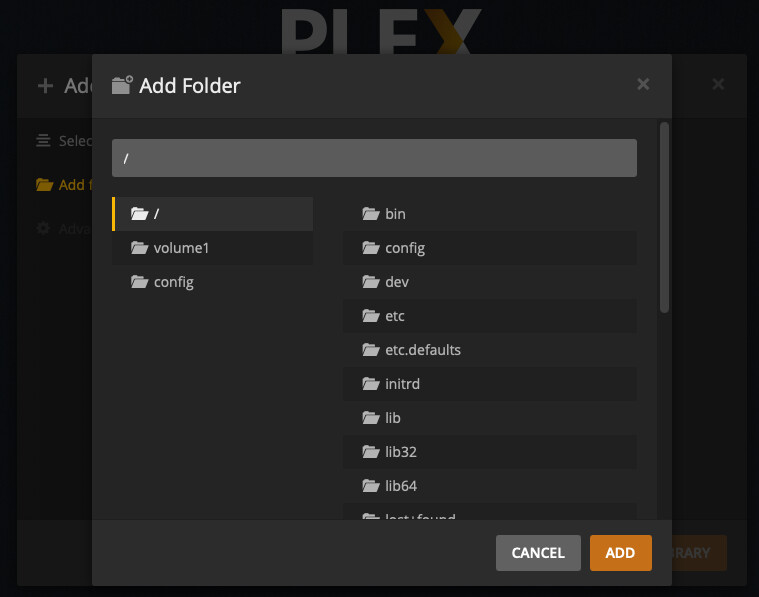
However when I install version “PlexMediaServer-1.24.2.4973-2b1b51db9-aarch64_DSM7.spk”, it does load PLEX, but looks like its completely new, asking me to setup my new media libraries. Here are a couple screen shots.
And in the last screen shot, if I drill into my old PLEX server to try and add existing libraries, they simply don’t show up (although in file station / share view all my content is present).
I guess it’s your app, and you’re the expert, so you know what it should be doing but none of those (or any of the steps 3.a)-d) in your previous post happened in my case when I installed Installed 1.24.2.4973.
Not sure if I have ‘rogue server’ - where should I look?
So I may be the worst user ever. I blindly went through the DSM 7 upgrade, and then blindly tried to go through and fix everything manually. After two days, I decided to wipe everything out and reinstall. I am now at a stand still where the installation is done, but I cannot see the directories on the server.
But this doesn’t seem to resolve anything and I am stuck now not being able to have the Plex Media Server read anything on the server. Thank you for helping someone who clearly should have read before leaping forward.
I am currently on DSM 6, and PMS 1.24.1.4931. I received a notification a couple of days ago that an update is available to 1.24.2.4973 and that it uses a new PlexMediaServer share on DSM 7. I plan to upgrade to DSM 7 eventually, but it is not critical for me, and I wanted to wait until all the kinks have been worked out (both on Plex and on Synology itself).
I am assuming it is OK to install the latest PMS version on DSM 6, but thought I’d do a quick check first.
Basically, I’m looking for some guidance regarding timing. I wouldn’t be surprised if at SOME point in the (far distant) future, Plex may even assume (or require) that we have DSM 7 installed as you won’t want to support both versions forever. So a few questions…
Are there any plans to move to the new storage structure with PMS on DSM 6. Is it even possible?
Is it better to install the latest PMS version now, and then later install DSM 7, or would I be better off installing DSM 7 now and THEN update to this new PMS version. Or does it even matter?
What will happen if I install the latest PMS version now and then later upgrade to DSM 7?
I could move the storage structure to DSM 6 but the outcry and upheaval it would bring would likely make DSM 7 seem trivial.
The same binary package (executable code-- literally) is used on DSM 7 and 6. Only the installation scripting and package management changes.
If you upgrade PMS now, you will still need to Uninstall the package and reinstall the DSM 7 package . (Package Center’s REPAIR button does not do anything productive. It just makes it worse)
There is no harm sitting where you’re at while DSM 7.0, soon 7.0.1, settles out.
Thank you sir, I’m going to go read through this link you gave me, to make sure I’m doing this right…
To your point about errors that may print during install, nothing like that happens. It smoothly goes through install quickly. Once its done, plex UI loads but it looks like a new install, asking me to add my libraries, etc. So its not recognizing any type of “migration” that needs to happen, and isn’t printing errors.
The LAST version on PMS I had installed was “PlexMediaServer-1.24.1.4931-1a38e63c6-x86_64_DSM6.spk”, then I saw the DSM update and applied it, and also clicked “repair”, like an idiot.
Thanks, @ChuckPa. I think I did that step. I am looking at the screen now and PlexMediaServer has the right permissions. Here is a screenshot of that step completed.