So sorry, @ChuckPa. Not sure I quite understand your last message. Are there other permissions I need to be updating as well? Thank you!
Is there a newer version available to download than the 5000 build? I installed it before it was pulled and now it’s crashing multiple times a day. It won’t let me install the older 4973 build. Maybe a preview link to the next build. Thanks
@ChuckPa , after I did the permissions, the install of PMS installed quickly like before, and still looks like a “new” PMS installation, however now I can at least see the movies if I try to add a new library. But it doesn’t look like its migrating anything into my old library. It created a new PMS with a new name. Like this
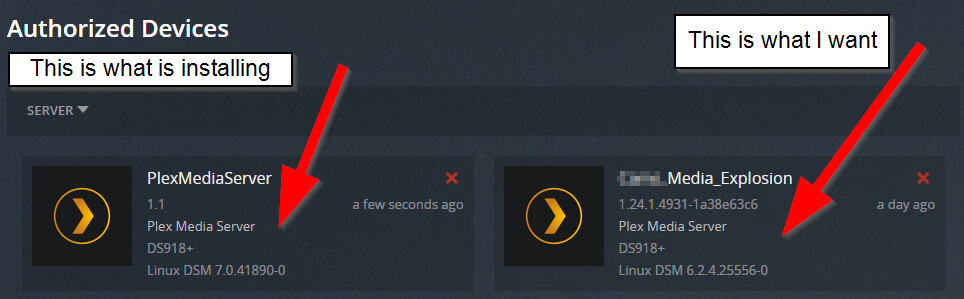
Under authorised devices, I see
2 TVs, some Android phones, a bunch of Chrome browser Plex Web authorisations and just one Synology NAS and something called " Plex Mediaverse"
IF,
- Installation of the package is quick (normal)
- You still have data in the
Plexshared folder (a Library/Application Support/Plex Media Server folder)
THEN,
It did not migrate.
- Uninstall & ERASE the DSM 7 package again.
- Install PMS 1.24.2.4973 fresh
I have seen cases where it takes two attempts to clean out any junk from mis-installation.
When it is correct,
- It will take longer to install
- Plex / Migration.log will exist and be a log file of the activity.
- Your existing server will have been moved from the Plex shared folder to the PlexMediaServer shared folder.
- Your server will exist just as it did before without change (less a possible need to CLAIM again)
On Synology, we must uninstall the software to downgrade.
This is a safe operation to do.
- Package Center → Uninstall (KEEP option) – to keep your data (the default)
- When complete → Install the older SPK file (1.24.2.4973)
I was referring to this image you linked

The permission boxes which are checked here – only need be applied to the Plex shared folder for the purpose of PMS migration.
For the rest of your shares (containing media), Read – or Read & Write – is all that’s needed.
PMS does not need nor should it ever have Administrative control of your media files (safety)
Thanks for your reply. Based on your feedback, the fact that DSM 7.0.1 is now out, and many of the gotcha’s with the migration seem to have been figured out, I decided to bite the bullet and do the upgrade tonight.
It went well, although, like others here, I did have to go through the install twice as it did not do the migration the first time around. As you’ve instructed others, I just uninstalled (with erase) and reinstalled, and the next time it did the migration.
So everything is on the latest rev now, and it seems to be in tip-top shape. Thanks for your hard work and responsiveness on these boards.
1 Like
I thought I’d followed the instructions but alas I am not seeing my libraries migrated, so I guess I missed some step or got out of order somewhere. Tried deleting restarting the NAS and adding again but not luck. In fact I now seem to have 2 servers with the same name one of which I cannot connect to. The other is empty but if I add a folder it start making a library so I guess if push comes to shove I can recreate from scratch. The path to the servers is similar but not identical
#good
http://192.168.70.4:32400/web/index.html#!/media/804a59cfc49914aad2fa8bfdb3b515243ef400c0/com.plexapp.plugins.library?key=%2Fhubs&pageType=hub
#bad
http://192.168.70.4:32400/web/index.html#!/media/9869380ecdebee34e25535f6f3cd8272ee642954/com.plexapp.plugins.library?key=%2Fhubs&pageType=hub
Plex 1.24.2.4973-7000
DS416j DSM 7.0-41890
For now I just readded my music/audio to see if that worked and it is currently building.
If your Plex share still contains the “Plex Media Server” directory
then it did not migrate.
The single-most common misstep, which would be ok every other time, is repair.
If you’re not seeing migration, then there exist valid DSM 7 instances on the system.
( I block migrating if it finds a valid DSM 7 native one)
Uninstall + Erase then install fresh until you see migration activate. (at most 2 times from what I’ve seen so far)
– 1 from the hidden area & 1 from PlexMediaServer shared folder.
Thanks for all your work on the DSM 7 updates and making the metadata folder accessible for backups even if it’s not how you’d have preferred to implement it. Plex is lucky to have someone as responsive and helpful as you on their team.
1 Like

2 Likes
Hello everyone,
Clueless individual here, unfrotunately I am having issues with my Plex after updating to the latest version 1.24.2.4973. I previously blindly updated to DSM 7 and was met with a broken plex app. I don’t quite fully remember how I resolved it but I think I just downloaded the latest version in late June, or agust which was 1.24.0.4930 and that fixed it. However, after the recent update that I tried to install(4973), it broke plex. I’ve been trying to figure out what happened since yesterday and just came upon this form.
-
I Uninstalled the package only and using keep all files.
-
Tried reinstalling and using my old PMS location to migrate, Which seems to be successful, backed up my library before doing so to my PC. I’m hoping that was a smart move since I may be screwed here.
-
I was getting a not authorized error even though I enabled the full control Plex Media Sever permission on all drive shares on the latest version Plex 4973.
-
Tried unintsalling Plex app again and used sign out and unclaim server.
-
I can see libraries and it says to claim server, however, when I click it, there’s a spinning circle for a few seconds and nothin happens. Used Chrome and Edge. Edge allows me to sign in to the server after clicking claim but same thing occurs, spinning circle and then nothing occurs.
I have a DS918+ synology box and running DSM 7. I’ve literally uninstalled and reinstalled plex multiple times trying to fix this so I may have potentially corrupted something at this point. Any help would be much appreciated. If any logs are required please let me know.
I love Plex Btw
Hi Trumpy,
Your speedy reply and assistance are greatly appreciated. Let me know if you need anything else or if I sent the wrong log.
This is the Error I received and logs are attached.

Hi Trumpy,
haha, that did it! You are excellent at what you do sir. I changed the DNS setting to google DNS. I usually do this, not sure why I didn’t do it way back when setting up my Synology box. Nonetheless, It was able to claim and I’m back up and running thanks to you 
Much appreciated, you have a wonderful day
Once the migration to DSM7 is complete, is the old Plex folder deprecated and can be deleted? I guess same question for the old Plex user. Delete-able?
Thanks. Uninstalled with erase, did not see the migrate option but after ~2 hours it finished.
Now installed I see my original 6.2 installation which looks good also the install I thought I just erased but that is no longer connectible, however, not an issue as long as it is cosmetic I can live with that.
@ChuckPa fixed me right up, outstanding fella and an absolute great guy. Thanks Chunk, <3
BRAVO!!
Logged into Synology NAS as admin to insure full access, stopped Plex server, loaded and installed version 1.24.2.4973 package, waited about 10 minutes and – voila – Plex fully migrated and running with no problems.
Thanks to all the Plex gurus – Great Work!!!
(…and HyperBackup works – again!!)
Hi @ChuckPa
Really sorry if this has been answered aready.
But maybe you can help please?
Ive upgraded to DSM 7 & now cant get anything to play via my phone or Nvidia shield, it plays on the PC fine, weird ah.
Also tried to upgrade to the latest plex media server but manual install keeps saying The Operation has failed. Please sign in to DSM again to try again, same thing happens all the time.
& also the Libraries update thing keeps failing, im guessing all these connected in same way.
Please some one help to get me back up & running!
Many thanks
James
