Why does it sound like a bunch of children the night before Christmas in here ?


Why does it sound like a bunch of children the night before Christmas in here ?
The problem was with the deployment software. It’s what replicates to all the hosts.
Because we’re supporting DSM 6 and DSM 7, and need different file names due to DSM package changes, we had to work out a problem as they tried to push it all live.
It’s been fixed but, rather than leaving coal in everyone’ stocking until the next PMS release (in a few days),
PMS 1.22.1 will deploy normally
Thank you for all your hard work.
Sorry for the offshoot here. Upgraded to 1.22.0.4136. When selecting the option to continue to use logs at configured location it reverts to internal location instead of location i had prior to upgrade.
Is this to be expected or something out of the norm? Just wanting to determine if i need to enter preferred location every time i upgrade. I don’t mind, i just don’t want to miss reporting a bug if there is one.
Check that there is access.
It will not accept the typed-in location if:
a. It doesn’t exist
b. It can’t write to it (user: PlexMediaServer)
That code has not changed in several iterations now.
Verified PlexMediaServer has full access. I will try a remove and re-install from prior to .4136 and see if it still occurs after upgrade.
Here’s the actual code
The logic is such that:
The only way this could go back to internal is if you performed 'Uninstall – KEEP". (which keeps your metadata / PMS installation ). The code & its files are gone.
Uninstall removes the executables and the file which contains the log location (my persistent storage file)
Did you “Upgrade” or “Uninstall-Reinstall the newer version” ?
# Redirect logfiles
if [ "$WUserDefined" = "true" ] ; then

  # If alternative PLEX_MEDIA_SERVER_LOG_DIR location specified,  test validity then save for later use.
  if [ -n "$WLogPathname" ]; then

    # Test if exists
    if [ ! -w "$WLogPathname" ]; then

      # Report error - Cannot write to given location
      MessageText M-LogPath-No-Write-Access "$WLogPathname"
      exit 1
    fi
  else

      # Report error - Forgot to give location
      MessageText M-LogPath-No-Path-Specified
      exit 1
  fi

  # Given location exists,  save the location for us to use
  echo -n "$WLogPathname" > "$SYNOPKG_PKGDEST/PlexMediaServerLogDir"

  # If any existing logs in the default location,  move them here.
  if [ -d "$SYNOPKG_PKGHOME/Plex Media Server/Logs" ] && \
     [ "$(ls "$SYNOPKG_PKGHOME/Plex Media Server/Logs/")" != "" ]; then

      # Move existing logs to new home to preserve them
      mv "$SYNOPKG_PKGHOME/Plex Media Server"/Logs/*  "$WLogPathname"
  fi

# Cancel log file redirection
elif [ "$WStoreInternal" = "true" ]; then

  # Remove it
  rm -f "$SYNOPKG_PKGDEST/PlexMediaServerLogDir"
fi```Can someone in the dev team, at least accnoklege, there is an issue?
I found an issue with PMS 1.22.0 and reported it to Engineering.
It is sufficiently severe that I have withdrawn PMS 1.22.0 from this thread.
To Downgrade version in DSM 7 is the same as DSM 6.
For anyone who does not still have 1.21.3, please use the following links.
@ChuckPa
hi, i see on website plex : 1.22.0.4163-d8c4875dd available March 9, 2021
can I install it with the dsm 7 instead of PlexMediaServer-1.21.3.4062-a090db7d3-aarch64_DSM7.spk ?
thank for return
@+
No. Unless it has the DSM7 designation in the name, it’s for DSM 6.
I’m trying to find out why we don’t have dsm 7 listed on the downloads page yet.
Plex.tv/downloads page not-withstanding,
I will repackage current and make packages available here for all.
@ChuckPa
Thanks for this update
best regards
Server Version#: 1.22.0.4163
Player Version#: 8.14.0.23432
Hi,
I recently changed from a truenas installation of PMS to a Synology ds-920+ running DSM 7 with version 1.22.0.4163 installed. I ended up readding all my media and rebuilding metadata.
Anyway I have an issue recording one program in particular- I am not sure if it’s due to the change in hardware or if it’s something to do with the program information. I used to record the program on the truenas box without issue, but I have had no success with the Synology box.
The program was supposed to start at 1850 on 11/03/21 - it’s Cbeebies Bedtime Stories. It either comes up saying recording Failed or just doesn’t record and eventually removes itself from the scheduled recordings on the guide. It’s set up to record new and previous airings.
Any help to understand if it’s a guide issue or hardware issue is appreciated.
Thanks.
Louis.
Plex Media Server.1.log (10.0 MB)
I’m sorry but that singular log is not at all useful.
I would need the full ZIP file which has also captured the event.
Removing from the ZIP doesn’t help.
Also, you do realize all this is barely even BETA (DSM is beta 1 level )?
Moving this thread to DSM 7 Preview Issues
I’ve moved us over here with the DSM 7 thread.
Ok,
Thanks for the help. Sorry full log attached.
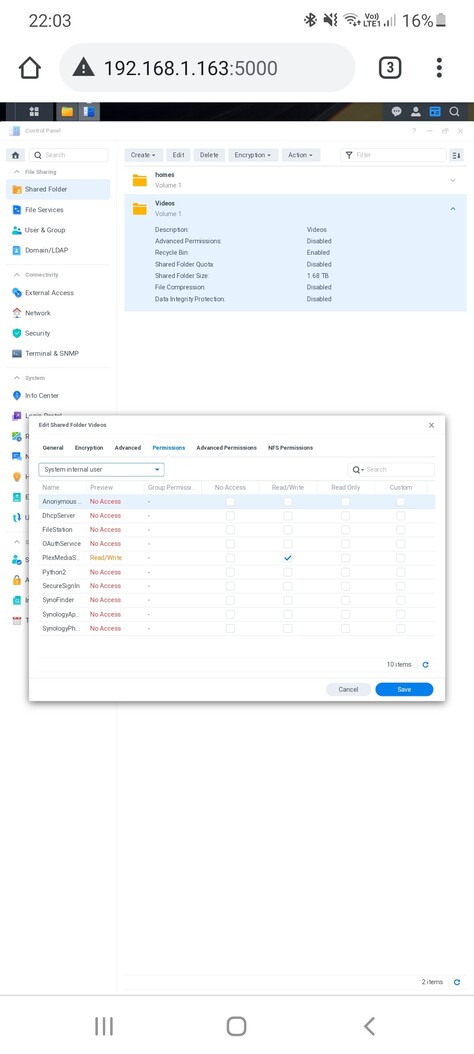
Is there perhaps a permissions issue?
On DSM 7, we don’t use user Plex anymore. It will need to be user PlexMediaServer (System Internal User)
I don’t believe so. All my other set recordings appear to work without issue. I have checked and the user PlexMediaServer has read/write access (as shown in attached screenshot).
That was the extent of my DVR knowledge. I have been on satellite for 2+ years and only recently switched to cable.
I suspect it’s either permissions (within the directory structure – common in DSM 7 migrating)
or it’s DVR itself (probably less likely given DSM 7)