Ran into this, too. Was instructed to download the package from plex.tv and manually install.
My steps to a successful installation were:
Didn’t do any research and just installed DSM 7 since I saw that Plex was a supported package
After DSM upgrade, package center reported Plex was in need of “repair” so I clicked the button
Received message saying I needed to grant the PlexMediaServer Internal User read/write access to my existing Plex shared folder
Did so, chose repair again, and waited for a while
Package center reported that the repair was unsuccessful
Came here and found this thread, and read. OOPS that should have been step 1
Small discrepancy in some instructions that say PlexMediaServer needs read/write to Plex Shared folder, versus full control. Went ahead and gave it full control.
Read that I needed to uninstall the DSM 6 Plex package I had from old package center before upgrade (I used uninstall only). Great! Done.
Cannot find Plex in the package center to re-install it, wtf
Come back here and read some more
Oooookkkaaayyy someone said to use the package from plex.tv
Proceed to research the CPU of my Syno
Proceed to research whether my intel CPU on my Syno is 32-bit or 64-bit
Download and install correct Plex package from plex.tv
Chose Normal Installation, use PMS internal storage for log files
Received message asking me to grant permission to media files
Granted read/write permission to applicable share
No clocking, no “installing” messages or waiting or anything. At this point, I’m confused as to whether it was successful, but package center reports it’s installed
Hesitantly open it up with cautious optimism
Everything working wonderfully, and much faster than on DSM 6
Thanking my lucky stars (and team members/other posters here) that I sort of stumbled into a successful upgrade/migration
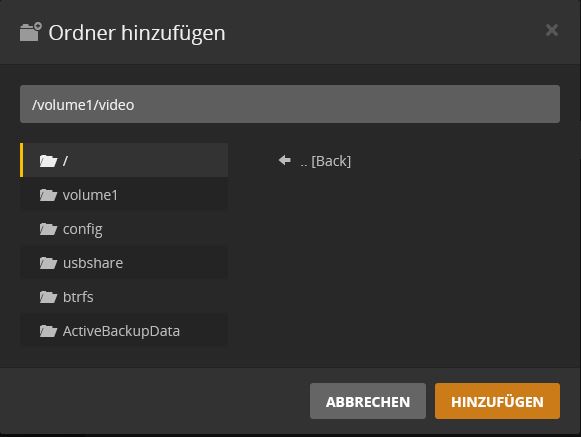
I reinstalled Plex on DSM7. But I can’t find the media data in my video folder to integrate it into the Plex
I gave the Plex internal system user the right R / W on the video folder. But when integrating in Plex I see the video folder but no other folders that are actually there.
I’ve tried a lot but nothing has helped.
I have two sub-folders in the video folder for films and series. I do not see this.
Just a quick question. Noticed that Plex for DSM7 has been updated 2 days ago ( 1.23.4.4775-b7e0c30f2), but does it still mean that the process of upgrade and permission needs to be followed as posted here on the forum or has there been an automated process once you upgrade from DSM6 > 7?
Once you’ve performed the migration from DSM 6 → DSM 7
Everything returns to normal.
Migration is a One-Time task.
Standard update / upgrade is performed. There are no special tasks at this point unless you wish to make any changes – which I present in the Upgrade GUI pages.
So my issue since the beginning is/was that the user “PlexMediaServer” was not existing under the “system internal user” list. The only way I had to fix this was to “reset” my synology, reinstalled DSM 7.0 and after installing the Plex package for DSM 7. Only now I see the user, but of course it was a fresh new install so all my server settings, database, etc was gone. So I uninstalled it, installed again and pointed to the share folder that I had previously with all my server folders (not media), was able to change the permissions accordingly and migration went through flawlessly.
Bottom line my main issue has always been the user “PlexMediaServer” which never existed or was created with the migration from DSM 6.0 to DSM 7.0, not sure when it should be created.
P.S.: all working as before with DSM7.0 and Plex for DSM 7.0
No, never used any DSM 7 beta. I waited for the oficial final release and also had the latest of everything, including the last DSM6 Plex package installed before doing any upgrade.
Indeed something with the DSM upgrade that failed, that’s my feeling. My DHCP server package was also not working, the same type of issue around permissions. Only fixed with reset and re-install DSM.
So the steps i took. Yesterday i’d copied over some new music into my Synology music folder, but I didn’t get around to doing a rescan in Plex via the scan library option.
Today i’ve followed the steps to install DSM 7, including the updating permissions etc and then installing newer Plex. So far so good.
I can see all the music etc that had been scanned previously, but not the new files I copied over yesterday. Wondering if I was to delete and re copy them over and then scan it would pick them up?
Are you expecting PMS to automatically detect the new files ?
So that I’m clear, what was the result of manually scanning ?
If automatic detection has ceased working, the most common cause is filling up the default notification table linux provides – which is easily increased.
Ok so I guess my question should have been, we need to do the uninstall, upgrade to DSM7, install Plex for DSM7 process. There is no way to just update to DSM7 and update with Plex for DSM 7 without hitting the permission problems etc?
Will that be sorted at some point or the manual intervention will be needed?
I’m seeing a lot of stuff flying about in here. I’m trying to distill that stuff down to some high level prep and implementation steps presuming the user has a properly functional PMS on DSM 6.x.