Hello,
I tried to reinstall the package and I follow your process but i have the same message.
Could you help me to resolve this issue please ?
Hello,
I tried to reinstall the package and I follow your process but i have the same message.
Could you help me to resolve this issue please ?
After you ADD R/W access to the Plex share for System Internal User PlexMediaServer and SAVE it,
You then install the package again and get this error message ?
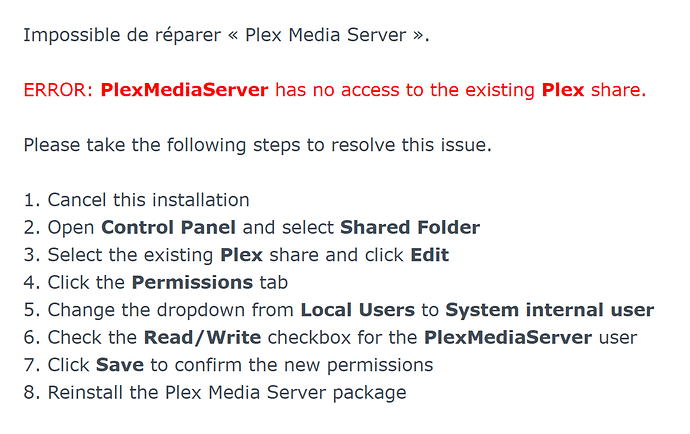
Your screenshot shows you are attempting to REPAIR.
“Impossible de reparer”
You must CANCEL the install,
UNINSTALL the package,
Then begin again.
What you’re showing me makes no sense.
Please do the following.
synoacltool -get /volume*/Plex
sudo synoshare --get Plex
I am writing this in advance of your reply.
I believe I have replicated the conditions and understand it.
Your answers will either confirm what I have found or show me another condition.
I believe you have two Plex directories on your system. One is the real Shared Folder. There is another, regular, but orphaned, folder and the install software is being confused by the orphan.
If this is all true, I am writing the solution now.
We will get you there.
I look forward to your results.
That worked, Thank You
Hallo,
have here the same problem ( @gabange )
I uninstalled and I reinstall the package but I have the same message …
Thanks for help
How comfortable are you at the command line?
If you are “ok”, would you be willing to make a check for me?
sudo -su rootecho /volume*/Plexls /volume*/PlexCopy & Past the output of both of those (the console session) back here for me to confirm.
root@DS916:/# echo /volume*/Plex
/volume1/Plex
root@DS916:/# ls /volume*/Plex
‘Application Support’
‘Bitte legen Sie hier keine Mediendateien ab.’
@eaDir
Library
‘Please do not place any media files here.’
‘Por favor, no coloque ningún archivo multimedia aquí.’
tmp_transcoding
‘Veuillez ne placer aucun fichier multimédia ici.’
ここにメディアファイルを置かないでください。
请不要在此处放置任何媒体文件。
To confirm:
What does this output show?
/usr/syno/bin/synoacltool -get /volume1/Plex
Output
root@DS916:/# /usr/syno/bin/synoacltool -get /volume1/Plex
(synoacltool.c, 488)It’s Linux mode
BINGO!!!
Thank you.
You hand set permissions on the Plex share at some point?
( chmod )
If not, how long as this /volume1/Plex share been in existence? (Which DSM version)
Not that I know of, I have set permissions with chmod.
The Plex Share has been around for a long time.
DSM 4.x
That explains everything.
Use of the chmod command, which I did not count on, broke the ACLs on the
directory.
My DSM 6-based installer set them and all was good.
Once running a hybrid DSM6-7 installation & then setting permissions with chmod will put the share into Linux Mode.
It seems DSM 7 has a small issue handling this situation in “Shared Folder”
I can now work around it.
If I may indulge one final time so I may see the permissions you have?
ls -la /volume1/Plex
root@DS916:/# ls -la /volume1/Plex
total 12
d--------- 1 root root 712 May 28 2019 .
drwxr-xr-x 1 root root 1168 Dec 10 15:53 …
drwxrwxrwx 1 admin users 0 Aug 21 2013 ‘Application Support’
----------+ 1 root root 0 Dec 8 22:17 ‘Bitte legen Sie hier keine Mediendateien ab.’
----------+ 1 admin users 10244 Aug 2 2017 .DS_Store
drwxrwxrwx+ 1 plex users 94 Dec 10 15:53 @eaDir
drwxrwxrwx 1 plex users 68 Aug 2 2017 Library
----------+ 1 root root 0 Dec 8 22:17 ‘Please do not place any media files here.’
----------+ 1 root root 0 Dec 8 22:17 ‘Por favor, no coloque ningún archivo multimedia aquí.’
drwxrwxrwx 1 plex users 34670 Dec 10 11:11 tmp_transcoding
----------+ 1 root root 0 Dec 8 22:17 ‘Veuillez ne placer aucun fichier multimédia ici.’
----------+ 1 root root 0 Dec 8 22:17 ここにメディアファイルを置かないで
ください。
----------+ 1 root root 0 Dec 8 22:17 请不要在此处放置任何媒体文件。
Excellent. Thank you.
Your case, like @gabange, may require manual cleanup after migration.
With this knowledge, I can now perform the migration of your data.
I will print a message if manual clean up is required.
Thank you again VERY much for your time here.
I will update the package as quickly as I can fix this issue.
I apologize, would you please do:



