Hi guys after new realase of DSM7 i dont find the libraries…how i can explore the folder with the files to do a backup ?
Tnx
my plex server version: 1.24.4930
Hi guys after new realase of DSM7 i dont find the libraries…how i can explore the folder with the files to do a backup ?
Tnx
my plex server version: 1.24.4930
@adorobat - check the permissions on the files you’ve newly-added. They might not be inheriting the permissions of the folders. Verify PlexMediaServer has rw on the actual files.
@massimo_agnese - What folder are you talking about, what is it you want to back up?
@philrigby until the DSM6 i have a plex folder with all folders, included the Libraries.
Now the Plex folder is empty … but the libraries and the settings of the previuos version is perfectly working after the upgrade
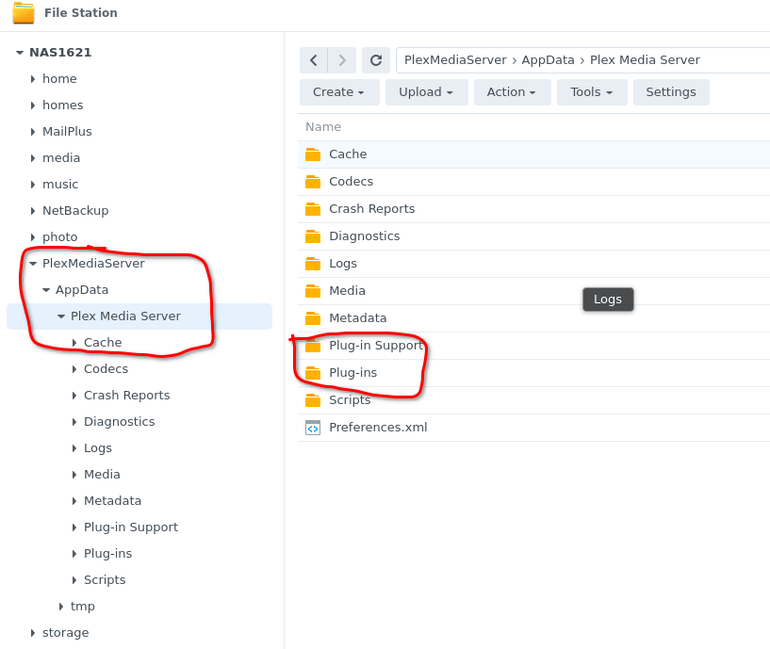
If you’re referring to having a “plex” folder or such that you’d created yourself, with the new version it’s all migrated into a shared folder called PlexMediaServer. If you open File Station, you should see it listed in the tree on the left.
The Write permission is so Plex can delete the file, if you tell it to.
Is that screen shot on one of the actual new files?
BTW you can scrap that “plex” user now, it isn’t needed anymore.
i dont have this folder. The “Plex” folder in DSM6 was created by the Plex server.
Now i dont have PlesMediaServer Folder…
I have only my folders that i create…
You earlier post said you’re on 1.24.4930 which absolutely should of created that PlexMediaServer folder and migrated all your data.
What we should probably try is to do an uninstall of Plex from the Package Center. Tell to to uninstall, unclaim the server but keep the data. Let that process. Then install ChuckPA’s package from here - DSM 7 - Packaging 2.0 - Forum Preview - #2 by ChuckPa - DO NOT GET THE ONE FROM PLEX.TV. Use this one. This one is meant specifically for Synology until it gets rolled into the general release.
Install it, claim the server when prompted. Follow all the steps in the dialog. Don’t miss any, don’t try to guess what it means - just do as it asks.
All being well, when that’s done, you’ll have a PlexMediaServer folder that has all the metadata for the libraries etc in it and you should be good.
To add to @philrigby
It looks like PMS 1.24.2 will have the new packaging (2.0) in it as production status.
The PMS release notes will mention the new packaging.
I will announce / confirm here when it comes out.
ok … now the PlexMediaServer is present. Tnx.
The server version is the same…
Cool. Are all the files you were looking for in that folder now? Playback etc works ok?
The only plex media server folder that I have is this one

Yes, the screenshot is of one the new files.
I’m afraid to remove anything for now, because most of it works and I don’t want to make it worse.
I understand that… been there too!
So, make sure I have this right - your old media plays fine. New media shows up, but does not play, correct?
If you mouse-over the media, click on the 3-dots in the bottom-right corner and select Get Info, does the dialog box that comes up show the right path?
i need only the metadata files !! 
As I read through here, I am getting a bit confused.
I’m not sure what we have here but will find out
Which is the case so far?
PlexMediaServer shared folder) ?I have an idea what has happened but would like to confirm before continuing.
I don’t know what happened, but now the new movie is working too  (while showing the right path, of course, but I’ve never checked previously)
Maybe it takes a bit of time before Radarr moves the files and I have never noticed before, I have no idea.
To start with, now it works, but it will still be nice to know what happened.
Thanks for taking the time to help me figure this out.
Where is the Plex shared folder ? (it usually is on Volume 1 unless manually moved) ?
Wherever located, I’d like you to do this for me to get some info
root
Contents of the script for it to run (one time):
#!/bin/sh
ls -la  /volume[12345]*
I only have one volume.
The script doesn’t send me any mail, but the output when I run it manually is this (I entered some spaces between @ and the rest because the forum confused them with users):
total 4
drwxr-xr-x 1 root root 312 Aug 17 11:34 .
drwxr-xr-x 23 root root 4096 Aug 17 11:34 …
drwxr-xr-x 1 root root 88 Aug 17 11:34 @S2S
drwxr-xr-x 1 SynoFinder SynoFinder 26 Apr 26 20:48 @ SynoFinder-etc-volume
drwxr-xr-x 1 SynoFinder SynoFinder 84 Apr 26 20:48 @ SynoFinder-log
drwxr-xr-x 1 root root 12 May 8 19:51 @ USBCopy
drwxr-xr-x 1 root root 76 Aug 17 10:59 @ appconf
drwxr-xr-x 1 root root 76 Aug 17 10:59 @ appdata
drwxr-xr-x 1 root root 76 Aug 17 10:59 @ apphome
drwxr-xr-x 1 root root 42 Aug 17 11:29 @ appstore
drwxr-xr-x 1 root root 42 Aug 17 11:29 @ apptemp
drwx------ 1 root root 0 Aug 7 09:13 @ autoupdate
drwxr-xr-x 1 admin users 136 Aug 7 09:18 @ database
drwx–x–x 1 root root 174 Aug 17 11:34 @ docker
drwxrwxrwx+ 1 root root 78 Aug 17 20:41 @ eaDir
drwxrwxrwt 1 root root 36 Aug 17 22:46 @ tmp
drwxr-xr-x 1 root root 50 Aug 7 09:16 @ userpreference
d---------+ 1 root root 64 Aug 17 22:53 Data
d---------+ 1 root root 656 Apr 26 21:15 Plex
drwxr-xr-x+ 1 root root 86 Apr 27 16:19 docker
P.S. I’m not running Plex as a container, or anything else for that matter, the docker folder is there because I didn’t get rid of it yet.