yes - everything seems to be working great until I try to install the new Plex update - when it stops with “permission restrictions” I cannot seem to get around. Does this make any sense. I should say I moved the files from the original folder, but against that parts seems to be working . . Thank you
will be with grandkids for a few hours, welcome any advice you can give. . will check back . . Again, thank you . . .
Upgrading to the “Packaging 2.0” release doesn’t require new permissions UNLESS there is something pre-existing which is colliding.
We will deal with it when time permits.
DS1817+ DSM 7.0-41890 no plex currently installed
No plexmediaserver user listed in synology
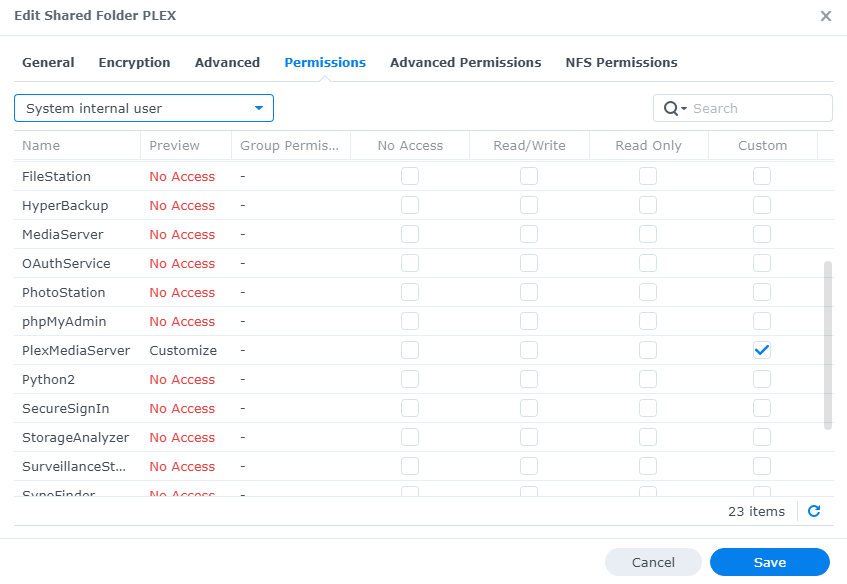
Trying to install PMS 1.24.0.4930 and of course it fails due to lack of permissions.
I can’t authorize permissions for a user that doesn’t exist.
What now?
Just updated from DSM6.x to DSM 7.0.
I had 2 PLEX servers:
- 1 running on my PC and accessing the files on the NAS - still works fine
- 1 running on the NAS itself -which is now unavailable

During the install process it asked me for PLEX serrver name: said PLEX NAS, then seeing it was empty, uninstalled it. Then installed again claining the token but it was the empty PLEX server :(, uninstalled it again and nammed it PLEX NAS 2 to “see” the difference with my previous, now missing PLEX NAS Server.
Any clue on what to do next to recover the “old” NAS PLEX server?
how to have Claim | Plex give me the claim code for the previous NAS server and not the new one as it seems to do?
thx
I freak out 
ok, will try
I get this after install 

new empty PLEX NAS server and lost my PLEX PC server 
edit: went on my PC PLEX server web UI and re claimed it from there, it works fine
but no mean to claim the “older” PLEX NAS server, I still have a new PLEX NAS server but empty, no libs etc
argh… all metadata/files still seem to be here on the NAS, no alternate mean to recover/migrate?
I did
back to work, will try again tonight
thx anyway
These are the files right?

You clearly believe I didn’t and I believe I did.
What else to say apart from I’ll try again tonight.
@leslienyc85 - What version of Plex do you have installed on the NAS? Also what version of DSM is on the NAS?
Yeah I realized that a few moments after I’d posted.
Updated to Synology 7 yesterday. Plex stopped being able to read shared files. Plex won’t reinstall the app on synology, and only the Plex Beta is available. It doesn’t find shared files either.
May I be of assistance here?
The new plex under synology 7 has somehow changed my external access settings. I am unable to access my shared video files from outside my NAS. I have scoured both the synology and the plex, but I can’t find the reason it is being blocked.
Synology has not yet updated Package Center. As the direct result of this inaction,
-
Package Center shows the original DSM 7 - PMS 1.21 build 3744 DSM 7 BETA package
-
This package is obsolete in several regards:
a. PMS version
b. BETA package control scripting -
PMS is now full production status (as of DSM 7.0-41890 release).
-
Package binaries are avaialable from Plex.tv/downloads
(DSM 7)Identifier.
My remote access on the plex settings keeps reverting back to ‘not available’ after a few seconds of being connected
Which version of PMS is installed ?
So, I got here because Plex stopped working after upgrading to DSM 7. I attempted to repair the installation, not knowing I wasn’t supposed to do that, and when it didn’t work, I came to the forums.
I uninstalled the old version, keeping the server, and installed the new one from the downloads page. After a few tries I managed to fix the permissions and almost everything worked (a few movies showed as unavailable at first, but that was fixed when retrying after a few minutes).
Problem is, while the old media works now, anything new I add shows as unavailable and gives me a playback error. I don’t know how to fix that. Can someone help?
