Plex not finding a few movies in my movies folder

I am not sure why certain movies are not showing up in my plex. They are in the same folder as all my other movies that plex is able to find. Examples include:

File: Moonage.Daydream.2022.720p.WEB.H264-KDOC.mkv
Path: /volume1/Content/Collection/Movies/Moonage Daydream (2022)/Moonage.Daydream.2022.720p.WEB.H264-KDOC.mkv

File: Fire.of.Love.2022.1080p.DSNP.WEB-DL.DDP5.1.H.264-APEX.mkv -
Path: /volume1/Content/Collection/Movies/Fire of Love (2022)/Fire.of.Love.2022.1080p.DSNP.WEB-DL.DDP5.1.H.264-APEX.mkv

Server Version#: 1.30.0.6442
Player Version#: 9.12.2.36964

Moonage Daydream (2022)

Fire of Love (2022)

If you want to keep all of that other file info put it in [square brackets]

That tells Plex to ignore it when it searches for a match

I renamed the file and then I rescanned the movies library. It is still not finding it.

renamed:
Moonage Daydream (2022) [720pWEBH264].mkv

It shows up ok named that way for me which means one of two things
You either need to Plex dance <–click

or…

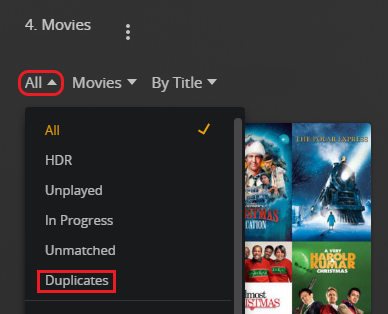
Check in the library settings up at the top left and filter by duplicate. It could be merged with a title you already have in the library so it’s not visible
Screenshot (506)

Which folder is added to the movie library?

Given the above path, it should be Movies.

That should work.

Try the Plex Dance, as @JaysPlex suggests. It clears any bad matching information from the Plex database.

I “cleaned bundles”
I checked for duplicates

Those movies are not listed under duplicates.
After cleaning bundles, I rescanned and they are still not showing up.

Perform the full Plex Dance - all the steps, not just cleaning bundles.

Also, check and set file permissions, even if they look OK. It is rare, but Synology can show them as OK when they are not.

DSM 6: Make sure the user Plex has at least read only access to the media files.
DSM 7: Make sure the system internal user PlexMediaServer has at least read only access to the media files.

See FAQ 19: Setting permissions to allow Plex access to media files

Important: Check the box for “Apply to this folder, subfolder, and files.”

This topic was automatically closed 90 days after the last reply. New replies are no longer allowed.