Glad this is fixed but seriously, you guys need to step up your QA on Samsung TVs before you push live. This is twice in the last 6 months a production release was significantly broken for everyone.
2 Likes
Take the time to read the replies. 1.16.5.1554 is the fix which has gone out to Plex Pass users, the rest will get it shortly…
1 Like
Link for the Synology 64bit as below (Intel)
https://downloads.plex.tv/plex-media-server-new/1.16.5.1554-1e5ff713d/synology/PlexMediaServer-1.16.5.1554-1e5ff713d-x86_64.spk
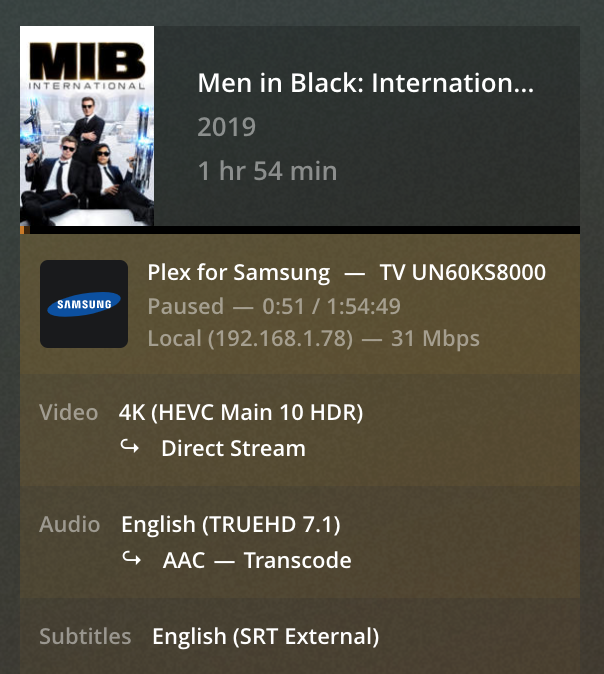
@chrisallen I am still getting skipping when Audio transcoder, transcoding “TrueDH” to AAC. I have attached the logs and image FYR. Issue is not present when direct play Audio.
PLEX MEDIA Server Version: Version 1.16.5.1554
Device: Synology NAS 64x Bit
NAS OS: DMS Latest
Plex Media Server Logs_2019-08-25_10-26-18.zip (731.1 KB)
1 Like
For those of you still having stuttering or jumping issues after installing the latest PMS 1.16.5.1544 build (currently in Plex Pass Beta update channel) please open a new forum topic for investigation 
1 Like
Is there any chance those of us without plex pass will get an update? The links above still take you to the previous update of .1488 be nice if the non plex pass users got a fix too?
Hi chrisallen. Kind of nice you provided the beta download links to non pass users since it’s more a bug fix than a new version, but too bad you did not provide any link to Synology ARMv8 
I’ve downgraded to 1.15.0 waiting for the 1544 to be released to the public 
I reinstalled plex on synology NAS to the default 1.13.4.5271 and its never worked better, not sure im ever going to update again.
I’ve posted a new thread for this.
@AliveKiller Would you mind replying so it can gain traction?
1 Like
@chrisallen I am still experiencing the this reported issue post the 1.16.5.1544 build. Logs and Transcoding image attached.
PMS: 1.16.5.1544 (Synology NAS - 64bit)
Plex for Samsung: 4.1.1
Tizen: 2.4.0
TV: Samsung KS8000 (55’’)
Logs:
Plex Media Server Logs_2019-08-25_10-26-18.zip (731.1 KB)
Here is a recorded video of the issue…
https://drive.google.com/file/d/1bWSDx9FCTRfiIPSfEK_N6uRQFjdaSBKr/view?usp=sharing
This looks to be the same type of 4K scene skipping bug that I have also mentioned above, but mine being streamed from a Windows 10 server. This bug has been prominent on the Plex Samsung app when playing 4K movies for much of the year. Here’s hoping it can be fixed.
So anyone on Synology and an Samsung 4k TV who can confirm the bug is fixed in 1.16.5.1554?
DS918+ latest DSM, Samsung KU6170 (4k).
Works for me. No jumping around. BUT i do not have 4K content, only SD and HD.
best regards
1554 fixed the problem for me. Samsung KS8000 series TV using Standard and HD.
@chrisallen As per your recommendation new topic link as below
https://forums.plex.tv/t/samsung-playback-skip-transcoding-truehd-to-aac/451716
Bug is not fixed… refer to below topic…
I just updated my server to version 1.16.5.1554, and I turned direct play and direct stream back on, on one of my Samsung Clients. As of now, I can confirm that the playback stuttering issue appears to be fixed, at least with SD and HD content. I don’t have any 4K content on my server.
I wanted to thank the Plex Team for fixing this issue.
1 Like
Hi, I’m still having a buffering problem on my samsung Q9FN. It happens with 4k/1080 videos when it transcodes only the audio stream, from DTS to ACC. It seems related to videos with 23.976 fps instead of 24fps. Could it be a bug?
Using my pc as a client (plex server is on my qnap nas) at the same conditions I don’t have any problem
Please see post above from @AliveKiller regarding new topic.
