@OttoKerner It is true. that’s how it used to work until PMS 1.23.3.4706
If you want downgrade your PMS to PMS 1.23.3.4706 and disable movie trailer in your client. Play a movie. It will play pre-rolls when trailers are disabled. That’s how it worked until PMS 1.23.3.4706.
@Volts Please downgrade your PMS to PMS 1.23.3.4706. You can see it yourself.
@OttoKerner Do you think Plex fix that BUG or killed that feature silently 
That’s what I would have said myself.
But this is an interesting comment from @BigWheel:
@Volts That thread has everything what I’m talking here 
Yeah. I don’t understand why there are two threads. 
 .
.
Oh, it’s simply true.
I had family members with their numerous clients who were all very un-savvy people and they always enjoyed my trailers. They wouldn’t know how to turn on trailers if their lives depended on it. I do upgrades as scheduled. One day , I upgraded, and I no longer had trailers on any of my clients and none of my family did either.
Actually, up until the recent server version change, none of my clients were set to play trailers at all. Yet, they all get the preroll without issue. The last version it worked on was 1.23.3.4706. Builds after that date no longer function in this way. I have multiple people on my plex, and several are not technical, so trying to explain how to turn on trailers and all that I might as well be trying to teach them to fly a rocket. I use the pre-roll to advise of upcoming downtimes, changes, etc to those in my family that are “non-technical”. I am holding at 1.23.3.4706 at the moment and we’ll see what happens.
Two things.
- @OttoKerner to force to play a trailer BEFORE a pre-roll… that was a dumb idea!
- I just switched to Linux. Anyone know where I can find old Linux PMS versions.
Yes, I do confirm that behavior on that version. 
I’m surprised to learn that Plex ever behaved that way!
The support page hasn’t changed, older versions didn’t behave that way, current versions don’t behave that way, and there’s a feature suggestion to change it to behave that way.
Maybe it was a temporary accident - or maybe the intention is for it to change. I dunno. 
Different clients have different settings. When prerolls were first introduced at least one trailer had to be selected but you could get around that by disabling the three cinema trailers options.
Then client got out of parity at some point. Where android and web I think forced the trailer regardless of the number of trailers set while other still had the need to set it to at least 1.
Then Roku had another version we were checking out and that team added the “pre roll only” option which is default. As far as I am aware the end goal for all clients is to have the “Preroll only” setting and it be default though I don’t know when that will happen.
This current bug is obviously making all clients behave a wacky and is exacerbating confusion due to the apps not being in parity
No that behavior had been there for a loooong time. It’s probably not just that version.
To have clients and or client settings be governing preroll behavior is wackiness too IMHO
That sounds perfect to me. It’s a sane default for almost every situation, and still treats users with respect.
It would be sane and perfect…
FWIW here is a link to Linux PMS that makes prerolls work in this sane and perfect fashion…
@Volts I can confirm all PMS versions until PMS 1.23.3.4706 behaves the same way. Simply play pre-rolls without tweaking anything in clients. Now everything is broken and Plex introduce stupid way to play pre-rolls.
Before
- if anybody wants just pre-rolls just don’t need to change anything in a client.
- if somebody need to play just only trailers, simply delete all pre-rolls from Extras → Movie pre-roll video
- if anyone likes to play movie trailers with pre-rolls just add pre-rolls to Extra → Movie pre-roll video and enable Cinema trailer features and enable Cinema trailers on plex client
Now there isn’t any option to do it. Plex just forces us to play trailer if we want to play our pre-roll videos. 
@BigWheel My suggestions are:
- Please add option on PMS to enable disable pre-roll and movie trailers for all clients. (PMS Admin can force clients to run movie trailers or pre-rolls)
- Add pre-roll only and movie trailers only option in client to stop playing forced movie trailers and pre-rolls in PMS.
- By default please enable clients to play movie trailers and pre-rolls.
Thank you.
I think I have a solve, if you set the number of trailers to 1, and then disable all the options in extras like in this image, then it only plays your intro:
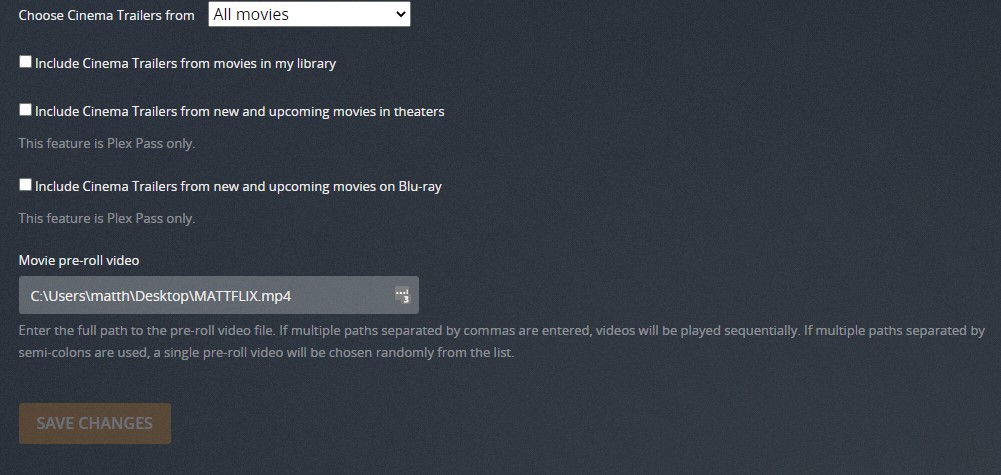
Only works for films though, would be nice for series as well. Not sure about other users, need to double check that.
Edit: looks like invited users also need to update their settings to include 1 trailer, but not managed users.
Doesn’t work for me on latest PMS version. My managed users, and me, still have to set trailers to play to 1. Unchecking the boxes though does let just the preroll play if the user has trailers turned on. Before, the users didn’t have to turn on trailers (and thus the source of this thread).
Guys anybody tried PMS 1.23.6.4810 ? But I can’t see anything about prerolls in changelog.
cheers
