Can also confirm this. Fix this, please.
1 Like
Also experiencing this on my PS5. 
And here. Linked and logged in, it state my server name (Mac mini) but cannot connect. It just says ‘retry’
Hi all. After working closely with Sony on this issue I have an update for folks affected by this.
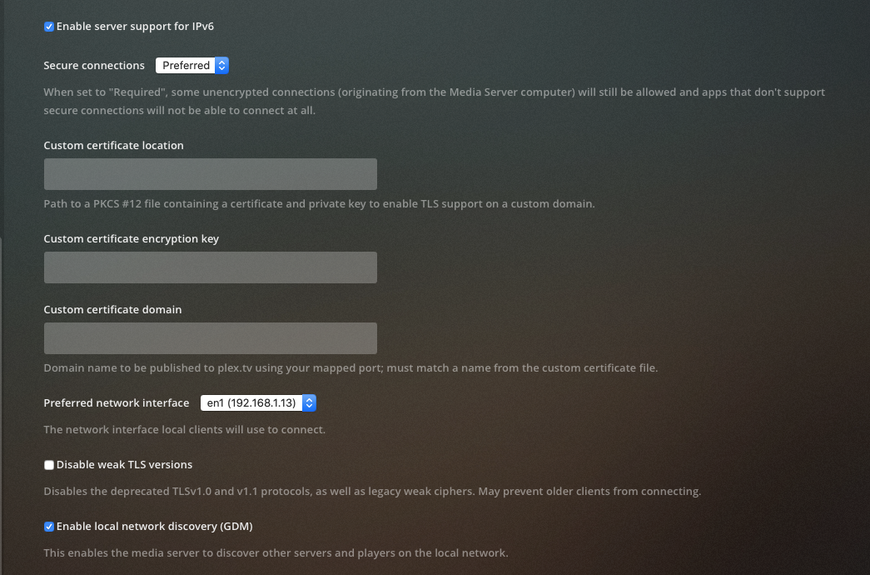
The application environment that we run in on the PS5 does not allow mixed content requests. The app is loaded via https, and any subsequent requests made via http are blocked. This leaves us with few options. If you want to be able to communicate with your server it will need to be published to plex.tv (and therefore get a certificate that allows us to communicate with it via https). Your server must have a certificate and must have secure connections enabled. Please see https://support.plex.tv/articles/206225077-how-to-use-secure-server-connections/ for further details.
We’ll also be removing the ability to add servers manually in the PS5 app, as these requests cannot be made over https and will therefore always be blocked.
To summarize, you must have your server published to plex.tv and you must have secure connections enabled in order for the PS5 app to communicate with your server.
2 Likes
How do I* get a certificate?
You need to sign in on your server, that’s pretty much it. See the How to Enable Secure Connections section in the article I linked above.
1 Like
Hi Team,
Thank you for responding to this issue.
Why can’t local connections be made over HTTPS? That sounds like utter bulltish to me. This sounds like a problem with a workable solution. Opening up my plex server to the internet, should not be necessary, and is not something I am willing to do.
Let’s say for example, I have my own domain, and my own valid SSL cert… Why can’t plex communicate via HTTPS to my local server in that case?
The secure connection setting is correct, but is the server signed in with your account and reachable from plex.tv?
Why can’t local connections be made over HTTPS?
Specifically insecure connections cannot be made once the app is loaded over https. Connecting to a local server via an IP address is almost always done over http. Users generally don’t have a certificate for an internal 192.168.. IP address. In theory you could have your own domain with a valid certificate and we could connect to it, but at the moment it would need to be published to plex.tv to make it discoverable as there’s no way to manually add a server like that via the app.
Actually, you’re right… I hadn’t had my coffee yet… You would need to be able to enter the address as a FQDN really, rather than an IP address for this to be able to work. SSL won’t verify for local IP addresses. It should, though, for a FQDN resolving to a local IP address (eg localserver.plex.tv IN A 192.168.0.1).
Since we don’t have the ability to do this, and since plex.tv won’t be able to determine the FQDN from the local IP address, I can’t think of a way for this to work.
Unless, there was a way to input a FQDN as a server address.
I’m trying to come up with a solution to make this work, without exposing plex to the internet. My best thoughts along that line now, are making it available remotely, but then denying incoming traffic, except that which is needed to communicate with plex.tv. I’m sure I can come up with something, it’s just going to take time ;o).
It should be reasonably trivial to add support for FQDN as Private server. I recognise though the scope of who it applies to is probably quite limited, and certainly the amount of effort required to support it, make it not worth your time investment.
Hi Moussa, I’ve applied all the settings as stated above and most times when I launch the PS5 Plex App I receive the following error message WV-109156-2 “Something went wrong”…
There are occasions when when it works and I have managed to link the PS5 using Plex.tv/link but most of the time it doesn’t…
Any suggestions?
I have checked this, and it is all working. It’s just that the PS5 still doesn’t connect.
1 Like
Can’t connect locally to Plex server with my PS5.
It’s working for my Android TVs like it’s always do
So is it Sony’s fault because of their software or yours for not properly investigating your app before launching and that it works?
1 Like
I’ve managed to open up a secure remote connection by manually port forwarding and now my PS5 app will let me browse the media on my server.
But when i try to play any file it gives me the error - “PLAYBACK ERROR. The file associated with this item is not accessible by the server. Please verify that the file exists and the necessary drive is available.”
My server is running on a Qnap NAS with all the media stored locally on the NAS. Never had this issue on any other device.
I have Secure Connections Enabled and the PS5 is still not connection to my Server.
PS5 connects to my Plex Server when i run the PS5 in my Work Network.
Server is available via app.plex.tv and is linked
Sorry, what do you mean link the device outside of he Plex App?- I cannot see anything that would indicate or see where this is done?
I was able to fix this issue so that the PS5 app can access my local server.
The problem I had was that, while secure connections was enabled (per the instructions that Moussa linked to), it wasn’t working correctly. To fix, I disabled “Prevent DNS Rebinding” in my router settings, and now everything is working as expected.
I’m worried about the security implications of having this setting turned off, so I’m going to research more and decide whether I want to leave it that way.
4 Likes
I had the same issue, but i found a solution that worked for me. On my modem / router there’s a section related to a protection against DNS rebind attacks. I’ve added plex to the exceptions writing the line “plex.direct” without the “” and saving the changes. Now my local server works perfectly on the ps5, probably cause it use a secure connection now
4 Likes
