Still having the same issue. Plex connects on iPad on same local network. But not my ps5.
1 Like
Was working fine for the first week, now I’m having the same issue. I can see my account on the PS5, I’m logged in, but I am unable to see any of my local media.
Happened right after we had a system update on the PS5, so perhaps Plex needs an update to address whatever settings caused it to become inoperable?
1 Like
Worked for me. Awesome, thanks man!
1 Like
The man, the legend! This did the trick for me 
Hello!
I have the trouble of connecting PS5 to plex while it connects on my iPhone and MacBook. I’m not sure what does “publish to plex.tv” means. When I login into https://plex.tv I can see my private server and can stream movies from it. Sounds like it is published.
The value for the “Secure connections” setting is “Preferred”.
When I press “retry” button on the media server status check page of PS5 plex app, I see the following logs in the plex server:
Nov 14, 2021 17:03:53.378 [0x72a11450] Debug — CERT: incomplete TLS handshake: tlsv1 alert unknown ca
Nov 14, 2021 17:03:53.380 [0x72cff450] Debug — CERT: incomplete TLS handshake: tlsv1 alert unknown ca
Nov 14, 2021 17:03:53.517 [0x72cff450] Debug — EventSource: Got event [data] '<Message host="178.79.176.52" port="443" command="startRelay"/>'
Nov 14, 2021 17:03:53.529 [0x72cff450] Debug — Relay: reused an existing key for https://downloads.plex.tv/relay/relay_v1.pub
Nov 14, 2021 17:03:53.529 [0x72cff450] Debug — Relay: starting relay.
Nov 14, 2021 17:03:53.529 [0x72cff450] Debug — Job running: PLEXTOKEN='xxxxxxxxxxxxxxxxxxxx' '/volume1/@appstore/Plex Media Server/Plex Relay' '-p' '443' '-N' '-R' '0:127.0.0.1:32401' '-o' 'StrictHostKeyChecking=yes' '-o' 'UserKnownHostsFile=/volume1/Plex/Library/Application Support/Plex Media Server/Cache/relayHostKey.txt' '-o' 'NoneSwitch=yes' '-o' 'NoneEnabled=yes' '-o' 'LogLevel=VERBOSE' '-o' 'PreferredAuthentications=password' '-o' 'PubkeyAuthentication=no' '-l' 'iafanasov@hotmail.com' '-F' '/dev/null' '178.79.176.52'
Nov 14, 2021 17:03:53.531 [0x72cff450] Debug — Jobs: Starting child process with pid 26056
Nov 14, 2021 17:03:53.948 [0x73bff450] Debug — Jobs: '/volume1/@appstore/Plex Media Server/Plex Relay' exit code for process 26056 is -11 (signal: Segmentation fault)
Nov 14, 2021 17:04:04.972 [0x72cff450] Debug — Completed: [192.168.31.1:64538] 200 GET /player/proxy/poll?deviceClass=pc&protocolVersion=3&protocolCapabilities=timeline%2Cplayback%2Cnavigation%2Cmirror%2Cplayqueues&timeout=1 (7 live) TLS GZIP 20003ms 5 bytes (pipelined: 1)
Nov 14, 2021 17:04:05.037 [0x72cff450] Debug — Auth: authenticated user 1 as iafanasov@hotmail.com
Nov 14, 2021 17:04:05.073 [0x6b5b3450] Debug — Request: [192.168.31.1:64539 (Subnet)] GET /player/proxy/poll?deviceClass=pc&protocolVersion=3&protocolCapabilities=timeline%2Cplayback%2Cnavigation%2Cmirror%2Cplayqueues&timeout=1 (7 live) TLS GZIP Signed-in Token (iafanasov@hotmail.com)
Nov 14, 2021 17:04:05.074 [0x6b5b3450] Debug — Content-Length is -1 (of total: -1).
I also have a weird behaviour of the remote connection indicator. Sometimes it reports that my server is reachable from outside of the local network, other times it reports unreachability. All the time I can reach it with my phone which is not connected to a local network.
Theree is a green lock icon next to the server name. It makes me think the connection is secure and the certificate business is sorted out by plex.tv.
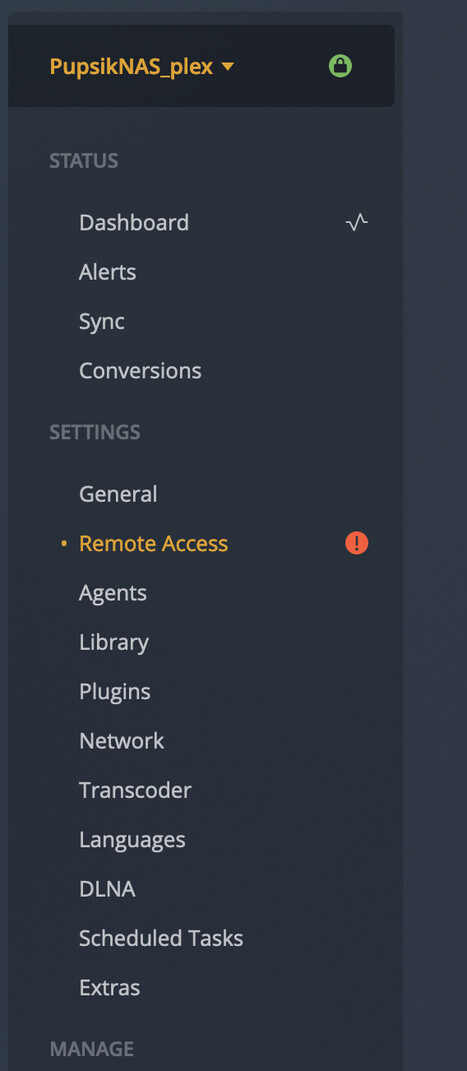
Any help would bee really appreciated
Updating the flex resolved my issue. I use it on Synology nas. The automatic update didn’t recognize a new version. The manual update worked perfectly.
I didn’t make any changes to my server, but the latest update of the PS5 app seems to have resolved it. Also works on the andriod app which previously only worked in browser for me as well.
Thanks.
wanted to update here as well…manual update helpedl, no changes done to my Nighthawk router or Synology NAS or Plex Server.
thanks to @iafanasov_hotmail_com for the tip
latest update 1.25.0.05282
Hey,
I still can’t connect to my local server with my PS5. Every other device connects fine except the PS5. Im using a wired connection.
Things i’ve tried:
Made sure server is linked with plex account.
Setting Secure connections as required.
Setting my Router DNS to 1.1.1.1 and 8.8.8.8 etc…
Setting my PS5 DNS to 1.1.1.1 and 8.8.8.8 etc…
Everything is updated
A lot of restarting…
My router doesnt have any settings about DNS Rebinding.
I dont know what to do other than that, any help would be appreciated!
Thanks
Which router do you have?
Same here, PS5 issues still persists.
I’m on a local network and can connect to iOS devices, LG TV app, Xbox Series X but still not to my PS5.
Looks like an issue on the PS app side as all other devies connect properly.
Possibly really trivial setting to check is that your Network Profile on your network adaptor is set to Private, to allow local file sharing:

I struggled waaay too long with that one 
I magically got it working but it seems that it’s not connecting through local network and everything looked 360p no matter what quality is set in the settings. Is it something I did wrong or is it meant to be like this?
Oh it didn’t work, it was connecting through relay
Same - Synology NAS and PS5
Plex app on Synology - not in Docker
I have the exact same problem, and can’t stream to PS5 
So I had the same problem like you guys. Plex was working locally on all my media players: LG TV, Sony TV, Smartphones, PS4 but not on PS5. On PS5 it was working only remotely. If i disabled remote connection on the server side, Server don’t shows up on PS5.
It turns out it was the DNS rebinding problem.
On PS5 with auto networking settings I had DNS settings like: Primary DNS - 192.168.0.1 (IP of my router), Secondary DNS - (nothing).
Even when I manually set the Secondary DNS to 8.8.8.8 the problem was still there.
But when is set manually Primary DNS to 8.8.8.8 and Secondary DNS to 8.8.4.4 the problem was gone. Now I can see PMS on PS5 locally.
How do you specify local server without need of connection to your plex.tv account ?
(if I have ISP connection down, PS5 Plex App will not run…)
I’m at a loss with my setup and would sincerely appreciate assistance to resolve the issues I’m having. Like others, I have multiple clients (iPad, Roku, PS4, web) connecting to my local server. All of them work flawlessly 99.99% of the time.
While I can browse my libraries without issue, my PS5 does not consistently play media correctly. It is now my primary media device (connected to the biggest/nicest TV in the house), so Plex not working on the PS5 (regardless of who’s fault it is) is a deal breaker for me. No point in continuing to pay for a Plex Pass if it doesn’t work on the PS5. Stupidly I purchased the PS5 instead of an Nvidia Shield because I thought I could have a great console and media player wrapped up in one.
What issues am I having?
- If I try to resume playback on a video file, the PS5 will usually refuse to do so. It’ll just hang with a black screen and spinning circle.
- Playback will also often stop intermittently and refuse to resume (see above). I then need to restart from the beginning and scrub forward to where I left off.
- Unfortunately this is often thwarted by the third issue. Scrubbing through a video file will usually cause playback to hang completely (again, the black screen with spinning circle).
- I can usually tell that my Plex session is going to get difficult not long after I start playing a file, as the quality will be terrible (pixelated low bandwidth 2005 internet streaming terrible).
- There does not seem to be any rhyme or reason to it and the above problems usually resolve themselves after a day or so without me having to intervene.
- Weirdly, trailers (in Discovery) are very, very sketchy (like 240p sketchy) but can sometimes be fixed by immediately going back to the beginning of the trailer, or exiting out and trying to play again. This is happening almost 100% of the time and I thought I’d mention it in case it was related to the rest of the issues.
The majority of these are almost certainly related to a single root cause.
What does my environment looks like?
- Plex is running on an up to date Win 11 box with the latest PMS version (1.28.2.6151)
- The PS5 is also running the latest revision firmware (22.02-06.00.00)
- I have a Telstra Smart Modem Gen 2 (Australian ISP) based on the Arcadyan LH1000 running the latest firmware (0.17.06r)
- There is no DNS rebind protection on this modem (guessing it happens at the ISP’s end) and it is not running a pfSense web UI
- UPnP has been disabled as that’s the closest thing I can think of
- DNS on the box running PMS has been changed to Cloudflare Primary (1.1.1.1) and Secondary (1.0.0.1)
- DNS on the PS5 has also been manually changed to Cloudflare Primary (1.1.1.1) and Secondary (1.0.0.1)
- The Secure connections setting in PMS has been set to Required
What I’ve done to resolve the issues
- Update firmware to the latest version on all devices (see above)
- Switch PMS Secure connections between Preferred and Required
- Turn off MS Defender Firewall
- Disable UPnP on my router
- Restart PMS (multiple times)
- Restart the host PC (multiple times)
- Restart the PS5 (multiple times)
Please, please, please… can somebody help me? Unsure if PMS logs would assist to diagnose.
Hello all, this problem still seems to persist on PS5, is there any update on a permanent solution? It seems wild that almost 2 years later this is happening
