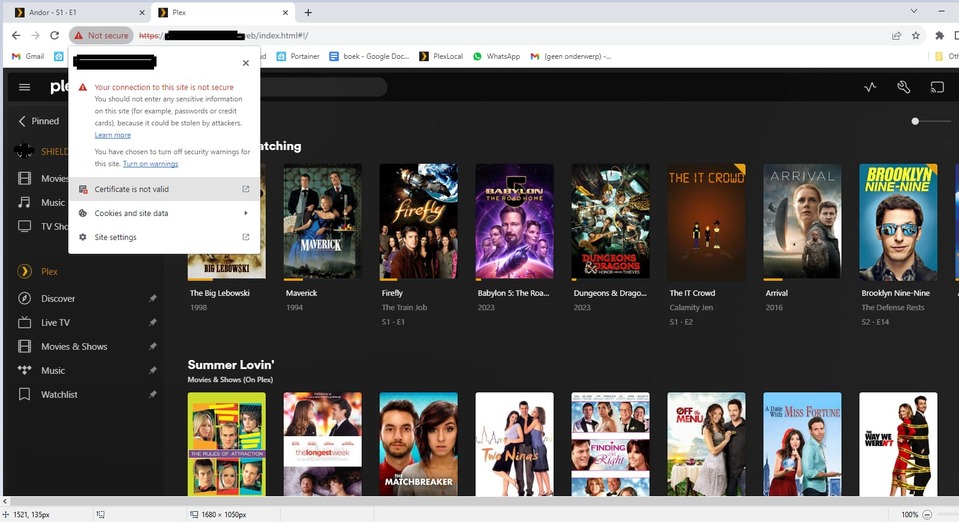
Suddenly no remote access

I’m hoping somebody can fix my certificate. I’ve been getting this for a few months now.

107-197-142-35:*** plex.direct:32400

The certificate for this server is invalid. You might be connecting to a server that is pretending to be

“107-197-142-35.1d76c984f0d94cf281a542366abc50f plex.direct” which could put your confidential information at risk.

Good morning. Since a few weeks I can’t find the Server library from the external devices I was using (it shows in red that it’s offline). In addition, from time to time, a warning symbol appears from the server indicating an error and referring me to the forums (that’s how I found this thread). Could you give me some help, please. Thanks in advance.

@ChuckPa can you check now that is connectable? now that i had time i found the problem

@aslav22

Connection to 8*...*** 32400

port connect succeeded.
Plex/web browser loads and asks me to sign in.

:clap:

What was the problem?

@MatthewH12

Your server’s certificate has been reset and regenerated.

Please restart the server and all apps so they get the new certificate.

@AdRaim

Looking at your account:

  1. Cas… is listed and appears functional (last seen 9 hours ago)
  2. Som… was deleted (from a Dresden, Germany IP address)

Which are you referring to?

EDIT: Account cleanup mystery resolved. Do not be alarmed

eset antivirus/firewall… needed to also allow ports which i dont remember doing before… maybe something changed after an update

@aslav22

Thanks for detailing.

Computer firewalls need the extra ports for the LAN
and then the firewall with the forwarded port.

Glad you got time to go through it and resolve!!

Good afternoon @ChuckPa. I understand that you mean the start of the library server name. It would be: 1.Cas… If it is seen, it is from the PC itself where PMS is installed. From an Android phone and Ipad the library is not displayed The second library server is completely unknown to me. I’m not in Germany.

at first i though it was fritz modem since it had an update last month but today when i removed /re-added all ports and was still locked i though to check eset firewall options

@aslav22

I resolved the question/confusion with the other server. At one time , you had a different name. That’s the one I saw. I know , by looking at your plex account, where you’re at :sunglasses:

The PC server is the being seen so if all is good now then :+1:

Please check if my certificates are in need of resetting. I can’t think of anything else left to try.
Please help

Plex Media Server Logs_2023-08-11_16-56-00.zip (746.8 KB)

@maartenvangrinsven

I am in your account right now ; cleaning up the mess.
(You have 6 Shield servers in rapid-fire succession)

Plex.tv issued a temporary IP block because of all the traffic.

I’ve cleaned up the overload and servers.

I reset your certificate.

Please restart the server AND use Control+F5 to reload the browser page

I just reset the server.
How did this happen?
How do I prevent this?
How do I fix this if it happens again?

From your logs, I don’t see where the server was ever claimed.

It looks like the server was started, and before it could complete setup, it was reinstalled again. (I should have seen evidence of claiming in the logs)

Are you having trouble claiming the server / keeping it claimed ?

This is useful:

NAT: PMP::getPublicIP, couldn’t initialize: -3:Unable to get Gateway

Is the Shield’s network configuration pointing to your network modem/router correctly ?

I believe it is

@ChuckPa
Thanks for taking a look at this issue.
I posted before about this with more info about my setup. But sadly I got no response
Chech the post here Remote connection not working in app web & external player is ok

That’s in an area I don’t normally monitor (i can only watch so much :frowning: )

I see this in your logs:

Aug 11, 2023 15:05:38.278 [211005983936] DEBUG - Network interfaces:
Aug 11, 2023 15:05:38.278 [211005983936] DEBUG -  * 1 lo (127.0.0.1) (00-00-00-00-00-00) (loopback: 1)
Aug 11, 2023 15:05:38.278 [211005983936] DEBUG -  * 6 eth0 (192.168.178.220) (00-00-00-00-00-00) (loopback: 0)
Aug 11, 2023 15:05:38.278 [211005983936] DEBUG -  * 1 lo (::1%1) (00-00-00-00-00-00) (loopback: 1)
Aug 11, 2023 15:05:38.278 [211005983936] DEBUG -  * 6 eth0 (2001:1c03:xxxxxxxxxx6) (00-00-00-00-00-00) (loopback: 0)
Aug 11, 2023 15:05:38.278 [211005983936] DEBUG - Creating NetworkServices singleton.

Notice all the IPv6 addresses (I obfuscated for you) which are attached to the interface.

There should be only 1 IPv6 address.