I tried 3 times using the most current version. Each install displayed the “Installing…” pop-up for approximately 5 seconds and then showed the Success pop-up with instructions about shared folder permissions. I never saw a migration.log.
Thanks,
This tells me something is wrong with the “Plex” shared folder itself.
Have you, at any time, manually applied permissions to the Plex share using the command line? (e.g. chmod command) ?
chmod is the only thing which will break the Plex shared folder permissions and stop detection other than the name of the folder itself being incorrect (trailing or leading spaces).
Did you move the Plex shared folder manually at any point?
Early troubleshooting I restored Plex folder from Hyper Backup. It appeared to be empty. In hindsight it might have been hidden from view due to permissions. I used a backup from a few hours before the DSM7 upgrade,
- I never did anything to the Plex share folder besides the recommended permission settings within DSM. I only restored the contents through Hyper Backup.
Check your PM
Turns out I was working on a DSM 5.2 file system which does NOT meet DSM 7 requirements. Using line commands, we were able to convert/fix my volume so the Plex package could do its job. I could never have figured this out. Thank you @ChuckPa !
1 Like
Ok, I don’t know if this has been addressed in this thread, this is a loooooooong thread.
I went through the upgrade instructions and the first issue was, it didn’t fail as the instructions said it would. As such, I didn’t add PlexMediaServer permissions mid-install as per the instructions. It just said “installation was successful”.
The new server recognizes my users, and it also seems to realize that the libraries are there, but they all have the yellow triangle and are inaccessible. If I got to settings, it shows that I have two servers called “roark” with one unavailable, and one being “nearby” and available but doesn’t have any configured libraries.
I was at one point presented with a screen that said something about “claiming” my server, but that specified new or lost servers, so I didn’t think it applicable. What can I do here?
Oh, I did go back and add plexmediaserver to both the plexmediaserver and my media folders, and restarted plex, but that has had no impact.
-
Did you UNINSTALL Plex before upgrading? – Sounds like you didn’t
-
Did you ‘Repair’ during the DSM upgrade? – Sounds like you did.
-
The “PlexMediaServer” shared folder is managed by DSM. It’s only there for you to make emergency repairs & backups.
We will deal with one server at a time.
Please let me know the status of questions #1 & #2 and, please also confirm whether or not you still have all the metadata in Plex/Library/Application Support/Plex Media Server ?
- I did uninstall PSM 6 before upgrading.
- I did not do a repair.
- I’m not sure what you mean here. I didn’t touch the PlexMediaServer directory, I only added permissions to the old Plex directory for the PlexMediaServer user. Unfortunately, this was post install, because the install didn’t error out per the instructions.
- When do you sleep?

One thing that I thought was odd. I had 2 update reminders on the synology. One for a minor 6.x update, and one for a 7.x update. I thought it best to go to the latest 6.x before going to 7 but when I did that, I was no longer being prompted for a 7.x upgrade. I’ve no idea if that’s relevant, but I thought it odd.
Missed that last part, yes, all data is in Plex/Library/Application Support/Plex Media Server
Which version of DSM are you using now? What’s the full version number please?
Which PMS version did you install? Was it 1.21.0.3744 from Package Center or one downloaded from Plex.tv/downloads ?
There are a couple cases, as we’re learning, where things can go sideways.
- The volume was originally created under DSM 5.x
-and- - During DSM 6 install & upgrade, it was converted to BTRFS
These two, which Synology completely overlooked in DSM 7, leave us with a file system which isn’t compatible for Plex.
Don’t be alarmed because the Plex shared folder can be upgraded pretty easily.
Before diving down that rabbit hole, I would like you to go to
Control Panel - Shared Folders - EDIT the Plex share - Permissions tab
Please let me know if you have a 'Custom" permissions button in the right column (total of 4 columns) or only have R/W, Read-only, and No-Access
If you have one of these impacted volumes/file systems, you won’t have “Custom” as a permissions option.
DSM Version: 7.0.1-42218 Update 2
PMS version: 1.25.4.5468-700
I downloaded from plex.tv/downloads as per the instructions
I don’t believe I was ever on DSM 5. I’ve no idea about the BTRFS thing.
I do have a custom permissions button which is checked for user plex. Screenshot attached
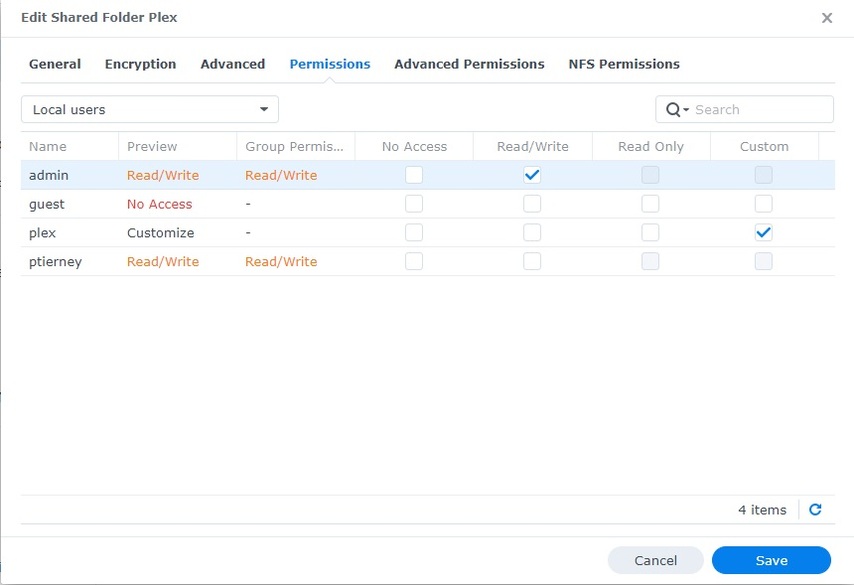
SWEET 
This will be easy to resolve.
I am writing these instructions presuming you want your existing server data (which still sits in the Plex shared folder, to be upgraded / migrated to DSM 7.
If that’s not the case or you have special request, please let me know.
Undoing what happened
-
Uninstall the current DSM 7 package with the ERASE option to remove this errant/rogue DSM 7 package
-
Manually set the “Full Control” permissions for the Plex shared folder
- This step will require approximately 2-3 minutes for each 1000 media items you have indexed. Don’t be surprised if it takes quite a while. I’ve seen a few extreme cases (Plex share was 500GB in size) that needed several days.. yes — DAYS)
When this step is complete, all the permissions will be set for migration to automatically start.
When you now Manual Install PMS again, it will go to “Installing” and sit there.
Be patient with it. It’s going to walk through each file in the shared folder and making it ready.
Do not be alarmed if DSM 7 gives you “Operation Failed” or similar. DSM 7 has a security timer which is fussy/flaky.
The way to confirm it’s still installing –
-
In a new session , Plex shared folder will contain “Migration.log” which will appear about 2-3 minutes after it starts.
-
Resource Monitor - Task manager / Processes – will show username “PlexMediaServer” (PlexMedia+) running tasks.
Whatever you do, don’t restart DSM until this is complete as you could be left with a split metadata / database .. which is a mess to clean up.
IF
If, when you start this process, it says “Installation successful” again very quickly –
- Check the Plex share and make certain it’s empty
- If NOT EMPTY – Uninstall + ERASE again
- Manual Install again
(sometimes DSM makes 2 copies)
So, yes, ideally I’d like my existing data transferred.
When you say DSM 7 package, do you mean the PMS package for DSM 7? I don’t know why this is considered rogue as I downloaded the the ARM v8 DSM package from https://www.plex.tv/media-server-downloads/
I picked that one because I ssh’d into the DSM and cat’d /proc/cpuinfo
cat /proc/cpuinfo
processor : 0
model name : ARMv8 Processor rev 4 (v8l)
This is a ds418, for reference.
second, set the folder permissions from where, control panel or file station? File station has most definitely been done, see attached
EDIT: sorry, I just want to be really specific here.
- The link I gave you shows FIleStation. The moment you go to “Properties” , the DSM GUI opens the “Edit Shared Folder Plex” page. This is another way of opening the shared folder’s permissions.
File Station → Right-click the “Plex” shared folder → Properties → Permissions
- You can always get the CPU info from “Control Panel - Info”. Yes, you want ARMv8 (RTD1296)
Ok, we’re off.
But, control panel info gives no indication that the CPU is ARM v8. All it says is the CPU is a “Realtek RTD1296 SoC”, which is non-obvious. That’s not really entirely on Plex, but if I weren’t a linux admin I would have had a hard time determining which version to download. Maybe the download site could pinpoint the correct download by DSM model? Just a suggestion.
Yes. RTD1296 SoC (System on a Chip) is the ARMv8 (aarch64)
My DS418j development system is also ARMv8
Being a Linux admin has nothing to do with it. I’m a kernel developer and I still need look things up
There is an effort underway to take ALL the guesswork out of it.
I get that, I’m just making suggestions that might make things easier for users who aren’t at our level.
Really appreciate all your help, we’re about 10 minutes into “installing”, so fingers crossed.
The work in process will put things back to how they should be (pre-DSM 7 days); where it was all “auto-magic”
Would say more if I could 
1 Like
