TIDAL integration used to work... now does not work

It seems like many people are having variations of the same kinds of problems. Just in case someone from Plex Support happens to stumble in here, I wanted to clearly illustrate exactly what I’m seeing in my various clients.

To be clear, I took these screen shots about 15 minutes after:
1.) Unlinking Tidal Account from my Plex Account
2.) Logged into Tidal website and changed password
3.) Confirmed PW change on Tidal Website
4.) Re-linked Tidal Account to Plex Account with updated password.

When I go to the Tidal page on my iPhone, I get the “Preview mode” banner at the top. However, the information below is actually correct and reflects music I’d recently played via the Tidal app directly.

However, I cannot browse the “My Tidal” or “My Tidal Playlists” tabs on my iPhone:
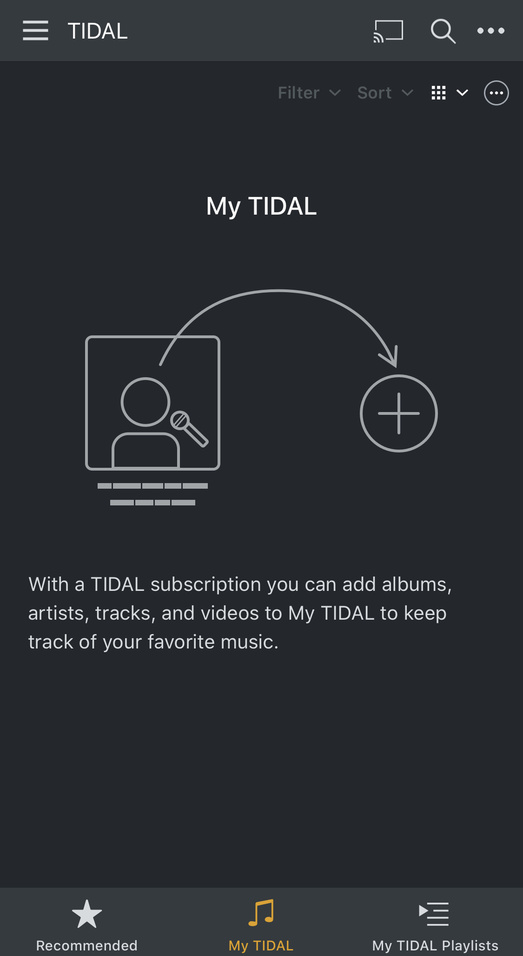

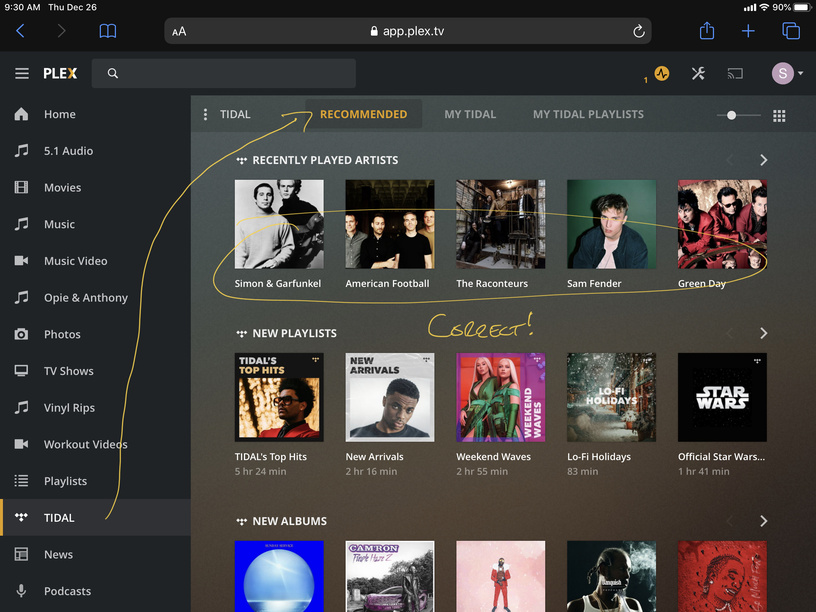
If I go to the Plex Web Client, however, my experience changes slightly… I am still unable to browse the “My Tidal” tab:

However, the “My Tidal Playlists” loads and does show the 1 Tidal Playlist I have added!

The “recommended” tab also reflects correct information!
I can even click an artist, select an album and play it not in Preview mode! You can see the song is playing, showing it sees the Tidal Hi-Fi Tier subscription and the song lengths are accurate, not showing only 30 second samples:

But then when I go over to a Plex Playlist that contains both songs local to my Plex library and Tidal songs, all the Tidal songs are in preview mode. Not that the individual track playing at the bottom, also from Tidal, is still reflecting the Tidal Hi-Fi subscription.

At this point, I’m kind of at my wits end here. The integration is clearly only half-broken or something. Which is strange because I’m assuming its all API calls. You would think if this was some account issue, it would be all or nothing. The only thing I can think of is that perhaps Tidal changed some of their API’s and Plex doesn’t know about it yet? Or Plex knows and haven’t been able to integrate the changes? Either way, some sort of feedback would be nice!

2 Likes

iOS Log:
PlexDebugInfo-SVXDAN83-6.6-19075 (2019-12-26 09.56.06 -0500).zip (2.5 MB)

Server Log:
Plex Media Server Logs_2019-12-26_09-59-35.zip (5.3 MB)

image

1 Like

There is also a similar, parallel thread here: Plex Pass user getting "Internal Server Error. Something went wrong on our end" **confirmed Tidal issue***

1 Like

@drzoidberg33 any news to report from the Plex side on this ongoing Tidal issue that you replied to back in July 2019? I am getting the exact same issues as @SVXDAN83.

2 Likes

First time TIDAL and Plex user here, trying to enjoy TIDAL on my Xbox one. Sad to see this is the way Plex is choosing to support this issue. I mean the only staff that replied didn’t come back for 3 months lol

Edit:

So far my solution is to go to your account page on desktop, go to manage web services, disable tidal. Then unlink and relink your tidal account and re enable tidal to be available on your devices. It gave me full access to each tidal page on my Xbox and iPhone. I will be sure to comment again if it stops working

I think I tried this in this order before, but if you’re saying it worked for you, I’m give it another try

Solution does not work for me. Hoping this can be resolved soonest by Plex staff. Thanks.

Yes… that’s assuming anyone from Plex support ever pays any attention to this thread. I’ve been trying to be patient, but I’m starting to get a little pissed… especially since some of us have chose to pay a higher premium to support the Plex platform but can’t get any help with some of its most fundamental advertised feature!

Not only did that solution not work for me, I can’t see to get Tidal to even show up in the menu bar on iOS after disabling and re-enabling it from “manage web services”. What a joke… and still radio silence from Plex support. I’ve even been spamming them on twitter with links to this problem; clearly to no avail.

Similar issues for me, except i don’t get any formal errors… It just doesn’t recognize that I’ve paid for a subscription on some of my devices. Oddly it seems to work perfectly fine on the Web UI and my Samsung tab app.

starfoxmccloud123_gmail_com, I tried your steps, but it made no difference for me. Also tried turning on/off my VPN on my media server PC and phone, but again… No difference. This is such horse sh it.

I tried tagging both Plex and a Tidal Support on Twitter with a link to this thread. That’s clearly accomplished nothing…

I’ve tagged Tidal on Twitter before and they just ignore you (even when it is something really trivial).

I was annoyed back in July. I’ve got used to the fact that nobody seems to care about this issue at all. :frowning:

Well at least it doesn’t cost me any more. In fact, I’m saving a tiny amount per month. But still, this is pretty ridiculous… Lazy a ss company.

1 Like

I wouldn’t mind if Plex said “we know of the issue but we can’t find the cause”, or “we know the cause but only 1% of our user base is affected and we have more widespread concerns to address”. It is the lack of any information whatsoever that is annoying.

Or even “we’re too lazy to do anything about it”

1 Like

Maybe I finally got their attention…

Kelvin (Plex, Inc.)

Dec 29, 8:51 PM PST

Hello Ryan,

Plex provides support to all users regardless of a Plex Pass. I have found your comment in our support forums. I will forward that thread to our support team to provide a response.

Thank you for contacting Plex!

Ryan Fehr

Dec 29, 8:31 PM PST

First, I’m paying you for a subscription, so you need to provide some actual tech support instead of referring me to a community forum. That’s ridiculous.

Second, you guys don’t even answer the support forum questions. There are literally hundreds of complaints about this issue on your forum, and you guys haven’t answered any of them.

Kelvin (Plex, Inc.)

Dec 29, 8:02 PM PST

Hello Ryan,

I can confirm that you do have a valid Tidal subscription associated with your Plex account. If you are having issues using Tidal on the Fire TV device, please post specific details in our support forums at https://forums.plex.tv/ if you haven’t done so already. Our staff or friendly community should be able to help you out.

Thanks for your interest in Plex!

2 Likes

Great… and how about everyone else having problems in this thread? Logs and detailed screen shots were provided.

2 Likes

Hi guys,

I have had exactly same problem. But in my case clearing all cache and cookies from browser helped :slight_smile: It makes sense, because Plex is PWA (progressive web app) and it stores a lot on user’s browser side. Hope it will solve your issues too.

1 Like