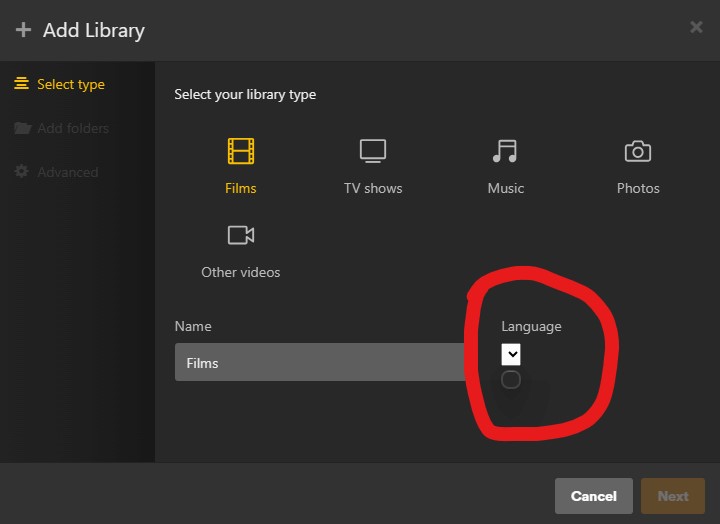
Server Version#: Version 1.32.4.7195
OS Windows 11
I’ve been having this issue for a while now,
I’ve had it on my precious server which was running on low hardware and it was temporarily fixed on this new one for a couple days but the issue came back.
When I try to add any sort of library to plex or even edit a established library, the language dropdown shows as it follows/
I really would appreciate some help or guidance on this as I’m very dedicated to Plex and Spent a lot of money to get a server and would love to keep using it.
I am having the same issue. I have restarted, I have tried different browsers, different PCs and even via mobile.
I can’t edit or add a new library…
So I’ve “fixed” this, or at least found a workaround for it…if I turn off my VPN, it all works fine. Recently I changed my VPN settings to allow Plex to bypass the VPN, but it seems that there’s still something that is redirecting or looping back incorrectly. I’ve allowed the PMS, PlexScriptHost, Tuner Service and Plex Relay to all bypass the VPN, should I allow something else too?
I’ve tried virtually everything but It just seems a bit annoying as now I cant add or change my libraries.
I Was considering paying for the lifetime plex pass but with current issues now and then and the lack of accountability and support from the plex admin team, it just seems like a bad idea.
does anyone have another suggestion that doesn’t apply having to do a fresh windows install and install plex server again?
SE56 suggested to reboot the server, not to do a re-installation.
What exactly did you try? I mean no offense but „virtually everything“ is rather vague and could even mean you didn’t check some of the mentioned suggestions.
From your description it sounds like either your browser(s) are filtering/blocking some of the controls / their content or the server messed up some cached language list.
Troubleshooting for the first scenario can be using a different browser (which you confirmed you did), testing the same from browsers on a different machine (I think you mentioned you did that too) or disabling every single browser add-on / ad-remover / whatsoever in your browser to confirm if one of those is messing with Plex‘ content.
If something got stuck within your server (e.g. some stale cache), restarting the server should fix this. In some situation it’ll help to optimize the database… but that’ll only apply if that issue includes some of your actual server content or metadata (not the case here).
I have tried 4 different browsers.
Without extensions and/or add-ons.
I have restarted the server multiple times, and uninstall it and installing it again.
I cant add new libraries and/or edit existing ones.
When I said I’ve tried virtually everything, I meant I’ve tried everything people recommended online either here or on reddit.
The problem remains a massive issue for someone that spent 700£ on a server and 200£ on storage for this to happen.
Everything you and everyone mentioned here, I gave it a try and it didn’t work, Do you have any other suggestions?
You could inspect the HTML of the language control to see if there’s any indication what might remove the options (although it seems to be a low probability)
Well I believe you have come to a cross road, I would be making a backup of your database and then nuke the current install of Plex Media Server. Read below carefully.
It hasn’t been updated for awhile though, so if you want anything newer than 1.32.0, you’ll have to manually replace the version in the URL with the version you want: