Yes. I actually just rebooted again, restarted the Plex server. My PC was listed at the top, and I was able to add folders. However, it then asked me to claim my server, I did that and it failed. Now it says “NO SOUP FOR YOU” NO access
Stop doing that. If it asks you ignore it.
Damn, so doing the opposite of logic is what worked? So this time , I did not claim the server and everything is working! U got it man, that was the ONE thing that prevented it from working. I really hope that is patched, as most people would do the "logical " thing.
Final Question: I noticed some videos were there and working, though my other drive with those videos was not attached. The server actually uploads the video ? I thought the drive had to be attached to watch?
Thanks 
It does not upload videos anywhere. We don’t provide any storage
Ok, must have confused with something else. Oh the thumbnails and previews thats what It was
Ok let’s just say in the future, I want to share my Plex server for my family to view my videos across the states. Then what if they accidentally claim my server? I know they would just click it by mistake. I want to prevent such things. Thanks
You can’t unless you either get a router you are happy with and claim it like intended, or for the few Plex players that allow it give your family your public IP address and let them enter in to the app settings and let them access with no security at all. You will also need to open the port completely in computers firewall. Basically just keeping your server open to the entire world ( which I don’t recommend)
When you claim the server (which is just a fancy way of saying signing into the server) security is automatically enabled. It failed because the security used is expecting you to be behind a router and have a standard private ip address from that router, so the authentication system and plex.tv directory which is used to find the server, does not work correctly. Due to the public and private IP being the essentially the same.
2 Likes
Ok that make sense! I will get to it when I can afford to do it. Thanks
@BigWheel, I reconfigured my router’s internal IP address to something other than the standard 127.0.0.1 which I believe was the cause. Perhaps the development team can add this feature to allow users to manually enter the router’s internal IP address in the future release.
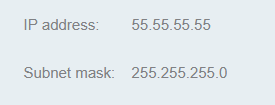
Thanks so much for all the help!
1 Like
Hello, having the exact same problem here, can’t seem to solve it. Running lates plex version on a Mac and on Chrome.
Had my library for ages, now it’s gone, and when I go to “Your media” It takes me to http://127.0.0.1:32400/web/index.html#!/get-plex-media-server. and says:
Add your media to Plex
Organize, beautify, stream, and share your personal collection of movies, TV, music, and photos anywhere, on all your devices. To get started, download our free Plex Media Server software on the device where you store your media.
.Get Media Plex Server·
However I do have the Icon of the server on my macToolbar and when I click Update library I can see that is checking and updating the library. But I can’t manage to find it in the web app.
Did anyone solve the problem? Please let me know how?
Having the exact same issue… Disaster
1 Like
looks for the server logs and copy out and zip and attach together with screenshot (not cropped) and time when the attempt was made to access the server
This article has info on where the logs are
See section: Manually Finding Log Files
Exact same thing is happening to me.
Happening to me as well :(. Guess their’s no solution then?
the original poster is using this basically without a router. if you are also using this without a router then yes you will have the issue.
Yes, happening with me as well. Tried everything, like the rest of you I’m sure.
Going to revert back to my tried and tested system of transferring my external hard drive from my PC to my TV until Plex post a clear solution.
HELP! same problem on MacOS. everything was working fine until today. Now I get this extremely annoying " Add your media to Plex - Organize, beautify, stream, and share your personal collection of movies, TV, music, and photos anywhere, on all your devices. To get started, download our free Plex Media Server software on the device where you store your media."
If you are getting that screen all the time it is usually a network issue or you had an old install of Plex Media Server on that computer that was used with a different account.
If you did have a different account in the past then try this https://support.plex.tv/articles/204281528-why-am-i-locked-out-of-server-settings-and-how-do-i-get-in/
If a network issue, Everyones network is different. Need info on how your network is set up.
Hi, @BigWheel
I’m having the same issue, however I am using a router.
My HTPC died, so installed a new hard drive and started from fresh. I installed “Plex Media Server.app” (I’m on MacOS (Catalina)), and when I ran it, it took me to the Plex web interface (not sure if that’s “local” or “web app”, that aspect has always been super confusing and I wish Plex would implement one or the other since they seem to work differently from each other), where it told me my server was unclaimed. I claimed it, and it gave me an endless spinning orange circle, and after a while that disappeared and trying to do anything else on that page returned an error. Reloading that page from the Plex Media Server app, the “unclaimed” server button was gone, as well as any other indication of any associated servers. After several hours of trying things and searching the forums, I made this post to ask about it: Unable to add any Libraries to a new Server, help, please! , after which I found this thread.
By using the method on this page: https://support.plex.tv/articles/204281528-why-am-i-locked-out-of-server-settings-and-how-do-i-get-in/ I was able to return to the state where the server is “unclaimed” and I can see it in my account settings. If I try to claim it again, everything disappears again. I would like to be able to claim it, since that’s the proper way of using it, as well as because I’d like to be able to return to streaming my media when I’m away from home.
My current setup is: ISP (Centurylink fiber) comes in to their modem (Actiontec C3000A) which goes from 192.168.x.x to my router (TP-Link Archer C9) which is configured to use 172.168.x.x and goes to my Mac Mini (Plex server).
Any ideas what’s going wrong?
Thanks for your time!
Edit: typos
I ended up fixing mine by entirely deleting any trace of Plex I could find on my hard drive and starting from scratch, in case that helps anyone else.
