We will look into this and decide if we should treat the following scenarios differently:
- Pressing “record” whilst watching live tv on a specific channel
- Recording “This Episode”
- Recording “All Episodes”
We will look into this and decide if we should treat the following scenarios differently:
I have looked deeper into this as I got different outcomes for a differing show when I tried this.
The problem is channel/show specific - Some shows on some channels are setup in the EPG with data at the series/show level and not episode level and for such cases, as in the case of “This Morning” show, we cannot tell what the episodes are and no current mechanism for establishing which are the same channels in SD or HD.
There is planned development work for the future to look into SD/HD/+1 channels - mainly to avoid getting duplicate recordings but it would also help with this case as well. Until that is in place, the SD and HD airings for such series will be treated as different and the Prefer HD option cannot be made use of
Due to this - New Plex Guide Very Poor in UK - #970 by Jakosaur (looks to happen again next week too)
My server recorded a 30 minute partial recording on 105 (HD), 1 hour full on 005 (SD), then 1 hour full 044 (worse SD quality).
Plex Media Server Logs_2020-02-18_11-07-32.zip (5.3 MB)
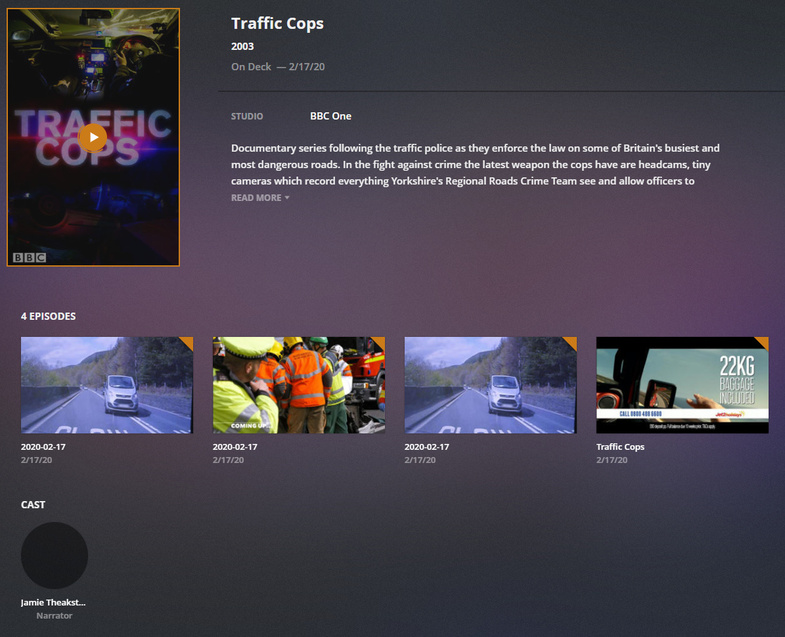
Somehow showing 4 episodes in the view:
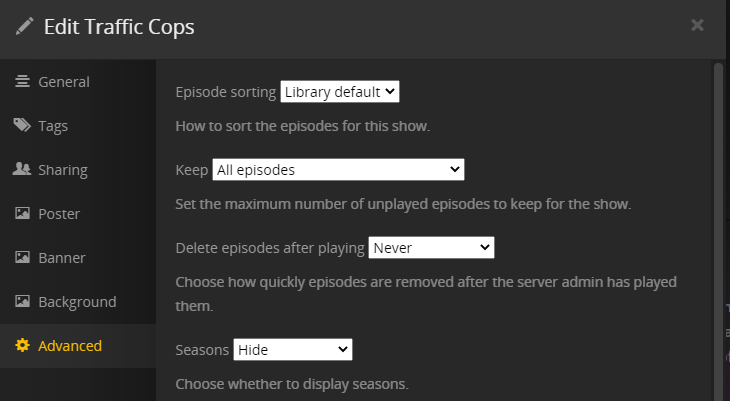
Also another DVR show, that wasn’t in my library before, ignoring the Libraries’ Seasons Show setting. Set itself to Seasons Hide.
Just sent this via the EPG Errors form.
Does Plex Media Server check for new metadata/poster art on a schedule? Or do you have to manually refresh the entire libraries’ metadata, for anything new to appear?
I’ve tried refreshing an episode & the overall show’s metadata and it didn’t change the poster art & name of an episode. Refreshing the libraries metadata grabbed the new information.
This does happen if the airing shows in the EPG as a show airing ie just indicating it is “Traffic Cops” and no episode info provided.
It appears to be correct in today’s data. A refresh should show the 24th Feb airings on 5 - Five, 105 Five HD and 44 Five +1 as being the same episode
I will follow this up
Thanks for the update. After a guide refresh this morning, had two recordings in my schedule. Just the scheduled recording for 044 was gone from my server.
Just did another guide refresh, and is just scheduled on 105 now. Poster Art has also changed back which is great.
Shows S5E10, probably should be S5E22 but doesn’t matter too much as that topic is still ongoing, confusing & messy. I just delete all Traffic Cops recording files now after watching, as the SSEE numbers vary so much. Just allows me to make sure the next one records correctly regardless of correct SSEE numbers.
Plex also matches it to “Traffic Cops” on TheTVDB, instead of “Traffic Cops (2018)” so wouldn’t get a correct metadata match anyway. But then again that’s a confusing situation as Plex would see guide data as “Traffic Cops” but matched the last recording to "Traffic Cops (2018), so might schedule airings again if not done correctly. The devs would have to get some sort of link going for that to work! Probably not easy. 
Hopefully the provider can get this all sorted for Traffic Cops, sometime in the future. 
Thanks.
Now my server has surprised me with a 480p recording of Traffic Cops. Series is set to NEW only, but seems to have recorded something today that isn’t NEW.

I’m cross posting here but I feel this needs to be added to this forum. My other post is here, Live TV tuning very slow
I’m experiencing extremely slow ‘tuning’ into a channel when invoking a channel change using the EPG.
So, I did quite a lot more testing and the only thing that I think is causing such a slow start for a stream once a channel is invoked, (20 to 30 secs) is the amount EPG channels that I have with my cable card tuner. ( Silicondust Commercial cable TECH tuner) I tested with only 1 channel and the stream would start immediately. Once I added more and more channels to the EPG, the delay would become longer and longer.
What’s interesting is that when you delete the DVR and with the Apple TV Plex app still running with the now cached guide with over 300 channels, all the streams started instantly!! But, once you re-add the DVR and scan for the new EPG guide and wait for it to complete, channel tuning again slows down to a crawl. Also of note, if you are monitoring the Dashboard, the actual amount of time that it takes to see “Recording - Live TV - Session” is where Plex is taking it’s time (20 to 30 secs) then when it appears (screen shot below) it takes several more seconds to actually start the stream. Is there anywhere I can look in the logs, for when a stream is invoked to actually when it starts to play?
I have rebuilt the sqlite databases, rebuilt the server from scratch etc and still come up with the same outcome. This was not an issue up until about a month ago.
Has anybody else experienced this issue? Help would be greatly appreciated.
BTW, this happens on Mac Chrome, PC Chrome, Apple TV, Amazon Firestick and other browsers.

Would like to find out how the recording schedule entries are setup - if at series/show level or episode. Would like to see the xml that lists all the schedules
Could you use curl to get the responses for each of these requests and save each response into separate text file - thanks
http://192.168.1.15:32400/media/subscriptions?includeGrabs=1&X-Plex-Token=xxxxxxxxxxxxx
http://192.168.1.15:32400/media/subscriptions/scheduled?X-Plex-Token=xxxxxxxxxxxxx
http://192.168.1.15:32400/media/subscriptions/1123?X-Plex-Token=xxxxxxxxxxxxx
You need to find the server security token and replace the xxxxxxxxxxxx with the token string for the server
Zip the 3 text files and let me have them
See this article for how to find out the security token string
https://support.plex.tv/articles/204059436-finding-an-authentication-token-x-plex-token/
(alternatively copy out of the Plex Media Server Preferences.xml)
There is nothing for me to start to look into to investigate and see what is happening.
Best to get some server logs with debug logging of one test that is ok and one test with the increased channels that is not ok. Test with one plex client eg Plex Web
Please clearly state what was being tuned and what time and the outcome
See
https://support.plex.tv/articles/201643703-reporting-issues-with-plex-media-server/
https://support.plex.tv/articles/200250417-plex-media-server-log-files/
Thank you! I will provide the requested logs and various scenarios.
Ok, so here is my first log for where it is not working so well.
I invoked a channel selection of Channel 4 "NBC 4 New York at 4.30 at 16:30:00 and once it streamed I stopped at 16:31:00
The Plex Media server version is: 1.18.7.2438 running on Unraid Nvidia Version 6.8.2.
For the working version I will send a copy once I delete all the channels except one.
Thank you
So after deleting all the channels and selecting only 1 channel, CBS, it took quite some time to reload the EPG after doing a rescan. Funnily enough, all the previous channels are still listed even though only one was selected. Also, loading the page in the DVR settings is very slow, about 15 secs for it to populate. I then restarted Plex Media server in my docker and after initiating another scan for channels, it scanned very quickly for the one channel (CBS), and then the DVR settings web page loaded quickly,
So with only the one channel in my new DVR channel lineup, after invoking a live TV session to CBS (CBS 2 News at 5) @ 17:00:02 the stream started within a couple of seconds.
Here is the log for this setup.
Sorry, I forgot to add that during the testing I’m using Chrome 80.0.3987.116 on Mac OS 10.4.6 and Apple TV 4k tvOS 13.3.1. I also have exactly the same experience on a FireStick 4k and on Windows with various other browsers,
no attachments showing on your posts
may be I had the wrong IP for the server. I will PM you. Are you running curl on windows or Linux ? There may be differences as to whether you need quotes round the url or not and which quote characters
You should never attach preferences,xml to forum posts as it contains your server security token
Here they are. Thank you.
I’m on Windows. Correct IP Address.

That’s all I get from those commands.
Scrap the above I think, I can manually visit those URLS in a browser and save as a text file. Should I PM or put them here in a ZIP folder?
zip and send me privately.
OK needed double quotes round the whole url because of the “&” before the “X-Plex-Token”