Had The Royal Insitution Christmas Lectures set to record yesterday (26/12/2019) 8PM 106 BBC4HD. Now gone from the schedule, so no idea if it was unscheduled or there was an error. Only just noticed it didn’t record.
I think some Server Notification options to Mobile Apps would be handy. When a show gets scheduled, removed from schedule, channel change for HD/SD (depending on option) & errors when starting to record/during.
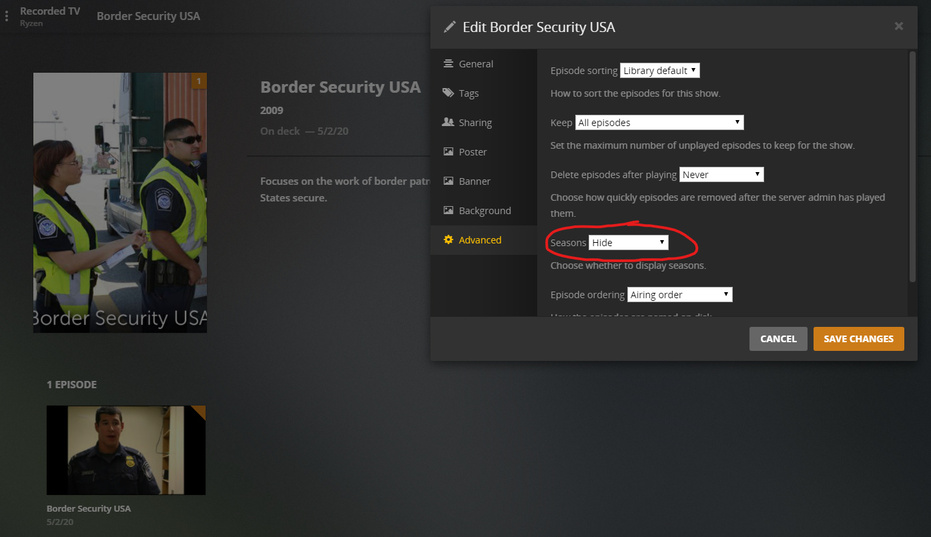
New DVR Show, no files in library beforehand… once again ignored the library setting. Plex defaults the shows’ Seasons to Hide instead of Library Default.
I waited to grab more logs until a new airing today, but the server is still giving me empty ZIP folders. Server did the exact same thing with Doctor Who again.
I zipped the logs folder as an alternative, hopefully the right thing.
Figured out the empty ZIP folders, was a new permissions error I set on my unRAID server.
Some more feedback. In the Recording Priority, can the poster art update if available? Had a show that originally had none, but after clicking a scheduled recording it suddenly had some. Had to cancel the show from recording totally in the priority, and scheduling it again for it to have art in the priority.
Obviously low priority, but some feedback for the future.
When you schedule a recording, for an airing that’s already started; does Plex check if it’s on a HD Channel? Just did a test recording after changing a docker setting, and it used Channel 003 when available in HD on 103. Or does it just go by what channel you scheduled it from if the airing is already in progress? Prefer HD was selected.
Could you help me not spend long time to figure out which time the recording you are refer to was. And what time did you add it to the schedule ? Or did you just click on Record from the grid entry?
Correct. Pretending this was the show, I highlighted over it; and pressed the red record button. Then just pressed Record from the Record options screen.
Sorry for so many, was testing something else when I noticed this happening. It was this show.
Sorry for bringing this up again as I did mention it a few comments up, but seems to be happening again. New shows (no files exist) for my server from DVR, seem to set Seasons to Hide instead of Library default.
Just noticed this on one of my test recordings I did.


 DVR | General Feedback & Issues - #166 by Jakosaur
 Server not downloading poster art - #9 by Jakosaur





 Thanks again!