Help! Just upgraded to DSM7 Beta. Can’t find Plex listed in the Beta packages. Tried to down load the SPK from plex but this was rejected when I did a manual install
DS415play
Q: How can I access the new Plex for DSM7 Beta?
Many thanks
I moderated the posts.
I’m not trying to be a jerk but i stated at the very top of the thread:
Ok ChuckPa, thanks for the justification, now I understood the reason.
You are doing a very good job, and I was only trying to help, but got it now.
Anyway, Merry Christmas to Plex team and Plex community, and thanks for the hard work
I understand and appreciate all the help I can get.
The only problem with too much help is when that help doesn’t contribute (which that post didn’t. Had I replied there, then you’d reply – that’s 4+ posts of dialog and confusion all of which was off-topic. That’s why i was surgical albeit abrupt. Sorry.
Have a great Christmas yoursel and to your family.
1 Like
Hi @ChuckPa,
I’ve been banging my head against the screen for a few days, stuck on the installation instruction Scenario 2, point 4.
It might help others to note that in order to set custom permissions on the Plex share, this needs to be using Windows ACLs (Control Panel > Shared Folder > Action > Convert to Windows ACL).
May be so obscure that it doesn’t need mentioning for most, but hopefully helpful to some.
Thanks for all the great work.
I am curious what Windows has to do with any of this.
It’s a Synology (Linux) shared folder with Synology ACLs.
The environment is Linux.
For purposes of migrating the Plex data out of the Plex share, I do not concern myself with anything else.
Would you please explain what else is in your Plex shared folder and what my procedure did not cover?
Hi @ChuckPa
Yes, Windows is generally irrelevant here but my original installation goes back to DSM 4.x and fresh installations post 5.0 use Windows ACLs for share permissions as default, including the ability to use custom permission [info]. This means custom permissions are not available [example] until converting to Windows ACL [process].
I guess this is a niche problem, but may be useful for anyone with a legacy install or not using Windows ACL for any reason.
Your proceedure otherwise covered everything needed. My Plex folder only contained whatever Plex put in there, I did not use it for any other purpose.
Thanks once again, I’m delighted my install is up and running again 
I’m glad you’re up and running. My only recourse would not have been very pleasant for you. (New shared folder or maybe reformat the volume for updated ACL support in the filesystem)
On a lighter note, I’ve got few things working here:
- Multi-language framework is in place. Languages can be added on demand.
- (re)Claiming Plex server via installation GUI in concert with www.plex.tv/claim
I’m trying to avoid all future “No Soup” conditions which need a command line hack to repair.
I upgraded to try to resolve issues with other, seemingly non-supported packages (photostation) not working. The migration process failed. I seem to have gotten lucky and been able to restore operation before finding this thread. Even now I’m confused whether I should keep using the package from the store or download this newer version from the forum. All that to say, I appreciate the possible issues with beta software, but think the state of this beta was misrepresented by synology. During pre-dsm7 install, plex is marked as a “verified” operational third party package. Based on experience and this forum this seems misleading and synology should be requested to make clearer the condition of dsm7. The way they described it, it seemed to be more of a release candidate, which it is not.
@diskmon Synology never gave any indication that this is finished software or close to it. It is in beta as the name suggests and they state everywhere that this is beta software. I’m sorry you misinterpreted it, but installing beta’s is always at your own risk.
Nobody compelled you to install DSM 7 BETA
I have made it abundantly clear this is a Forum Preview version of Plex Media Server.
As a Forum Preview it, by definition, is Development-Alpha stage.
To your complaints:
- Does it work? - YES
- Had you actually read the instructions I’ve painstakingly worked out and provided PLUS included in the package itself - You would have a working DSM 7 installation.
- IF there is still data in the Plex share to migrate THEN it is still possible to migrate successfully to DSM 7. The instructions must be followed VERBATIM.
- IF you have questions or issues, everyone knows I am ALWAYS available to assist.
Now, How may I help you unscrew whatever has been done to the DSM 6 installation?
Hello good afternoon, it is known when Plex is going to release a 32-bit version for Dsm7 beta, I contacted Synology support, and they told me that it was they who should carry out an update since it was a third-party package. i am waiting for this update very impatiently. thanks
I warned against upgrading to DSM 7 beta in the forum preview thread announcement.
Don’t know when there will be 32 bit PMS versions on DSM 7.
There are certain NAS models which will not be supported. period.
Which Synology model would this be for?
AS FYI:
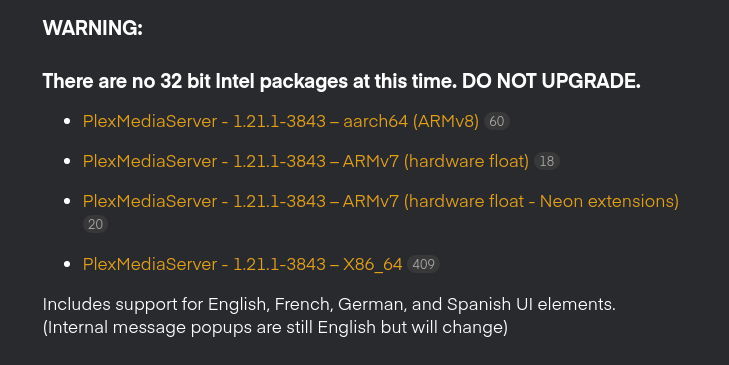
Hi @ChuckPa and others: I was not complaining about you all, and managed back to a stable state in dsm 7 (and thanks as always for the helpful advice and offers to help). I was just commenting that one perception of synology’s download page for the dsm 7 beta is drastically different from the forum post from ~20 days ago suggesting that noone should really be upgrading to the beta at this point. I think most people will not navigate to the forum to receive these warnings until they run into problems. Thanks to all for continuing to work on this project. I have been a fan of plex for a decade.
Just wait until my next development release.
I’m spending today on completing the multilanguage support
It won’t be all encompassing but will definitely make a lot of folks happy as I’m hitting the top 4
I will share, and imply a request for the future, your words came off as critical of the work I am performing here.
If there are ill feelings toward Synology, I ask they be directed to their forums.
I further ask any criticisms be clearly differentiated.
1 Like
Should I upgrade to the latest version 1.21.1.3870?
I currently still have 1.21.1.3744 which works very well for me.
I cannot continue to support two threads.
Please join the Preview thread.
1.21.1.3870 brings multi-languae support as well as corrects the numbering to be Synology compatible.
Uninstall (Keep) and install 3870 is advised.
Please continue all further DSM 7 Preview discourse in the Issues thread.
1 Like
Dear ChuckPa , hope You are Well , I have a Question For You : when we have the same title of one Movie let’s say we got 1 Blu-ray normal and 1 bluray in 3d version , how can we make disappear that multiple number ( 2 ) and fit a different poster or description ? should those anyway stay in same folder or different folders ? please try to explain in simple words if you can … Thanks a Lot for Your Help as Usual
Renato,
When I have multiple versions, I use different library sections.
As example:
- “Movies” - all 1080p movies
- “UHD Movies” - all 2160p movies
If you have many 3D movies, organizing the storage to make a “3D” library section might be easiest.
thanks for You Answer , I already have it separated as You say , but I believe you may want to say a different thing for library you mean a folder other than : Homes- Music-Photo-Video ? cause inside video I got UHD movie folder - 3D movie Folder - Extra bonus disc folder- Film Folder .then inside Film folder I got Fantasy folder - Star Wars folder with all the movies but then I got the problem with Force Awakens which I got one normal here and one in 3d version on the 3d movie Folder
