I would have said any decent provider would have had the correct information and clearly they are not worth the money they are being paid.
All other providers had the correct information.
I would have said any decent provider would have had the correct information and clearly they are not worth the money they are being paid.
All other providers had the correct information.
If you changed Plex to allow users to set up their own manual recurring recordings then the first one might have some mileage, otherwise it seems a pretty poor idea.
I don’t understand why the provider (who are being paid money by Plex) are fixing this as a matter of urgency. Is it because things presumably work better in the USA they don’t see it as a priority?
Channel 5 is once again unrecordable wrong films showing or the right film at the wrong time
We really need to get a manual record option if the EPG data is going to continually be so unreliable.
if no data it would be more useful to have hourly slots marked with “no data available and time and date”, so that you could manually pick them to create a manual record of that time period
I cant believe we are now at a stage of wondering which is best
No guide data or data that is a week old
Both of these are ridiculous and not acceptable, is this what the state of certain channels has come to
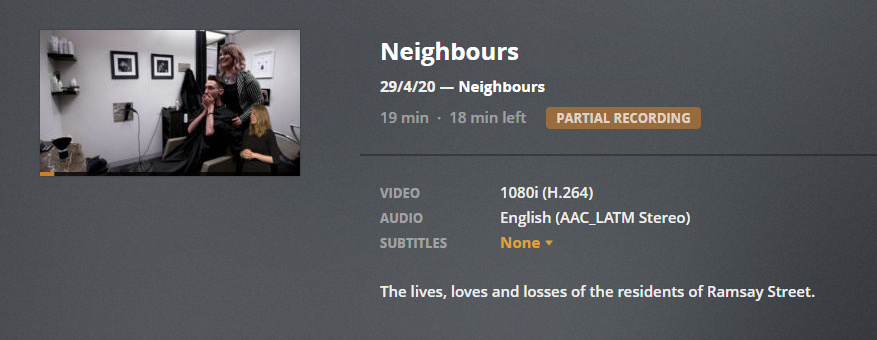
Something is still very wrong with this guide and Plex DVR. Neighbours didn’t record today. Is showing in the guide as being on but won’t record. Also showing as being on Wed/Fri in the Guide but not in the DVR schedule, with ‘no upcoming airings’ despite a red dot on the guide and being flagged as ‘new’!
I’ve deleted all existing recordings, deleted the scheduled recording and recreated it - they now seem to show up in the DVR schedule so here’s hoping they actually record. Presumably some sort of link was broken in the guide data that made it think it already had them with there being ‘no upcoming airings’? Very confusing to have a recording dot on the guide though but with nothing then listed - the UI needs to be improved to make this clearer.
Have you tried a full guide refresh today?
I don’t know if some of the internal Guide IDs changed over the weekend but I had similar issues with Danger Mouse over on the BBC.
It wouldn’t record and didn’t show up in the upcoming recordings - when I looked at it further, the Start Year had changed to 1981 as if it was the original series and not the 2015 reboot and poster art was missing.
It also seems that if the episode data is wrong and Plex thinks it is a repeat of an episode that has already been recorded - then it doesn’t show up under upcoming recordings either.
I performed a full update sometime yesterday evening and now it is showing up again!
Haven’t done a guide refresh yet (although I thought it now did a full refresh every night automatically because of all these issues?) - deleting and re-adding the recording seemed to do the trick. I did notice however the episode description was totally wrong and was for an episode a week or so ago, so that bit still isn’t sorted. @sa2000 any updates as to when this will be fixed? I can’t understand what the provider is doing to muck things up so badly when the correct info is out there everywhere else!
Good point - I’ve lost track of where Plex are with that one so I just er on the side of caution and perform a full refresh when there are issues now 
Yeah - if it is a internal ID issue that should work around it for you. I suspect if you had left the original recording in place and clicked record series on the new entries that would have worked as well.
Caution: If the problem was caused by an ID issue and Plex fix it by going back to the original ID then you’ll see the problem again when they do 
According to the Plex Guide “The Mummy” (2017) staring Tom Cruise that is showing this Friday at 21:00 on 5 Star (Channel 30) is a special “Plex Extended Edition” 
As you can see it is quoted as being 6 hours and 25 minutes long.
I’m hoping that the Freeview Guide is correct and I don’t need to stock up on 20 bags of popcorn:
Is there anyway of telling Plex to only record 2 hours and 5 minutes instead or @sa2000 will this be fixed in time?
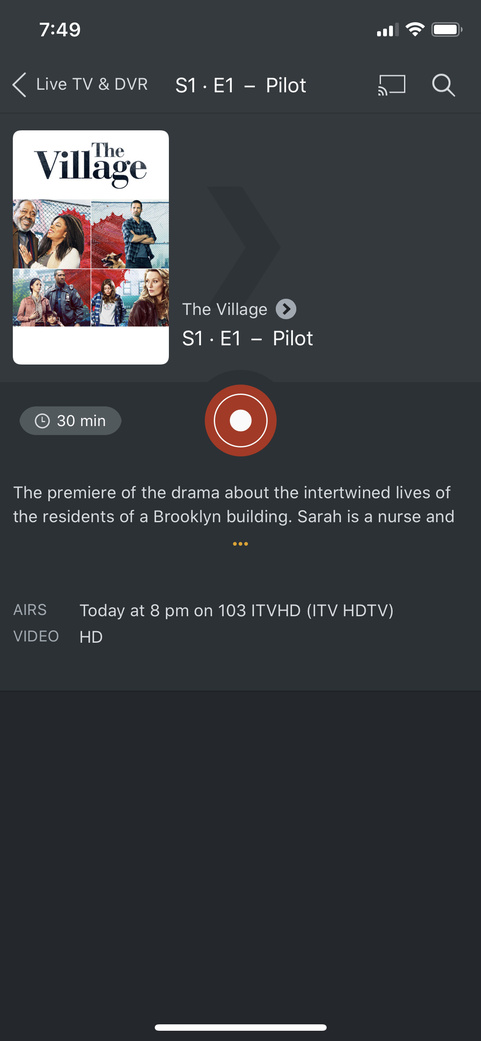
ITV guide data is quite wrong. The entry for ‘The village’ at 8pm today is wrong. Channels app has it right. Also last night, Plex had ‘the expendables’ on instead of what was actually on ‘Red Dragon’ on Channel 5. Why is Plex guide data so bad? I’m giving up on live tv and DVR. I’ll review it after Christmas.
This getting really infuriating… Just had my parents on the phone wanting to record ‘Blood’ on CH5 at 09:00 (which is on almost every night this week) and wanted me to explain why they can’t find it!! Plex guide is completely wrong still.
OK so it recorded today, but as S2020 E-1 with a broadcast date of 1/1/20 and generic series info that looks about 30y old! @sa2000 any word from the provider on a fix?
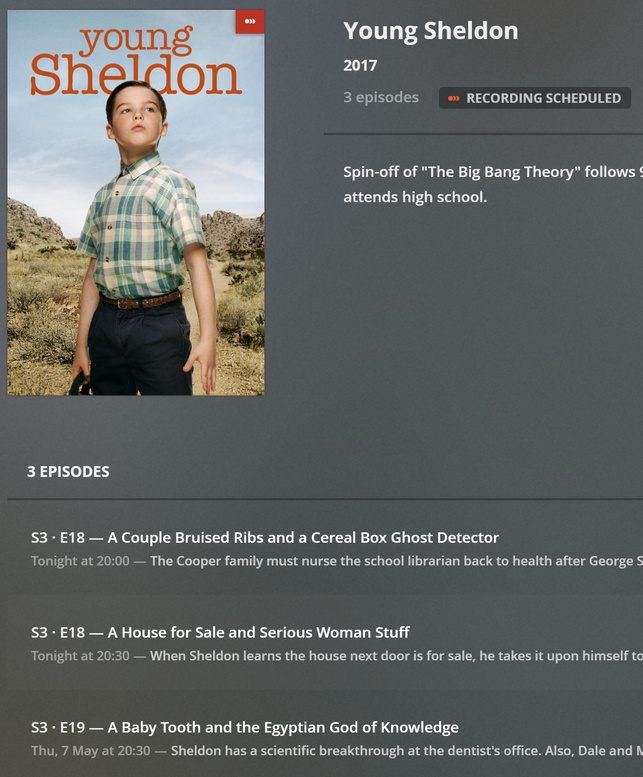
It seems the episode data for Young Sheldon for both Tomorrow’s and Next Thursday’s showings (30th April and 7th May respectively) on E4 (Channel 13) is incorrect:
As you can see the two episodes for Tomorrow are both marked as S03E18..
The first (20:00 to 20:30) is the correct S03E18 and is a repeat of the first UK airing from last Thursday (23rd April), whereas the second episode (20:30 to 21:00) should be S03E19. Because of this the second episode won’t record even though it is correctly tagged as “New” and shows in the Guide view as such:
This second episode is then repeated next Thursday at 20:00 to 2030 (which isn’t showing in this screenshot for some reason  ) and the episode that is marked S03E19 (20:30 to 21:00) next Thursday should be S03E20.
The correct episode data can be seen on thetvdb.com:
Yep yet more guide mistakes here. Same programme (sorry to keep harping on about it).
Now seem to be just getting random extra non-existent episodes recorded (there was some hairdressing show on at lunchtime that got recorded instead).
The guide is really clearly published - https://www.channel5.com/tv-guide/ - why isn’t the provider doing anything to fix this?
Well you could argue, unless you are specifically interested in the airing of “Ghost Rider 2; Spirit of Vengeance” that things have gotten slightly better on 5Star this evening, with the recent guide refresh:
It seems I only need 10 bags of Pop Corn now as the airing for “The Mummy” (2017) is down to 3 hours and 10 minutes, from 6 hours and 25 minutes - however it is still nowhere near the actual 2 hours and 5 minutes that is being advertised on both the Channel 5 and Freeview websites.
It also seems that the Plex guide:
a) Is getting confused with “The Mummy” (1999) as the recording isn’t showing in my DVR schedule
b) Doesn’t know what follows this movie either - as can be seen by the “Unknown Airing” in the screenshot.
I have perfect Channel setup + EPG data for Freesat in UK in NextPVR (used via Kodi/MrMC). I wrote code to sort it out properly a few years ago and it’s worked fine ever since.
I use a csv file listing all the channels I want (number, name, altname, sid, epg source, groups) then just match them up via sid, altname (both optional) or name with the channel frequency data from KingOfSat/other stashed in another csv file, to config the tuners (waste of time doing a scan).
The EPG comes from the OTA EPG grabber built into NextPVR + xml data via WebGrab+. The ‘epg source’ in mychannels.csv can be OTA, XML or cloned from another channel optionally shifted by +/- n hours (just clone existing db epg records, amending channel_id + timestamps)
I think you need to be supplying a channels tuning data + epg linked as one entity or it’s never going to match up, especially for satellite chans that have lots named the same, some which are dead or encrypted and also move around a bit. The user should just input their location and then the rest is just data supplied by you, no frequency scans or anything. Pretty much like a set-top box.
The start times of shows on Sony Movies Action (Channel 40) seem to be wrong after the afternoon of Wednesday 6th May.
It looks like a parsing script somewhere is mixing up the “tens” and “units” of some of the minutes. Initially I thought it was when there is a “Soccer Bites” interlude before the show, but the showing of “The Flying Missile” disproves that.
For example: What should be 15:10, has become 15:01 in Plex and 22:50 has become 22:05 (FreeView Guide times shown in brackets):
The Flying Missile: 15:01 (15:10) - 9 minutes out
The Battle of Sinai: 17:05 (17:05) - Correct
Asteroids vs Earth: 19:01 (19:10) - 9 minutes out
Half Past Dead 2: 21:00 (21:00) - Correct
Replicant: 22:05 (22:50) - 45 minutes out
The Day the Earth Stood Still: 00:05 (00:50) - 45 minutes out
Stanger In My Bed: 02:35 (02:35) - Correct
Teleshopping: 04:00 (04:00) - Correct
Some show are only being truncated by minutes (when you take into account the ad break after a show) but “Half Past Dead 2” and “Replicant” are both being truncated by 45 minutes due to “Replicant” and “The Day the Earth Stood Still” respectively starting early.
Additionally: The channel logo is still missing even though Movies for Men rebranded months ago - as can be seen from my Plex screenshot.
In February this year we stopped matching completed recordings to thetvdb (see EPG metadata is now retained for DVR recordings), because that was leading to missed recordings or duplicate recordings
If you have not started with a new DVR dedicated set of libraries for TV and Film after this change, then automatching with tvdb may still happen because of the existing shows in the library. The tvdb continues to be used if the show is already in the library from the time before this February 2020 change.
I have raised this with the development team to see if we can stop it doing that