Plex Media Server Logs_2025-05-13_10-48-57.zip (1.2 MB)
Here you go! Thanks for looking into this!
Just bought a Plex Pass, so would love to solve this ASAP!
Plex Media Server Logs_2025-05-13_10-48-57.zip (1.2 MB)
Here you go! Thanks for looking into this!
Just bought a Plex Pass, so would love to solve this ASAP!
as for ISP, DNS etc.
I did try switching DNS to 1.1.1.1 and 9.9.9.9 without success
As for my ISP, it has stayed the same between it working, and then now not working
From the log it looks like it’s getting stuck trying to load some urls.
Can you get to these urls from your network:
https://vod.provider.plex.tv
https://metadata.provider.plex.tv
These should just open some xml.
From your logs it also looks like other requests are also timing out like https://meta.plex.tv
So to be clear, are you saying that engineers have looked at these issues and see no issue on back end systems and have made no changes to code to fix things?
FWIW: all three sites you referenced load properly for me and Cloudflare is configured as my upstream DNS provider.
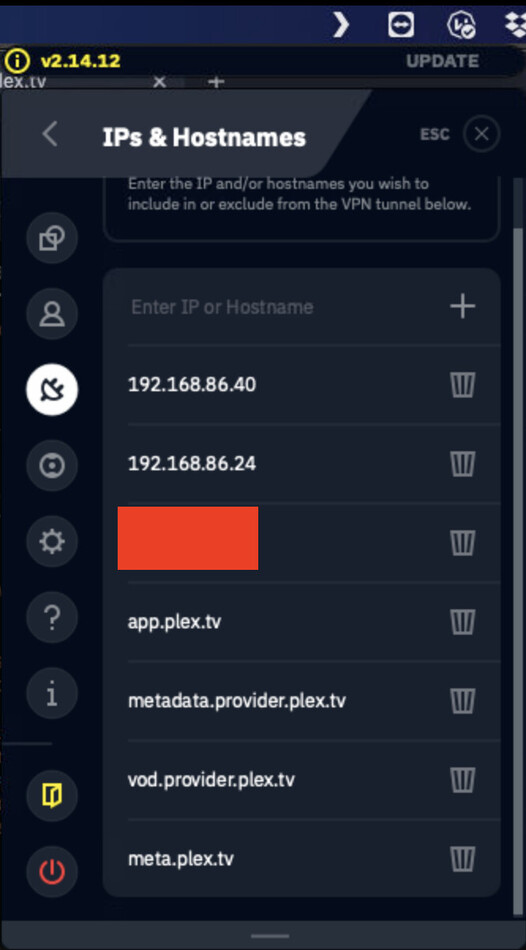
I can open those links on my network, and just to be safe I also excluded them from my VPN (see screenshot)
No luck though, the agent fails instantly
Just started seeing the Plex Movie scanner issue trying to get metadata for any of the movies I’ve added since yesterday May 12, 2025.
I am on Windows 11 server version: 1.41.6.9685
Tried rebooting the machine, did the “plex dance” with the specific movies. Nothing seems to work. Just started out of nowhere.
Am using Cloudflare DNS but my setup has never had an issue in the 1 year it’s been setup this way.
Well I can report this is now working for me, tested it again just 2 hours ago without luck, and now when I went to check again it was matching all my movies
I’m happy, but also concerned I have no idea what went wrong!
Wait so it just started working for you or after you made some changes to your network? I tried restarting but still have the same problem.
If this is the case, that mirrors what previous versions have and are still experiencing: it works for some people randomly, then doesn’t. And for some other folks, it dies immediately and never works. Every response I’ve received so far is “it’s your network”. Funny. I have Jellyfin running on the exact same physical Plex server machine, on the same VLAN, using the same network settings and it matches media perfectly.
Still sitting on the legacy agents and Version 1.41.6.9685 to keep things “working”.
I’m in the same boat.
it just started working, I did try every fix suggested in this thread, but none of them worked!
Yesterday afternoon it was not working and I tested again in the evening without making any further changes in between (not even a restart of a router, server or anything), and then it was just suddenly working!
I guess one of the fixes could’ve worked but on a significant delay… super annoying issue, I wish had something more useful to share
Still experiencing this issue on the latest beta. Version 1.41.5.9522 seems to be the most recent version that scrapes metadata properly for me.
This is NOT a network issue on ALL OF OUR ENDS! You guys need to look again as this is STILL NOT WORKING! How hard is it to see in my logs that the AGENT IS NOT FOUND!
I have been unable to use my Watchlist and the new plex agent now since the start of this post. Every other media server works JUST FINE. It is only plex. YOU GUYS NEED TO ACTUALLY DO SOME REAL DEBUGGING or get some better backend devs.
Facts! 1.41.5.9522 works fine but any other newer server versions have issues with their agents.
Can confirm 1.41.5.9522 is the last working version. Reverting to this version and force refresh of metadata fixes it
Not to derail this thread too much, but I was having a look at your logs and found this error:
May 13, 2025 10:47:58.378 [0x70000d634000] ERROR - Error parsing allowedNetworks entry ' 127.0.0.1': Invalid argument [system:22]
This likely means that you have a space somewhere in the Settings -> Network -> List of IP addresses and networks that are allowed without auth field in your server settings. It’s likely unrelated to your metadata issue, but it should be corrected.
I also noticed this:
May 13, 2025 10:48:15.566 [0x70000d8c3000] DEBUG - NAT: PMP::getPublicIP, Received public IP from router: 24.242.x.x
May 13, 2025 10:48:15.566 [0x70000d8c3000] DEBUG - PublicAddressManager: got WAN IP 24.242.x.x
x from router
May 13, 2025 10:48:15.566 [0x70000d8c3000] WARN - PublicAddressManager: WAN IP on router does not match public IP from plex.tv
Normally this would mean you may be in a double-NAT configuration or using a VPN. Neither would necessarily cause metadata retrieved issues but either could cause remote access problems.
It’s very clear that there is a major regression going on. I wasn’t getting any metadata updated in at least a few weeks running the latest release.
If I went into a newer episode and hit “Refresh metatdata” I would get the error about the agent.
Reverting the docker container to plexinc/pms-docker:1.41.5.9522-a96edc606 and re-attempting to manually refresh the metadata works every time.
Unsure why it isn’t impacting more people but sticking to 1.41.5.9522 until the Plex team can get their crap together.
I just downgraded to 1.41.5.9522 as well and the new agents work flawlessly. But by all means Plex… just keep blaming our networks.
Are you guys using the linux server docker PMS image? I keep trying to downgrade but it keeps putting me on latest. I removed the version variable as well..
Native debian packages not in a Docker container unfortunately.