Hi, just found that when researching how to back up my Plex.
So if I understnad this correctly, with Packaging 2.0 I can backup my Plex by backing up the newly created shared folder, right?
As I don’t need this right now, I can wait until after the testing phase. This is intended to become the mainline release in the not too distant future, right?! Will this be installed as any other update via “Server Settings > General > Check for updates”, or do I need to reinstall the Package Manager package, or something else?
I’m currently running 1.21.0-3744 (beta) which I managed to get working properly before I even found this page. I had to adjust a few permission etc but its working.
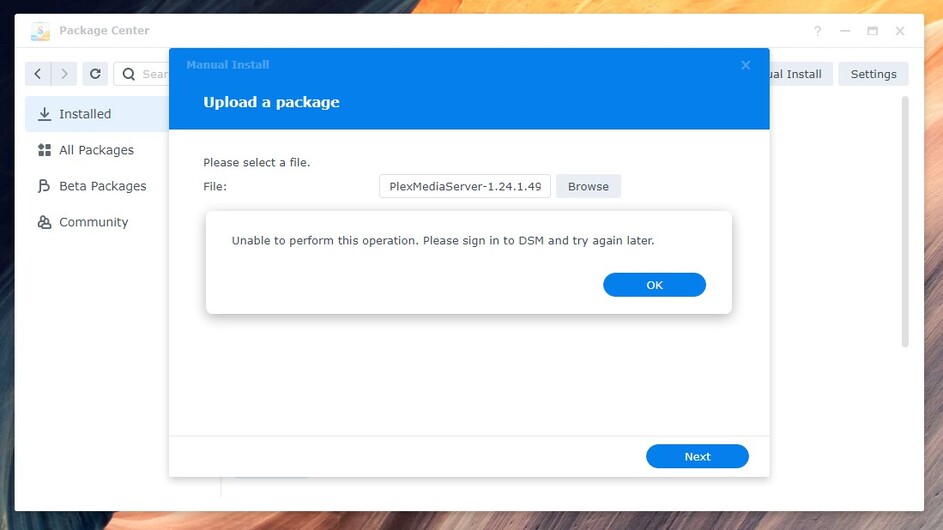
I noticed it seemed to have taken a step back in the release version considerably so went in to manually install the new version PlexMediaServer-1.24.1.4931 but I get a weird error that says the following.
1.21.0.3744 was the beta package version before DSM 7.0 - 41890 released.
It’s extremely obsolete now.
None of the packages released have been a “step back”.
Since you are posting here, in this thread, you have ready-access to what will be official PlexPass release in a few hours. That said, you should upgrade to PMS 1.24.2.4955.
To address the error you see shared -
That’s a DSM 7 bug (a minor one)
There is an easy remedy
Control Panel - Security - Set the idle timeout to 65535 and OK that.
Log out and back into DSM to make it active.
After you sign in again,
Now you can upgrade to the package SPK files I have shared here
The upgrade will move some data around. Don’t be alarmed if it takes some time. The wait will be worth it.
If you review the top of this thread, you’ll see what we gain; most notably – Access to our metadata in HyperBackup or other backup/restore tools.
@ChuckPa
Hello Chuck, I’ve read through the instructions for installing Plex on DSM 7…lots of info and thanks for that…
It seems that the migration worked, but Plex is unable to see my server now…I might have missed a step or a settings…any ideas on where to start looking? thx…
Resource Monitor → Processes allows you to see the occasional blip from “Plex Media Server”
Those two satisfied, while not common, it can and does sometimes sign out during migration from DSM 6
For that reason, as well as a bunch of other networking-related reasons, I’ve added the “Plex Claim Token” installation option where it handles all the dialog with Plex.tv for you and then logs the server into Plex.tv for you
It’s this easy:
Package Center - Uninstall - KEEP option
Package Center - Manual Install (same version) -
Choose the “Plex Claim Token” option
Click the blue hyperlink “Get Claim Token”
It will open a browser window to plex.tv/claim and get you a token.
click COPY
Come back to Package Center.
Paste that token into the window for the claim token
Click your way through.
During “Installing”, it will install the software
It will then reach to plex.tv and authenticate for you and update Preferences.xml
Upon completion, it will show you your Plex username (account name) and be successful.
@ChuckPa
Thanks very much ChuckPa for all the work you have put into this DSM 7 Plex issue.
I am a Synology newbie (I have over the past month setup a DS920+ and DS220+) and one of the attractions in going with Synology was to use Plex Media Server on the NAS.
My aim with the Synology is to keep things simple and so I am now installing the Synology apps (Video Station & Audio Station) and I will use them until Plex becomes available as an operational (and easy to install) app via the Synology Package Centre.
My question therefore is if the ultimate intent is to have an easily installed Plex Media Server app via the Synology Package Centre, and a guess as to how far away that might be?
Again though, many thanks for the time and patience that you exhibit here on this forum.
Plex has been an app on Synology hosts at least since DSM 4.3 when I joined.
Synology has historically taken a long time to update packages. There is no rhyme or reason.
I took over as the Synology developer during DSM 6.
When DSM 7 beta was made available (7.0-41222), that’s when we realized a complete rewrite was needed – with Synology constantly asking if we would have a beta package they could put in Package Center.
Then came DSM 7.0.41882, and 41888. Both those versions caused major breakage in my package which forced me to scramble and pull my package back from “stable / production ready” to “beta” status after some long (re)design & development hours.
DSM 7.0.41890 (released 1 July) had a few minor changes which I had to, yet again, accommodate.
Throughout all that, there were deficiencies in the DSM 7 → Application API which changed how Plex operates on the NAS. I had to find solutions. If you look here in the forums, you’ll find “DSM 7 - Packaging 2.0”. This represents how I initially wanted the package to be.
14 months after DSM 7 started, we are here. Package Center hasn’t caught up yet but that’s not a surprise. You download Plex then “Manual Install” I do the rest.
Eventually Synology will catch up (they are re-validating EVERY package for DSM 7)
I am about to shut down ( Scheduled switch / wiring rack upgrade day )
I will be back in a few hours when completed. (24 ports 10GbE custom lengths).
If you can open the docker shell to it, you can peek around in there.
Play with the paths.
I seem to remember the Plex container expects: /config/Library/Application Support
where the Linuxserver container expects: /Library/Application Support
Not sure if this is expected or not but I would have expected when browsing the file system that the /config/Library etc. files would be mounted inside /PlexMediaServer/Appdata but it isn’t there…

 )
)