Hi A security question. After migration (yes i got it workin) does plexmediaserver (system internal user) still need read/write acces to the " plex folder" And also to the media folders?
Or can i change that to only read?
Greets from rainy Amsterdam
Hi A security question. After migration (yes i got it workin) does plexmediaserver (system internal user) still need read/write acces to the " plex folder" And also to the media folders?
Or can i change that to only read?
Greets from rainy Amsterdam
Now Sorted so deleted 
Question –
Has anyone new to DSM 7 noticed the multi-language support in the Package UI ?
@ChuckPa could you add the info to switch to “System internal user” in the dropdown of “Edit Shared Folder Plex” Permissions tab in DSM 7 - Plex Media Server forum preview - #6 by ChuckPa Step 4. It is in the screenshots but the sub-steps to Step 4 lack that info.
Show me please? Maybe I can adjust wording ?
I know it’s VERY detail rich.
We all understand it here but maybe others don’t.
One thing I see or don’t see is that there is no output to the “Console” part when logging is enabled. Yes I can download the logs from the troubleshooting area … Not sure this is a bug or a bad installation 
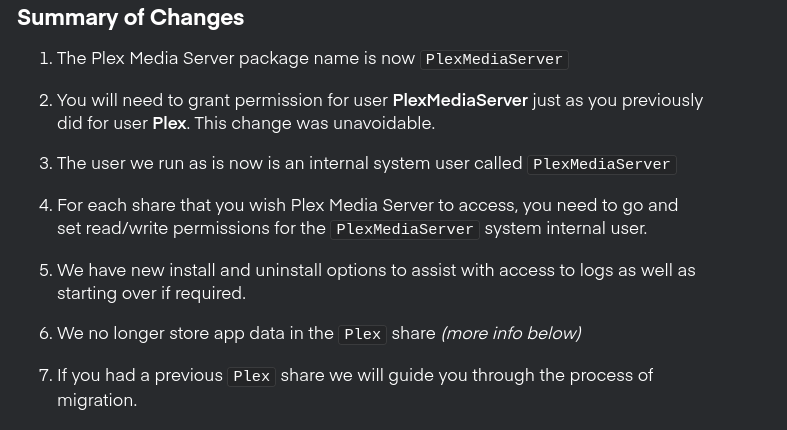
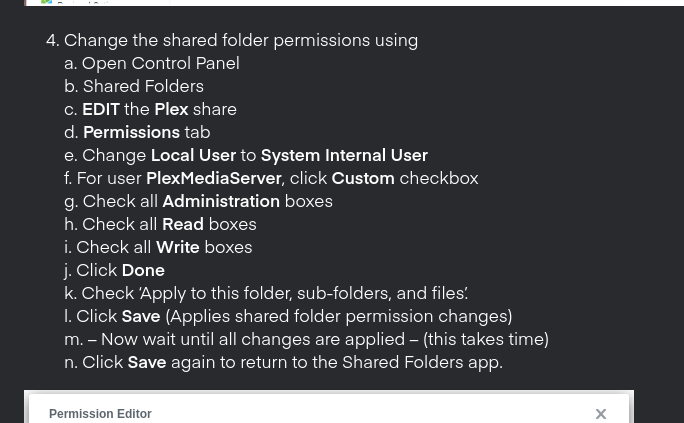
Change the shared folder permissions using
a. Open Control Panel
b. Shared Folders
c. EDIT the Plex share
d. Permissions tab
e. Click Custom
f. Check all Administration
g. Check all Read
h. Check all Write
i. Click Done
j. Check ‘Apply to this folder, sub-folders, and files’.
j. Click Save (Applies shared folder permission changes)
k. – Now wait until all changes are applied
l. Click Save again to return to the Shared Folders app.
From my understanding step 4d opens up Local users so a user would have to switch the dropdown to System internal user as per the screenshot above the steps, which would be a step that goes between d and e if I am not mistaken.
I see it !

Editing now
How does this look ?
Screenshot of finished edits.
Thanks. No big thing, but it threw me off as I was trying to follow closely and there was this gap.
The tutorial leaves two questions unanswered: is Plex volume still needed? Is Plex user still needed? And if not, would it make sense to add steps how to remove the items?
Kudos to Plex team and especially @ChuckPa for handling the migration so well and being very responsive all over the forum. Those certainly were stressful weeks especially if DSM keeps changing things beyond a point where it should not have. My hat is off to you.
Now that the Plex shared folder is useless, how do we backup our settings and metadata? Is there a way?
As detailed here:
Plex is no longer needed. DSM forced abandoning as well. You are free to delete it.Now that DSM 7.0 is showing signs of design stability, I can complete the work I’ve already started for this
In the interim,
tar backup of:cd /var/packages/PlexMediaServer/home
# put full path to backup location. This example uses the old "Plex" shared folder.
tar cf /volume1/Plex/PlexBackup.tar ./Plex\ Media\ Server
@ChuckPa : I started the installation of PlexMediaServer-1.23.4.4712-1f0ed4aea-x86_64_DSM7.spk on my Synology DS918+ over 13 hours ago and it still does not appear to have completed. All of my media combined is around 15,000 items (this includes recorded TV, personal videos, movies, series, music). Is it possible for the migration process to take this long considering the size of my library?
Here are the steps I performed (high level):
I pulled up resource monitor, which shows that the Package Center service is running and the following child processes are present below it: synoscgi_SYNO.Core.Package.Installation_1_install, bash, find. Occasionally the ln and realpath processes pop in as well, so I suspect the migration is still running?
Note that bash fluctuates around 4-6% CPU usage and 700MB - 1500MB of memory usage, while disk usage is very low and infrequent (0kB/s - 390KB/s, but mostly sits at 0KB/s)
Attached is a screenshot if that helps
Thank you for that screen shot. It provides the evidence.
find and realpath are the core elements of metadata validation.
15,000 indexed items is not a large amount
— unless —
Is this music or photos ?
@ChuckPa there are no photos - the biggest chunk of my library is composed of music, recorded TV and personal home videos, followed by series and movies.
If you will give me a bit of time, I’ll test the behavior again on my DS418j.
I have almost 16,000 songs (ripping CDs and digitizing LPs)
[chuck@lizum music.504]$ find . -type f -print | wc -l
  15943
[chuck@lizum music.505]$
Thank you @ChuckPa! In the meantime, is there any way for me to verify/debug whether the migration process has entered an infinite loop (logs, etc?).
Also, if this were to be the case, would my only recourse be to do a clean install of Plex, or might there be other options?
It is possible to force the migration and then deal with the specific library section afterwards.
That’s not a decision to take lightly, imho.
I’m starting my test now for you.
Quick question –
Was your media in the Plex shared folder ?
@ChuckPa - All of my media is in a PlexMedia folder, outside of the Plex folder. Thank you for testing this for me, I really appreciate it!
Thank you! PlexMedia = Goodness 
Media in the Plex share is a guaranteed way to break migration.