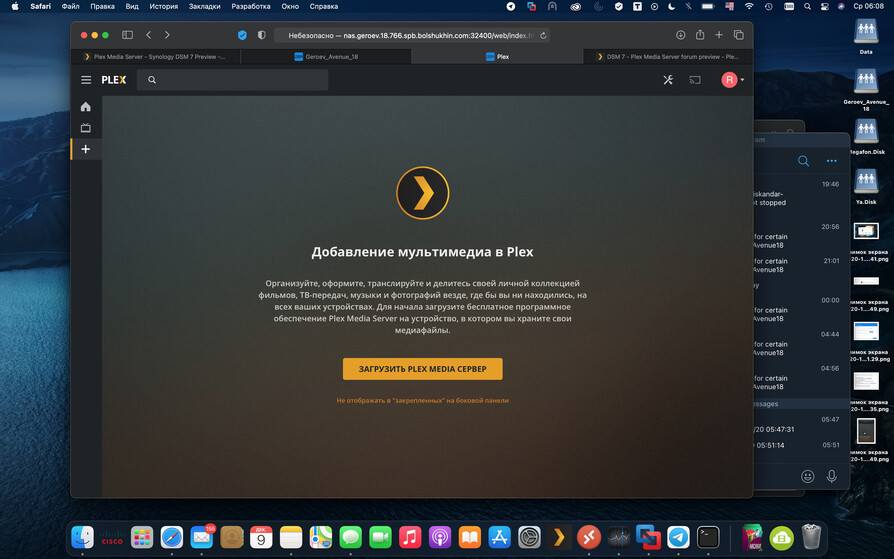
Yeah, that’s what I meant. And yes those settings are enabled.
Please follow the instructions here:
This is a two-step process.
What you show is the residual form the DSM 6 package stuck in a DSM 7 environment. It is not supported / not allowed in DSM 7. It will NOT work.
We now have a native DSM 7 package.
I have switched to the to the DSM 7 package using that method. What I was stating was I was able to have my hardware encoder work prior to the upgrade of the new package using the work around method.
Now that the Plex DSM 7 package is installed the hardware encoding no longer works as intended.
Encoding service? To what do you speak?
The environment of DSM 7 is entirely different.
Anything you might have previously engineered is, sorry to say, null and void until re-engineered for the DSM 7 runtime environment.
Did you read about all the changes?
This hardware encoding … I have not engineered anything as I am only using the built in hardware acceleration of the DS1019+ Sonology

DEBUG log files please which capture a transcoding session starting?
Attached is what I am seeing on the Synology as well as my Debug logs. I launched a stream via the application for windows first and then with chrome. The application looked like it loaded direct play without an issue. However when chrome started playback that is when the cpu spiked to nearly 100%

debug.txt (41.4 KB)
I’m sorry I need the server logs.
- Settings - Server - General - Show Advanced
- Verify DEBUG logging enabled, VERBOSE loggging disabled, SAVE if changes made.
- Start Playback
- Let play 15 seconds
- Stop Playback
- Wait 15 seconds
- Settings - Server - Troubleshooting - Download Logs
- Attach the ZIP file it gives you.
One sec, forgot to disable the VERBOSE loggging … It’s been one of those days.
Thx for your answer but I tried to install the package many times with the same error message ! could you send me all steps by email ? or here ? thx again
Now here is the correct log files. (File removed)
You are burning subtitles.
Dec 08, 2020 20:26:04.244 [0x7fa98911f700] DEBUG - Request: [10.0.1.11:50211 (Allowed Network (Subnet))] GET /video/:/transcode/universal/decision?hasMDE=1&path=%2Flibrary%2Fmetadata%2F31856&mediaIndex=0&partIndex=0&protocol=dash&fastSeek=1&directPlay=0&directStream=1&subtitleSize=100&audioBoost=100&location=lan&addDebugOverlay=0&autoAdjustQuality=0&directStreamAudio=1&mediaBufferSize=102400&session=k1ovx92p0zs3sqpmwliaxrra&subtitles=burn&Accept-Language=en (8 live) TLS GZIP Signed-in Token (jjjonesjr33)
Dec 08, 2020 20:26:04.244 [0x7fa98911f700] VERBOSE -  * Accept => text/plain, */*; q=0.01
Dec 08, 2020 20:26:04.244 [0x7fa98911f700] VERBOSE -  * Accept-Encoding => gzip, deflate, br
Dec 08, 2020 20:26:04.244 [0x7fa98911f700] VERBOSE -  * Accept-Language => en
Dec 08, 2020 20:26:04.244 [0x7fa98911f700] VERBOSE -  * Connection => keep-alive
Dec 08, 2020 20:26:04.244 [0x7fa98911f700] VERBOSE -  * Host => 10-0-1-8.355269f3f8354f80864c5f1ef698dda9.plex.direct:32400
Dec 08, 2020 20:26:04.244 [0x7fa98911f700] VERBOSE -  * Origin => https://app.plex.tv
Dec 08, 2020 20:26:04.244 [0x7fa98911f700] VERBOSE -  * Referer => https://app.plex.tv/
Dec 08, 2020 20:26:04.244 [0x7fa98911f700] VERBOSE -  * sec-ch-ua => "Google Chrome";v="87", " Not;A Brand";v="99", "Chromium";v="87"
Dec 08, 2020 20:26:04.244 [0x7fa98911f700] VERBOSE -  * sec-ch-ua-mobile => ?0
Dec 08, 2020 20:26:04.244 [0x7fa98911f700] VERBOSE -  * Sec-Fetch-Dest => empty
Dec 08, 2020 20:26:04.244 [0x7fa98911f700] VERBOSE -  * Sec-Fetch-Mode => cors
Dec 08, 2020 20:26:04.244 [0x7fa98911f700] VERBOSE -  * Sec-Fetch-Site => cross-site
Dec 08, 2020 20:26:04.244 [0x7fa98911f700] VERBOSE -  * User-Agent => Mozilla/5.0 (Windows NT 10.0; Win64; x64) AppleWebKit/537.36 (KHTML, like Gecko) Chrome/87.0.4280.88 Safari/537.36
Dec 08, 2020 20:26:04.244 [0x7fa98911f700] VERBOSE -  * X-Plex-Client-Identifier => a3uotopt3vv29a8781ugo1da
Dec 08, 2020 20:26:04.244 [0x7fa98911f700] VERBOSE -  * X-Plex-Client-Profile-Extra => append-transcode-target-codec(type=videoProfile&context=streaming&audioCodec=aac&protocol=dash)
Dec 08, 2020 20:26:04.244 [0x7fa98911f700] VERBOSE -  * X-Plex-Device => Windows
Dec 08, 2020 20:26:04.244 [0x7fa98911f700] VERBOSE -  * X-Plex-Device-Name => Chrome
Dec 08, 2020 20:26:04.244 [0x7fa98911f700] VERBOSE -  * X-Plex-Device-Screen-Resolution => 1920x947,1920x1080
Dec 08, 2020 20:26:04.244 [0x7fa98911f700] VERBOSE -  * X-Plex-Features => external-media,indirect-media
Dec 08, 2020 20:26:04.244 [0x7fa98911f700] VERBOSE -  * X-Plex-Incomplete-Segments => 1
Dec 08, 2020 20:26:04.244 [0x7fa98911f700] VERBOSE -  * X-Plex-Language => en
Dec 08, 2020 20:26:04.244 [0x7fa98911f700] VERBOSE -  * X-Plex-Model => hosted
Dec 08, 2020 20:26:04.244 [0x7fa98911f700] VERBOSE -  * X-Plex-Platform => Chrome
Dec 08, 2020 20:26:04.244 [0x7fa98911f700] VERBOSE -  * X-Plex-Platform-Version => 87.0
Dec 08, 2020 20:26:04.244 [0x7fa98911f700] VERBOSE -  * X-Plex-Product => Plex Web
Dec 08, 2020 20:26:04.244 [0x7fa98911f700] VERBOSE -  * X-Plex-Session-Identifier => ntxsyf9ndig5u1gd6lsy8757
Dec 08, 2020 20:26:04.244 [0x7fa98911f700] VERBOSE -  * X-Plex-Sync-Version => 2
Dec 08, 2020 20:26:04.244 [0x7fa98911f700] VERBOSE -  * X-Plex-Token => xxxxxxxxxxxxxxxxxxxx
Dec 08, 2020 20:26:04.244 [0x7fa98911f700] VERBOSE -  * X-Plex-Version => 4.48.1
Dec 08, 2020 20:26:04.244 [0x7fa98911f700] VERBOSE -  * hasMDE => 1
Dec 08, 2020 20:26:04.244 [0x7fa98911f700] VERBOSE -  * path => /library/metadata/31856
Dec 08, 2020 20:26:04.244 [0x7fa98911f700] VERBOSE -  * mediaIndex => 0
Dec 08, 2020 20:26:04.244 [0x7fa98911f700] VERBOSE -  * partIndex => 0
Dec 08, 2020 20:26:04.244 [0x7fa98911f700] VERBOSE -  * protocol => dash
Dec 08, 2020 20:26:04.244 [0x7fa98911f700] VERBOSE -  * fastSeek => 1
Dec 08, 2020 20:26:04.244 [0x7fa98911f700] VERBOSE -  * directPlay => 0
Dec 08, 2020 20:26:04.244 [0x7fa98911f700] VERBOSE -  * directStream => 1
Dec 08, 2020 20:26:04.244 [0x7fa98911f700] VERBOSE -  * subtitleSize => 100
Dec 08, 2020 20:26:04.244 [0x7fa98911f700] VERBOSE -  * audioBoost => 100
Dec 08, 2020 20:26:04.244 [0x7fa98911f700] VERBOSE -  * location => lan
Dec 08, 2020 20:26:04.244 [0x7fa98911f700] VERBOSE -  * addDebugOverlay => 0
Dec 08, 2020 20:26:04.244 [0x7fa98911f700] VERBOSE -  * autoAdjustQuality => 0
Dec 08, 2020 20:26:04.244 [0x7fa98911f700] VERBOSE -  * directStreamAudio => 1
Dec 08, 2020 20:26:04.244 [0x7fa98911f700] VERBOSE -  * mediaBufferSize => 102400
Dec 08, 2020 20:26:04.244 [0x7fa98911f700] VERBOSE -  * session => k1ovx92p0zs3sqpmwliaxrra
Dec 08, 2020 20:26:04.244 [0x7fa98911f700] VERBOSE -  * subtitles => burn
Dec 08, 2020 20:26:04.244 [0x7fa98911f700] VERBOSE -  * Accept-Language => en
Dec 08, 2020 20:26:04.244 [0x7fa98911f700] VERBOSE -  * X-Plex-Session-Identifier => ntxsyf9ndig5u1gd6lsy8757
Dec 08, 2020 20:26:04.244 [0x7fa98911f700] VERBOSE -  * X-Plex-Client-Profile-Extra => append-transcode-target-codec(type=videoProfile&context=streaming&audioCodec=aac&protocol=dash)
Dec 08, 2020 20:26:04.244 [0x7fa98911f700] VERBOSE -  * X-Plex-Incomplete-Segments => 1
Dec 08, 2020 20:26:04.244 [0x7fa98911f700] VERBOSE -  * X-Plex-Product => Plex Web
Dec 08, 2020 20:26:04.244 [0x7fa98911f700] VERBOSE -  * X-Plex-Version => 4.48.1
Dec 08, 2020 20:26:04.244 [0x7fa98911f700] VERBOSE -  * X-Plex-Client-Identifier => a3uotopt3vv29a8781ugo1da
Dec 08, 2020 20:26:04.244 [0x7fa98911f700] VERBOSE -  * X-Plex-Platform => Chrome
Dec 08, 2020 20:26:04.244 [0x7fa98911f700] VERBOSE -  * X-Plex-Platform-Version => 87.0
Dec 08, 2020 20:26:04.244 [0x7fa98911f700] VERBOSE -  * X-Plex-Sync-Version => 2
Dec 08, 2020 20:26:04.244 [0x7fa98911f700] VERBOSE -  * X-Plex-Features => external-media,indirect-media
Dec 08, 2020 20:26:04.244 [0x7fa98911f700] VERBOSE -  * X-Plex-Model => hosted
Dec 08, 2020 20:26:04.244 [0x7fa98911f700] VERBOSE -  * X-Plex-Device => Windows
Dec 08, 2020 20:26:04.244 [0x7fa98911f700] VERBOSE -  * X-Plex-Device-Name => Chrome
Dec 08, 2020 20:26:04.244 [0x7fa98911f700] VERBOSE -  * X-Plex-Device-Screen-Resolution => 1920x947,1920x1080
Dec 08, 2020 20:26:04.244 [0x7fa98911f700] VERBOSE -  * X-Plex-Token => xxxxxxxxxxxxxxxxxxxx
Dec 08, 2020 20:26:04.244 [0x7fa98911f700] VERBOSE -  * X-Plex-Language => en
Dec 08, 2020 20:26:04.244 [0x7fa98911f700] DEBUG - [Transcode] Found session GUID of k1ovx92p0zs3sqpmwliaxrra in session start.
Dec 08, 2020 20:26:04.244 [0x7fa98911f700] DEBUG - [Transcode] TranscodeUniversalRequest: using augmented profile Web
&subtitles=burn&Accept-Language=en
The J3455 doesn’t have a lot of CPU power. it’s normal for it to go full CPU when burning subtitles.
Hardware trascoding is active but provides almost no benefit because of the load caused by subtitle burning.
I am not convinced any of this is you or PMS yet.
- Are you running this in a Synology VM? (We can’t decode that yet in DSM 7)
- Can you try something without subtitles ?
You must follow the instructions VERY carefully.
Take your time with them.
They do work.
The instuctions are here (the second post – with two Scenario):
I am running a Synology DS1019+
I am not using it in a VM.
These were the same settings as what I had previously with no issues for subtitles. As well as CPU bottlenecks. It’s always been set to automatic. Before a stream would play/encode under 10%
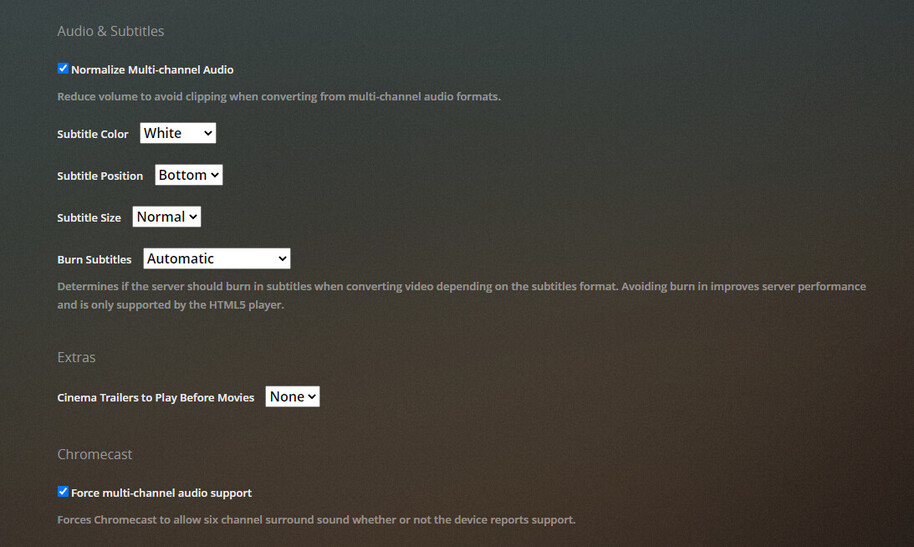
As for the playback subtitles are set to none when I played that sample.

please do the following.
- Uninstall PMS. — KEEP ALL DATA option
- Restart the Synology
- When it comes back up, Reinstall this version of PMS
What I’m hoping to find is where you might have caught it in a weird DSM 6-7 state.
This time, when it installs, it will ask DSM 7 for access to the hardware.
DSM 7 will grant it.
Go into PMS - Settings - Server - Transcoder
turn off all HW transcoding, including HDR.
Save
Turn on hardware transcoding – Keep HDR OFF (we don’t have that yet on Syno)
Now retest
Okay, give me a few and I will get it started. BTW thanks for the help
You’re welcome.
I apologize if I’m a bit terse. It’s been a VERY long two weeks.
I think that fixed it. Might want to mark that down incase someone else runs into that issue.

Thank you very much!
1 Like
I think I said it in the instructions somewhere 
LOL
Have a great night.
Tnx, installed
But, I can’t add server to my account and I can’t access throuht internet to it. 32400 port is forwarded.