Great. Thank you again for the fast responses. Time to let my NAS munch on the data overnight.
Ok thanks so much for explain !
Hi guys.
@ChuckPa I’m so sorry I’ve read almost the entire thread and I’m still completely lost and getting very nervous because I do not want to loose all of my Plex history.
I did the same thing as @svendsvenstrup_gmail_com. I didn’t know there was all of this problem with Plex so I just went ahead and upgraded DSM from 6 to 7. I then, by chance, came across a Tutorial regarding the whole give permission etc and followed it.
I’ve installed the PMS from Plex.tv web site, everything went according to the tutorial but I’m getting the same “Playback Error - Please check that the file exists and the necessary drive is mounted.” as a lot of people.
I’ve read some of your replies and this is where I am.
- All permissions are checked.
- I do not have that Library folder on Plex
- I have a migration.log
- I did a Copy/Paste from the whole Plex folder before installing the new version.
- (not sure if this has anything to do with it but) I still have “Git” / “Python” / “Python3” / “WebDavServer” needing to be repaired after the upgrade.
Could you please just point me in some direction as to how to proceed?
Can you please attach “Migration.log” (found in the Plex shared folder) ?
Also, can you attach the Plex logs which show these playback errors?
You did a copy/paste of the Plex folder from where to where?
- Migration.log (693 Bytes)
- Where can I find these logs?
- I copied the entire Plex folder to another drive on my DSM. Created a folder called "Plex BackUp "and just pasted it there.
Your migration from DSM 6 → DSM 7 was flawless (as shown in the Migration log)
Plex Media Server migration to DSM 7 started:  Tue Aug 10 07:51:12 +01 2021
=== Tue Aug 10 07:51:12 +01 2021 === Start: Change ownership
=== Tue Aug 10 07:51:51 +01 2021 === Completed: Change ownership
=== Tue Aug 10 07:51:51 +01 2021 === Start: Convert symbolic links
=== Tue Aug 10 08:04:05 +01 2021 === Completed:  Convert symbolic links
=== Tue Aug 10 08:04:05 +01 2021 === Start: Migrate Plex Media Server
=== Tue Aug 10 08:10:01 +01 2021 === Completed:  Migrate Plex Media Server
=== Tue Aug 10 08:10:01 +01 2021 === Completed:  Migrate Plex Media Server
=== Tue Aug 10 08:10:01 +01 2021 === Start: Clean /volume2/Plex
=== Tue Aug 10 08:10:01 +01 2021 === Completed: Clean /volume2/Plex
Your Plex logs are those found in Settings - Server - Troubleshooting (Left pane) - Download Logs.
Strange it’s not working then.
There you go:
Plex Media Server Logs_2021-08-10_13-28-16.zip (270.1 KB)

Actually, it is working.
Remember the final message when Migration finished?
The one with the Blue text?
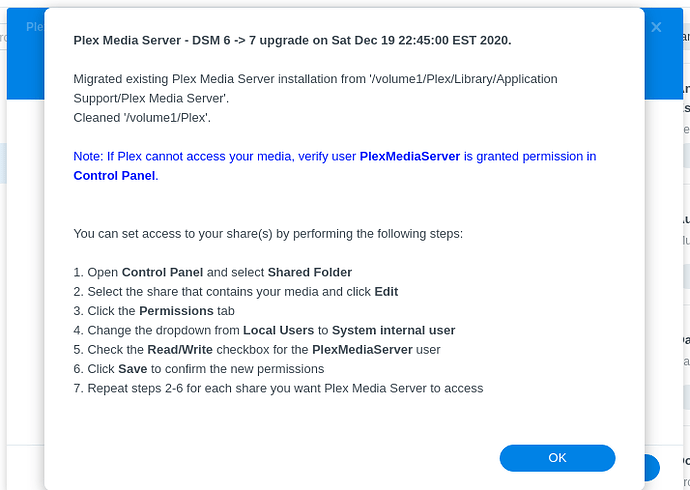
You’ve forgotten to give “PlexMediaServer” (new name) permission to read the media.
Aug 10, 2021 10:47:52.473 [0x7f9b4aec9d48] DEBUG - Media Provider: Registering provider com.plexapp.plugins.library
Aug 10, 2021 10:47:52.473 [0x7f9b4910bb38] ERROR - Couldn't check for the existence of file "/volume2/General/Kids PT/.grab": boost::filesystem::status: Permission denied: "/volume2/General/Kids PT/.grab"
Aug 10, 2021 10:47:52.473 [0x7f9b4aec9d48] DEBUG - Auth: Refreshing tokens inside the token-based authentication filter.
Aug 10, 2021 10:47:52.473 [0x7f9b4910bb38] ERROR - Couldn't check for the existence of file "/volume4/Top Movies/- Kids PT/.grab": boost::filesystem::status: Permission denied: "/volume4/Top Movies/- Kids PT/.grab"
Aug 10, 2021 10:47:52.474 [0x7f9b4910bb38] ERROR - Couldn't check for the existence of file "/volume4/Top Movies/.grab": boost::filesystem::status: Permission denied: "/volume4/Top Movies/.grab"
Aug 10, 2021 10:47:52.474 [0x7f9b4910bb38] ERROR - Couldn't check for the existence of file "/volume1/Movies/.grab": boost::filesystem::status: Permission denied: "/volume1/Movies/.grab"
Aug 10, 2021 10:47:52.474 [0x7f9b4910bb38] ERROR - Couldn't check for the existence of file "/volume3/Series/- Outros/.grab": boost::filesystem::status: Permission denied: "/volume3/Series/- Outros/.grab"
Aug 10, 2021 10:47:52.474 [0x7f9b4910bb38] ERROR - Couldn't check for the existence of file "/volume3/Series/.grab": boost::filesystem::status: Permission denied: "/volume3/Series/.grab"
Aug 10, 2021 10:47:52.474 [0x7f9b4910bb38] DEBUG - Grabber: Cleaned up 0 decrepit directories in 0.0 sec.
Aug 10, 2021 10:47:52.550 [0x7f9b48e89b38] DEBUG - Relay: read 63 cached entries from hosts file
You my kind sir, are the man. Thank you so much for your help.
DIdn’t bother to read that message 
So, should I read that message correctly, my update went pretty smooth.
I just updated from DSM 6 to 7 with no prior “safeguards” or tweaks.
Downloaded the PMS file directly from Plex site and just manually installed it.
The only thing “complicated” and out of the box I had to do was that “Give Permissions” step.
Thanks again @ChuckPa
All is good now?
Children happy?
If children are happy then parents are happy too 
Very happy 
Thank you
Hi, to begin, my knowledge of DSM is limited so please go easy.
I installed DSM 7 (I did not uninstall PMS as instructions above indicate).
I did grab the latest version of PMS from the Plex download site and installed that.
I have watched several shows since this upgrade but now when I try to add a new video, PMS doesn’t see the update, this goes for removing a video as well so now I am stuck.
Where can I start to get this fixed?
Thank You!!
Gave it a try last night in that order and am up and running now Thank you.
Now to figure out getting Plex to work remotely, got port forwarding and firewall rules set up on router and the test passes in the Plex settings but as soon as I navigate of that specific menu page then it shows a red x again.
I managed to migrate Plex to DSM 7 with minor hassles (thank you). However, a last problem still persists: the automatic refresh of library when there is a change in a folder is not working any more. If I add a movie or a tv show, I have to manually force a rescan of the folder (and sometimes it’s a BIG folder). Is there a solution? thanks
Have completed migration on a DS918+, but am still receiving “No Write Access to Destination” errors when attempting to record OTA broadcasts via HDHomeRun CONNECT 4K.
Does each of the destination media folders need to be a Shared Folder? At present, my media folders (TV Shows, Plex Movies, Home Videos) are subdirectories under the Shared Folder “/Volumn1/Video”. When going through the migration process, PlexMediaServer was given full control to the shared folder “Volumn1/Video” per the directions. The same permissions ostensibly were applied to all subfolder and files per the checkbox, but that “flowdown” process does not appear to have been adequate to confer write privileges to the subfolders. (The migrated install has no difficulty reading all of the old media subfolders.)
Do I need to move all of my media to Shared Folders and then go through the Edit Permission process for each shared folder? Other ideas?
1 Like
I’ve just migrated from DSM6 → DSM7 today. I didn’t even think about Plex when I did the upgrade so found this thread/info afterwards. For anyone else who may be experiencing the same issue I was…
I didn’t uninstall Plex before upgrading, I tried to ‘repair’ which said to come to the forums, found this guide, followed the instructions and all looked to be good - I had a migration.log in my Plex folder…however I couldn’t access the WebUI! I just got this in Chrome:

I tried a curl from another server but get an empty response.
$ curl -I http://10.0.0.8:32400
curl: (52) Empty reply from server
Then I spotted this in the logs:
Aug 10, 2021 16:30:05.772 [0x7f5246819b38] DEBUG - Request: [172.16.0.42:50260] rejected because secure connections are required
Aug 10, 2021 16:30:06.582 [0x7f5246819b38] DEBUG - Request: [172.16.0.42:55762] rejected because secure connections are required
Aug 10, 2021 16:30:06.689 [0x7f5246819b38] DEBUG - Request: [172.16.0.42:62100] rejected because secure connections are required
Aug 10, 2021 16:30:12.072 [0x7f5246819b38] DEBUG - Request: [172.16.0.42:55856] rejected because secure connections are required
Aug 10, 2021 16:30:13.497 [0x7f5246748b38] DEBUG - Request: [172.16.0.42:61704] rejected because secure connections are required
Aug 10, 2021 16:30:13.504 [0x7f5246748b38] DEBUG - Request: [172.16.0.42:63232] rejected because secure connections are required
Aug 10, 2021 16:30:44.011 [0x7f5246819b38] DEBUG - Request: [172.16.0.42:62772] rejected because secure connections are required
Aug 10, 2021 16:30:44.253 [0x7f5246748b38] DEBUG - Request: [172.16.0.42:53247] rejected because secure connections are required
Aug 10, 2021 16:30:44.326 [0x7f5246748b38] DEBUG - Request: [172.16.0.42:58755] rejected because secure connections are required
Aug 10, 2021 16:31:44.613 [0x7f5246748b38] DEBUG - Request: [172.16.0.42:64766] rejected because secure connections are required
Aug 10, 2021 16:31:45.626 [0x7f5246748b38] DEBUG - Request: [172.16.0.42:49550] rejected because secure connections are required
Aug 10, 2021 16:31:45.673 [0x7f5246819b38] DEBUG - Request: [172.16.0.42:52452] rejected because secure connections are required
Aug 10, 2021 16:33:44.696 [0x7f5246748b38] DEBUG - Request: [10.0.0.1:44696] rejected because secure connections are required
Tried with https:// instead of http:// and got straight in. A stupid error on my part but wanted to highlight in case anyone had a similar issue and was scratching their head.
How much risk is there in waiting a while to update to DSM 7? I’m a bit wary of doing this install and changes to Plex. If there are security holes with DSM 6.2 and DSM 7 is more secure then I’ll push forward this weekend, but if not…I’d rather wait a bit.
Hi,
I just tried to access the new topic my post was split to and receive this message:
Oops! That page doesn’t exist or is private.
I am logged in and have tried using both Chrome and Edge.
Edit: I found the post by looking in the Live TV & DVR forum. The link in my reply here works. The link in the Split notice is off by one digit in the post number: 735315 is the correct post, not 735314.
Thanks!
Rob
Do you still have metadata in Plex/Libfary/Application Support/Plex Media Server
-or-
Migration.log?
If you have Metadata
- Uninstall + DELETE option the DSM 7 package to remove partial DSM 7
- Now install the DSM 7 package cleanly and observe it will do all the work and migrate cleanly.
- Upon completion, the Plex share no longer has metadata.
- It will write “Migration.log” as it performs the actual migration
Do you also have metadata in the Plex share?
If so, fix that first. Uninstall + ERASE then Install the package properly.
your other findings won’t matter once the package is properly installed.
1 Like
The upgrade to DSM 7 is no risk if the procedure is followed.
The biggest problem is people IGNORE the documentation.
-
Uninstall the DSM 6 package first – DO NOT “Repair” it. – Repair does NOT work.
-
Install the package from Plex.tv/downloads
