That’s what @philrigby also told me. I’m not 100% sure anymore since when I uninstalled the previous PMS package, I told it to get rid of everything (and it did remove the user), but maybe I did something wrong after all and had it pop back up again.
I’m already happy finding that System Internal User page… I had no idea it even existed and that PlexMediaServer changed in such a way that it added itself to that part of the system. Glad I was pointed in the right direction though, it’s working like a charm again
We had to change the username (DSM 7 imposed change)
With the name change, we no longer had permission to remove the old name.
As a direct consequence of the above, we could no longer perform the DSM 6 → DSM 7 migration ourselves (We don’t have ‘administrator’ / ‘root’ permission anymore.. DSM 7 application limitation now)
This means “Plex” from DSM 6 just sat there unused.
It allso meant we needed that exotic procedure for you to setup the Plex share so the new username “PlexMediaServer” could take ownership of the files and move them to where they were needed.
Now that you’re done, with everything running as username PlexMediaServer, we will be good. Normal package install (update) won’t be painful anymore unless Synology breaks something again. LOL
You might want to read the initial announcement again. You’ll see where I laid this all out when first launched in Preview (beta) .
Thanks, I guess Synology’s changes to DSM bogged things up for many people… how many of us ever had any use for going to something as obscure (from a user standpoint perhaps) as System Internal User until now? Luckily it’ll be a while before DSM 8 might be released, so hiphip-hooray for leaving it as is for the upcoming years
@ChuckPa First of all congratulations to all the hard work you’ve put into this. Same goes for the rest of the team.
Do you plan on releasing a package that will do all this by itself? Is it even possible with the revoked privileges? If that’s planned, I might wait for it before jumping into DSM7.
Doesn’t it stand to reason that if I could release a package which could do everything all by itself I would have done so already?
What you will see in “Packaging 2.0”, with maybe exception of addition of more language support (it supports 8 languages now) is the limit of what can be done.
Respectfully, I suggest you review again what this new packaging can do even with the constraints imposed by Synology.
I have tried everything to get this to install. I changed the permissions as requested. Even tried creating a new logging folder with permissions and it still fails the pre checks. Is there a log I can read to see what is happening? …and I did an uninstall keep as part of this process. Spent hours. Tried the latest package released yesterday and still get permissions pre check error. Help
Hey Chuck. I really had no idea, that’s why I asked. I have 6 servers in the family in multiple locations that I’ll be taking care of so before I dive into this, I really needed to check. Hope it makes sense.
I got my plex back up and running after DSM 7 update. But has anyone noticed transcoding got slower? My 4k videos will not transcode above 0.5 for smooth playback.
YAY ! After changing the permissions of the PLEX folder, it finally worked. I thought the app needs full control access access to the shared MEDIA folder… that was my mistake.
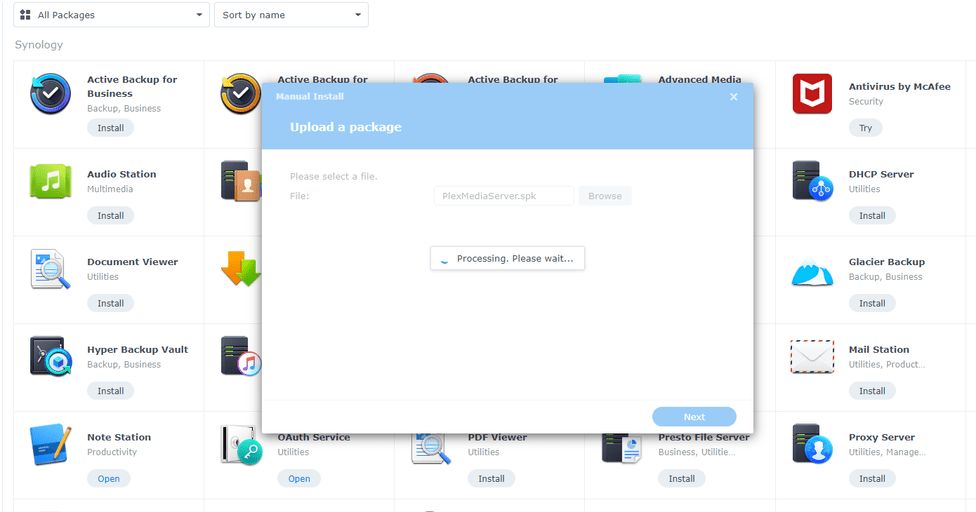
I have an issue with the latest server vesrions, where it is stuck in Processing state during installation attempt.
I’m using DS718+ model with DSM 7.0-41890. Installation of version from Package Center I get no problem, but when I upload x64 version (Celeron J3455 supports 64bit instructions, and DSM7 version was selected - PlexMediaServer-1.24.0.4930-ab6e1a058-x86_64_DSM7.spk) and try to upgrade or have a clean install, I get it hanging in “Processing” state. I’ve waited for almost an hour with no change in the state. Are there changes in the latest pakages that are incompatible or could it be some files preventing the installation?
If it’s doing the migration and you have a lot of metadata, it can take a few hours. I’d leave it alone for a while. Looks like you’re installing the version that creates the new PlexMediaServer folder and copies the metadata over, there’s thousands of tiny files and they take a long time to copy, ironically. Patience, grashopper
Is it possible to view the progress somewhere? - just to see if it is in fact doing something and there isn’t other bug. I have made few attempts with uninstall of all types, follwed by install attempts. I have kept default folder during installation and created new one during the last attempt. I’m curious if there is metadata involved in all of those cases or it shouldn’t have been.

 LOL
LOL