Server Version#: 1.25.3.5409
Player Version#: N/A
Tuner Make/Model: HDHOMERUN PRIME
Guide/Lineup name: Verizon Fios Burlington (MA , US)
Using XMLTV?: No
Channel number/Name: 190/690 Comedy Central
The issue is still occurring.
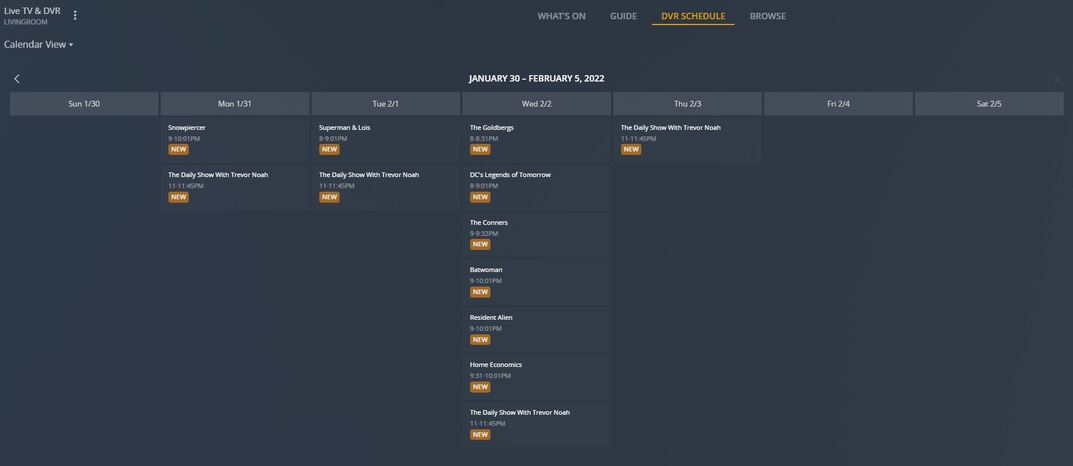
Here are screen shots of the DVR schedule before the service restart.
The tuner channels have the new numbers but the epg channels still have the old channel numbers. Currently you need to manually associate channels between dave ja vu and PBS following the retune.
Thanks, that’s annoying, that sounds like nothing has happened on Plex’s side then! I’ll avoid doing rescan myself for a bit, I can’t bothered with headache of sorting out mappings.
Very - especially as a) If you accidentally have EPG channel mapped to multiple physical channels and don’t realise before hitting save nothing happens with the new(ish) Channel Matching dialog - no error message or anything that I can see, and b) I now have two Ideal Worlds (on Channel 50 and 51) and two Jewellery Makers (on Channel 71 and 72):
I did last night, on the 26thJanuary and then manually updated the channel mapping. I don’t want to do that again until I know that the epg has been corrected.
Some good news… Both BBC3 (Channel 23) and BBC HD (Channel 109) are present in this morning’s guide refresh. However, it looks like the logo for the standard definition channel is using the old logo and not the new style like channel 109 is.
The bad news… Anyone that manually fixed up the new channels numbers to point at the old EPG channels will need to performed this again - it only took me 5 minutes but still it’s a pain
Note: Whilst the guide has updated for the rebranding of the Paramount Network (was Channel 032, now Channel 33) to 5 Action, the logo is still the the Paramount Network logo - the rebranding happened on the 19th January.
Also is there any word on the return of EPG data for Channel 85 - It used to be Hochanda which I believe the company (Hochanda Global) rebranded to Craft Store TV at the end of March / beginning of April last year - since then we have lost the channel in the EPG altogether!
I started remapping the channels again but found that, unless I remapped a few channels at a time (saving between each set) Plex got stuck. So I actually found t easier to delete the DVR and re-add it (Plex mapped everything automatically, I just needed to disable a few channels).
I found the save button did nothing if I accidentally had the same EPG channel mapped to two physical channels the other day and had to add a few at a time until I realised that was the issue.
That new Channel Matching dialog is just horrible, no warnings or error messages when things aren’t quite right, and no way to change the IP address of my DVR either - yet another half baked implementation from Plex.
The latter I’ve had to do recently as well as I needed to reconfigure parts of my network - I ended up editing the SQL database, via sqlite, as I’m always worried about loosing recording if I delete the DVR and add it again
I don’t remember ever losing any scheduled recordings if I delete and re-add the DVR. I think that’s because these are actually stored in the library database (I believe in the media_subscriptions table) rather than in the DVR database.
The only problem I have when I need to recreate the DVR is that I sometimes forget to add my postprocessing script back to the config or set the commercial detection option so that it detects comercials and marks for skip.
I’ve just done the retune on my tuner (vbox) and tried a few times to get a rescan on Plex to map my channels correctly but it just wouldn’t work. Oddly it managed to find 5 empty channels at the beginning of my list that couldn’t be mapped but the main issue was over half the channels needed mapping manually.
Deleting the Plex DVR solved my mapping issues, hurray, but that isn’t ideal as doing that screws up all the clients which I now need to set up again. But at least I’m working after the channel movements.
Ah that’s good to know - I remember there were issues when the the EPG changed from Gracenote to Tivo (June 2019), and then again from Tivo to Gracenote (December 2020). Maybe I will give it go one day when I am feeling brave
I have it here (albeit the old glossy multicoloured logo - not the newer flat logo) - is this the old ‘possibly postcode dependent’ issue from December 2020?