Task: PMS
Start time: Sun, 03 Oct 2021 22:57:46 GMT
Stop time: Sun, 03 Oct 2021 22:57:47 GMT
Current status: 0 (Normal)
Standard output/error:
Hidden Pathname: /volume1/@apphome/PlexMediaServer
Location of PMS: /volume1/@apphome/PlexMediaServer/Plex Media Server
Contents of PMS: total 8 drwx------+ 1 PlexMediaServer PlexMediaServer 246 Oct 3 18:17 . drwx------ 1 PlexMediaServer PlexMediaServer 62 Oct 3 16:54 .. drwx------+ 1 PlexMediaServer PlexMediaServer 494 Aug 30 08:27 Cache drwx------+ 1 PlexMediaServer PlexMediaServer 138 Jul 20 17:59 Codecs drwx------+ 1 PlexMediaServer PlexMediaServer 3508 Jul 29 10:54 Crash Reports drwx------+ 1 PlexMediaServer PlexMediaServer 0 Jun 27 2018 Diagnostics drwx------+ 1 PlexMediaServer PlexMediaServer 18 Jan 27 2017 Media drwx------+ 1 PlexMediaServer PlexMediaServer 28 Feb 9 2017 Metadata drwx------+ 1 PlexMediaServer PlexMediaServer 100 Jan 25 2017 Plug-in Support drwx------+ 1 PlexMediaServer PlexMediaServer 368 Dec 15 2018 Plug-ins -rwx------+ 1 PlexMediaServer PlexMediaServer 1378 Aug 30 08:23 Preferences.xml drwx------+ 1 PlexMediaServer PlexMediaServer 0 Jan 27 2017 Scanners drwx------+ 1 PlexMediaServer PlexMediaServer 10 Jan 25 2017 Thumbnails -rwx------+ 1 PlexMediaServer PlexMediaServer 5 Aug 30 08:22 plexmediaserver.pid
it looked like in your instructions the screenshot was installing that version from package center and then upgrading after. so thought that was what i had to do…
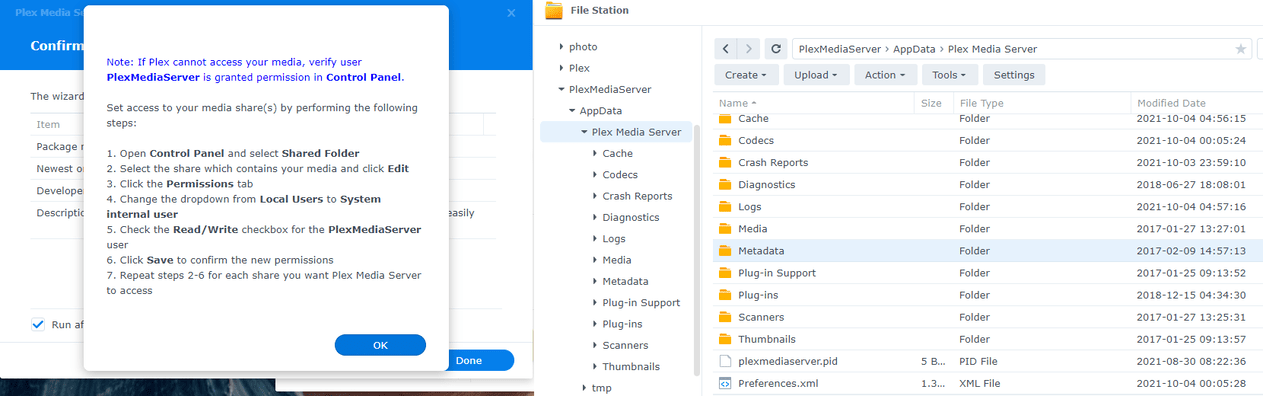
Confirm AppData does not contain a “Plex Media Server” folder
If it does screenshot it as I need to see it.
Presuming there is no ‘Plex Media Server’ in AppData (still puzzled as to why)
Control Panel - Security
Set the auto logout timer value to 65535 (you can set it back after this is done.
Restart the Synology
Sign in again
Manual Install Plex version 1.24.4.5081-e362dc1ee (Plex Pass version)
Allow it all the time it needs to Install (MOVE) your data from the hidden storage (which is what 1.21.0.3744 did) to where it belongs in “PlexMediaServer/AppData” (which did not exist prior to version 1.24.2.4973)
You are urged to not migrate away from the Package Center installer’s “Installing” screen.
If you have any errors, please screen shot the errors and attach here.
Thank you for the reply!
However, I did not add the 2,000 media content all at once, but only about 200-300 movies each day and only 6 movie at a time, waited 1 minute until the metadata was retrieved and then the other 6 movies. The dashbord doesn’t shows any activity when it idles.
Are you sure that after a week it’s still normal, that most of the movies are not playable and all the lag?
woohoo!
woke up this morning to see a reminder on the permissions and when i click ‘ok’ both windows closed. and now i see the plex media server in the AppData!
it took a few mins and a few times closing and relaunching plex but now i see my server and files.
still have to work on that remote connections constantly going red, but that is a different issue.
thanks! would have never figured this out on my own
I have followed the instructions to migrate from DSM 6 Plex to DSM 7 PlexMediaServer but when I open plex it just says “TheVault” (my plex server name) is currently unavailable when I try to open any of my libraries. I have gone through the install/uninstall process with assigning all permissions to the new PlexMediaServer system internal user on my Plex folder and also the new PlexMediaServer folder. When I ran the manual instal of PlexMediaServer last it still showed the message telling me to give PlexMediaServer full permissions to the library, which I have already done. How do I get my libraries to show up in PlexMediaServer??
Thank you for the quick response. When I uninstalled and unclaimed the server then reinstalled and claimed it again with the token it is now having me go though the plex server setup as though it is a brand new server and asking me to name it and add libraries. Is this expected? I’m guessing not (also hoping not) as I would expect that it is supposed to migrate my existing libraries. I will note that my Plex shared folder and PlexMediaServer shared folder are on the same volume on my server.
I don’t see any of my existing libraries in listed in the Media Library section of the setup wizard. I did try selecting “Add Library” but this seems to just allow me to add a new library which I could point at the media location (Don’t want to do that because I want my metadata to migrate).
@mmutza135 Your libraries will be there in the directories they originally were, but you have to point your ‘new’ install to them and recreate the libraries. Once they are created, PMS will rescan the libraries and get the meta data again. It can take a while though so dont panic. Im over 24 hours now of it still scanning my libraries.
Okay I figured it didn’t migrate correctly. I’m not sure I understand what you are saying with “if you have all the data in the Plex folder and only if”. How do I know if that data is there? This is what is in my Plex folder after running though the migration instructions earlier.
That may be, but when I followed your directions as above thats what I had to do, and in the end things seemed to work. Maybe Im not a pro about PMS, I was just trying to give my experience. So Ill step aside since I dont know what Im talking about and let everyone else do their thing.
Hello ChuckPa,
Thanks in advance for all your work and for any feedback/assistance.
(I’ve already updated to DS7) Currently can see all my media from PC’s but not Nvidia Shield or Android devices
I have been running PLEX on DSM6 Synology DS218+ for last year with no problems. I watch PLEX content mostly on new Nvidia Shield but also sometimes on PC or Android phone both locally and remotely. PLEX has been fine until a few weeks ago when Synology nagged me to update to DSM7. I did so and now I’m running DSM 7.0-41890, and PLEX 1.24.3.5033-7000.
At some point just recently my Nvidia Shield and Android devices lost access to my content/media. *(Strangely I can still see/view everything just fine using any PC on my home network!) After a brief scan of the forums I attempted a manual update (downloaded most recent PlexMediaServer directly from plex.tv, then did a manual install from DSM package installer). All went well until an error message appeared:
[THIS PACKAGE REQUIRES DSM 7.0-40000(update 0) or OLDER]
??? OLDER ??? What on earth?
I’m assuming that attempted PLEX install/update is what created the new: ‘PlexMediaServer’ folder. All my media is still in the original ‘Plex’ folder…but can’t be accessed from either Nvidia or Android.
I’ve read a bunch of the postings/inputs here, including yours, but I’m lost. I’ve already updated to what I guess is the latest DSM 7.0-41890. Suggestions??? Sorry I’m having trouble understanding the bits and pieces of the other posts.
It seems like a top-level post somewhere on the forum that explains what in DSM7 caused the discord with PLEX in the first place might go a long way to helping all of us lightweights understand what’s going on and how/why some ‘fixes’ or ‘workarounds’ might work. Like I said, if think a lot of us users are pretty darn confused.
THANKS for any help. In the meantime I’m forced to use an old media center PC to watch my media rather than my preferred Nvidia Shield.
Server Version#:1.24.4.5081-7000
Player Version#:1.35.1.2632-c6783c78
Another person attempting to understand why updating to DSM seems to have broken Plex. A total noob when it comes to IT and permissions. I’ve read several docs on this about changing permissions, tried reinstalling the PMS, reinstalling the window player app, Restarting the Synology NAS several times, restarting the router. still nothing connects
Let me know what sort of info I can provide, Im a total novice with this but have been using plex for yes, have a lifetime pass membership, and would love to get this working again.
A small request for just-starting users such as myself: could you please update some threads with the information that (a) the user (used to be “plex”, now “PlexMediaServer”) is auto-created (b) the user depends on the DSM version? That would have saved me quite some time (as a newby to both synology on a DSM 7 and plex, I thought I had to create the user “plex” manually.)