Qnap faq.....read me first!

Q28: How to use the PlexData share

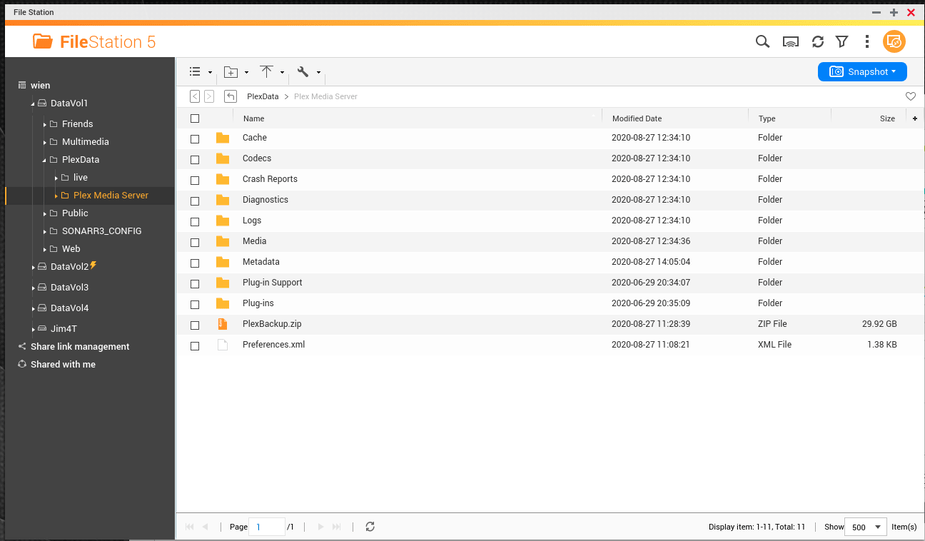
The PlexData share, available in PMS 1.19.5 and above, can be used in multiple ways, like:

  1. Obtain log files to post in the forum when Plex misbehaves
  2. Add hidden preferences to your Plex configuration (Preferences.xml)
  3. Backup / Restore your entire Plex installation

Use of the PlexData share is completely optional. It is a diagnostic and support mechanism. It has no active interaction with PMS itself. PMS is completely unaware of this mechanism and independent.

Setting up and administering the PlexData share

Before the PlexData share can be accessed and used in FileStation, you (the administrator), must

  1. Create the “PlexData” share using Control Panel - Shared Folders. You may place this share on any storage volume you wish.

  2. Assign access permissions using the Shared Folders tool (Control Panel - Shared Folders). This is a required step because every system is different. Presuming any ‘default’ access rights would not be in the best interest of all users.

  3. If you have an existing shared folder named “PlexData” and do not wish to use this feature, it can be disabled: Create an empty file "${QPKG_DIR}/Library/Plex Media Server/.disablePlexDataSymlink" and restart PMS. (QPKG_DIR) is wherever QTS installed PMS. The path name typically looks like: /share/CACHEDEV1_DATA/.qpkg/PlexMediaServer.

  4. Restart Plex one time. This initial start/stop cycle populates the linkage in the PlexData shared folder.

Obtaining Log Files

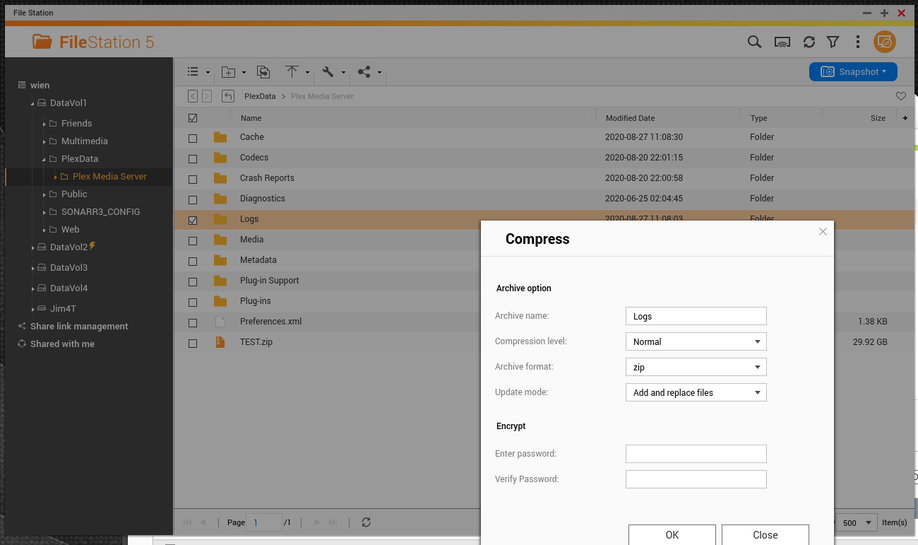
Zipping the log files to post in the forum is as simple as:

  1. Open the PlexData share
  2. Click the link to go into “Plex Media Server
  3. Right-Click “Logs
  4. Compress to the ZIP file
  5. When complete, download to your computer and upload to the forum.
Backing up your Plex metadata

Backing up your Plex metadata is very easy.

  1. Stop Plex
  2. Open FileStation
  3. Click into PlexData
  4. Click into “Plex Media Server
  5. Click the top selection box to select everything
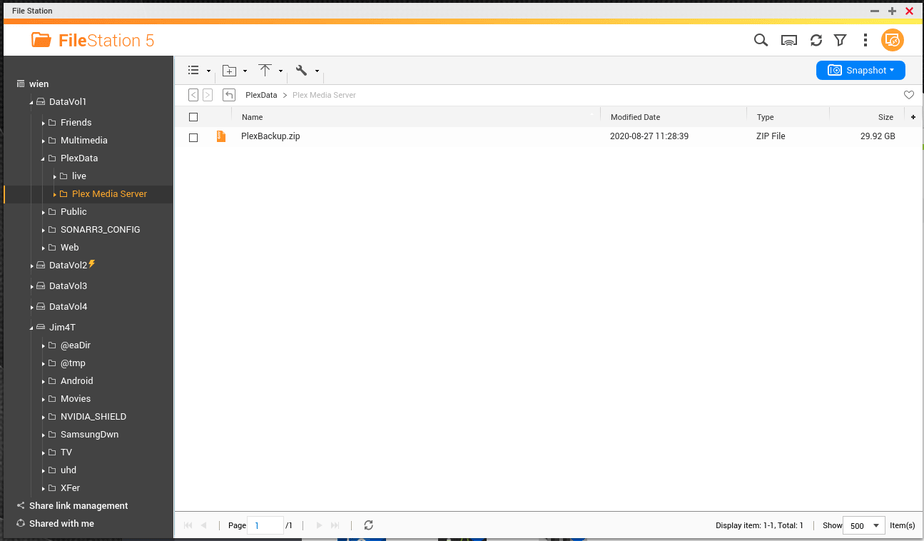
  6. Right click anywhere in the selected block and “Compress”
    6a. Change the name from Cache to the name you want. (By default, QTS uses the name of the first entry found as the backup name.)
  7. When complete, COPY/MOVE the ZIP file to a safe place.

Restoring a backup of your Plex metadata

Restoring the backup of your Plex metadata is as easy as it was making the backup
with one additional step

  1. Stop Plex

  2. Open the PlexData share

  3. Click the link and go into “Plex Media Server

  4. Delete everything

  5. Copy your backup ZIP into the now-empty “Plex Media Server” directory

  6. Right-click on your backup file and “Extract Here”

  7. After the extraction is complete (several minutes), you should see your full Plex Media Server directory back as it was. (You will not see any interim progress until after it completes and FileStation refreshes. This is how QNAP works)
Back to top

5 Likes
PlexData share for QNAP systems
Could not create PlexData share
Can't access server through local host
How backup plex configuration on qnap?
PMS not working on QNAP TS-451 but works perfectly fine on QNAP TS-253
Intro detection and PlexData were both "stuck" on Qnap NAS
Create a share for Plex Library Directory
PLEX media Server local Port 32400 on QNAP NAS not reachable
Unable to pull down metadata
QNAP 251+ kann die PlexMediaServer/Library/ nicht finden
Moving from QNAP to Linux
Need help with Plex backup using QuTS
Metadata Backup
I have been locked out of my plex server on my QNAP Nas
Plex on QNAP NAS cannot be reached
Plex server cannot connect the Internet. The internal and external IP become 'unknown'
Plex Media Server Backup and Restore
Program vs. Backup Folders
Invalid Digital Signature for Plex running on QNAP
Add a restore Database option to Plex NAS versions
Why Did My Plex Media Server Get so Large?
Is latest version of Plex Server compatible with latest version of QNAP firmware 5.0.0.xxxx?
Could not create PlexData share
PlexData share for QNAP systems
Could not create PlexData share
I got the message in server : Severity Level Date Time Users Source IP Application Category Content Error 2020/09/07 05:11:40 System 127.0.0.1 --- --- WARNING: Could not create PlexData share. Further assistance is available in our Support Forums. Cont
QNAP 251+ kann die PlexMediaServer/Library/ nicht finden
Could not create PlexData share
Backup PMS data on Qnap
Asking for confirmation on restoring PMS installation
TV Shows not updating newly installed "extras"
Could not create PlexData share
QNAP Plex Library Directory
Can't update Plex on my TVS-882
Plex stops working after a few days-Plex doesn’t work anymore
QNAP NAS Remote Streaming Issue with New PMS 1.20.0.3181
Move an install to another system
Can't get Plex running, even after total uninstall
No connection to Server after latest 2 updates
503 Service Unavailable error after it crashed and I had to reinstall
Unauthorised You do not have access to this server
Plex stops running on QNap
Server unavailable on QNAP NAS
All of my libraries on QNAP are missing and no server settings
Moving Plex Media Server and files to new hard drive in QNAP
"An unexpected error is impacting the navigation bar" and Cannot find Series media (but it shows in "Home")
How to backup and restore PMS settings/metadata?
Plex Media Server won't launch on my QNAP since last Autumn
QNAP New Install Issue
After changing password i can't access my media by web browser
Security password reset
Server reports "Not authorized: You do not have access to this server" after password reset
QNAP - Plex Server starts then drops out after 30 odd secs
After changing password i can't access my media by web browser
Cannot access QNAP Plex Since resetting password
(Re-)Claiming a QNAP Plex Media Server
After changing password i can't access my media by web browser
Plex not starting after upgrade - QNAP
Backing up plex media server from NAS
Remove PMSLibShare - Extremely Slow Scan performance
Plex no longer working on QNAP TS-451+
Plex not automatically launching on after rebooting QNAP
Photo library
Media Server Refused to Connect
How to backup the library content for Raid change?
QNAP und Plex Medienserver
After update to Version 1.32.1.6999, cannot archive the Plex Media Server folder on my NAS
What is "Download Database"? Is it a backup
PmsLibShare on QNAP - Invalid digital signature
Plex no longer working/booting after unrelated QNAP NAS outage
Ajouter un agent Plex sur un NAS QNAP?
Backup and restore?
How to delete plex database or the film librarys on plex istance in qnap?
Migrate Plex data form QNAP to another QNAP
Server Error when opening Plex Server on QNAP TS-h973AX
Photo Timeline Gets Corrupted by Plex initiated Scan