[HowTo]: joining multi-part movies files with MKVtoolnix GUI

The purpose of this HowTo is to join videofiles, when a movie was ripped and split into two or more files.
(This happens usually with very long movies [i.e. LOTR] or more often back in the day when we had Video CD or DIVX CDs)

The ultimate goal is to have the movie back in one file, so there is no trouble in the various Plex clients which do not support multi-part files.

The tool used is MKVtoolnixGUI
it is freely available for all major PC operating systems.

Therefore the container format of the output files will be MKV.
The input format can be a multitude of containers like AVI, MP4, MKV, MPEG, TS, DIVX and several more.
The quality of the files will remain the same, because mkvtoolnix only remuxes the files, it doesn’t re-encode them.

Prerequisite:
All parts of the movie must be from the same source, encoded with the same parameters into the same audio/video codecs, or a lossless joining with mkvmerge is not possible!

  • start up MKVtoolnixGUI
    (depending on your operating system this might look a little bit different)

  • drag the first part file into the window marked by my crude arrow

  • the video, audio and subtitle tracks it contains will appear in the window underneath it

  • Right-click on the File name of the first part and choose ‘Append files’. Navigate to the file for the second part and select it.
  • Your screen should now look like the screenshot below. Note, how the filename for the second part is ‘indented’.
  • you may want to revise the language code that is assigned to the audio track(s) and the language and ‘forced’ attribute of subtitle tracks so the Plex interface informs you correctly about the languages available.
    Plex’s automatic audio and subtitle track selection feature relies also on these tags to work correctly.

  • Now we correct the ‘Output file’ name to Plex standards to ensure a successful matching.
    Filmtitle (year) - [extraneous info which is not mentioned in the movie naming guide].ext
  • ‘Start Muxing’

Done.


Optional: create chapter markers for each file

This will allow you to jump quickly to these markers during playback.

Before clicking on “Start muxing”, switch to the “Output” tab.
Then, on the right side select “One chapter for each appended file” for “Generating Chapters”.
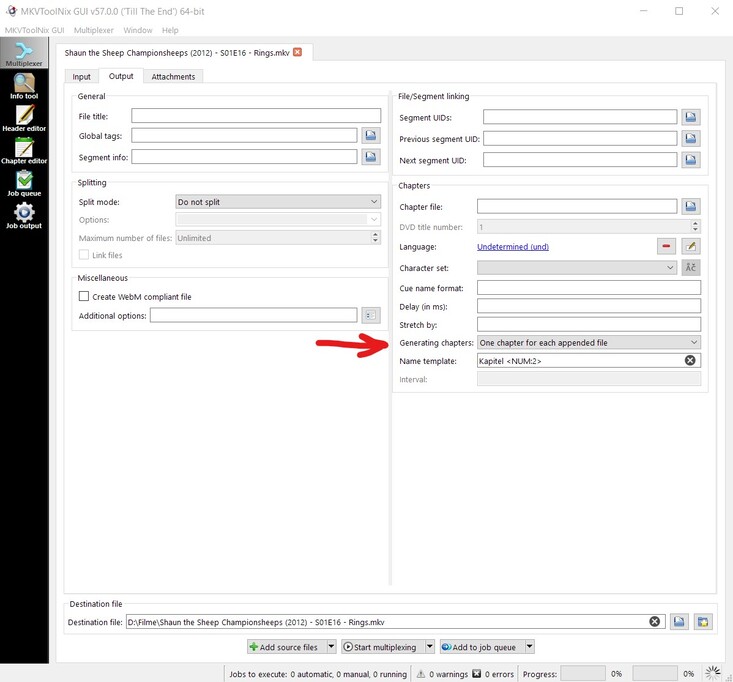
Guide for splitting video files with MKVtoolnix GUI

Thanks to @Nights0ng who suggested writing this guide.

32 Likes
Multi-file movie has title like first file name
Series Naming Issues
Can't play multi disk movies
Movie Volumes not separated
Software recommendation to join multiple MP4 files together
[HowTo]: splitting multi-episode files with MKVtoolnix GUI
Help joining mp4
Subtitles on Extras
How to name multi-file movies?
Multiple files for one film?
How to index this?
How do i get plex do recognise extras for LotR?
How to split movie titles
Plex auf QNAP lÀsst sich nicht starten
Gopro multiple files for one Video
PLEX combines a two part movie without a way to play either file
Media that should be stacked shows up as three different movies
Film mehrere Teile – wird nicht als ein Film angezeigt
Multi-Part Videos
[BUG REPORT] Multi-part content fails with new player on NVIDIA Shield
[BUG REPORT] Multi-part content fails with new player on NVIDIA Shield
New Movies not showing up in library
Programm um Folgen zu schneiden und zusammen zufĂŒgen?
Top Gear Challenges problem with duplicate data under TV Shows
How do I get Plex to see second disk/part to movies?
Konzertfilm auf Blueraydisc
Abspielen geteilter Filme funktioniert nicht
[HowTo] Media file prep for Concerts or similar music-related videos in Plex
DVD order broken?
Merge movie playing in wrong order.
Plex is not seeing embedded subtitles in MKV file
Doctor Who Classic 1963 naming
Multiple Episodes in a Single File - Display Only One Item?
One movie two parts
DVD commentary tracks unavailable for second disc of two-disc movies
Span the progress bar over each part of a multiple file episode
Increase Split Stack Please
Part ZusammenfĂŒhrung funktioniert nicht (FireTV Stick)
Problem files divided into parts
Multi disc movie needs manual match
Blood Machines will not match, exists on TVDB and TMDB
Converter will not optimize multi-part movies
Android and movies in parts
TV Episode 1 in two files/parts
Splitted movies: Part 2 doesn't work
Star trek the journey to the silver screen - matching
Movie Library Help
Filme mit 2CDs werden nicht weiter abgespielt
Plex doesn's play second part of movie on apps
Twilight Zone (1985) Multiple files per episode- all together instead of split- how do I fix this?
Two Part TV Show Only Playing 2nd Part
Plex + filebot: adding info to the filename, is it possibile?
Movie file unmatched when placed in folder
"The Lost Room" DVD set refuses to use DVD ordering from thetvdb.com
Part 2 of the fimls
TV episodes split across multiple files - but not playing properly
When Calls the Heart - HELP!
Two part concert
Stitching DVDs together- file size issues
Android / Android TV - Support split files
How to name Extended Edition
Come unire un film con 2 files mkv parte 1, parte 2?
Juntar dois episódios de uma série para o thetvdb.com reconhecer como 1 episódio?
Google Chromecast with Android TV and multi file movies
Multipart Movie/Episode only playing part 1 on Web Player
With Splitted movie Sound on second part format changes from 5.1 to Stereo
Plex subtitles don't play on the 2nd half of 2 part 4K movies
2-sided DVD
[bug] new player can't play stacked files
Subtitles for the Second Part of a 2-Part Movie
Two (multi) part videos will only play first part
File naming multiple parts - same episode
Plex finding TheTVDB "extended version" vs airing version of same show?
BluRay has 2 MKV files - How do I combine them? MakeMKV / HandBrake
Rasplex auf Raspberry bricht mehrteilige Filme ab
How to handle different versions of the same movie
How do I load a movie title spread over 2 DVD disks
Movie files with cd folders not playing whole movie and no option to play cd2
Zack Snyder's Justice League two parts - how to handle?
Family Guy - Plex erkennt aufgeteilte Episoden nicht
Adding split movies
Hypothetical question about 2 two file movies
Multipart movies do not play 2nd part
Wie kann ich mehrere Filme zusammenfĂŒhren?
What's the latest on multiple episodes in the same file? So frustrating!
Merge Two Parts of Wyatt Earp movie - Not Working
Renaming Solutions
[1 Film - plusieurs parties]
BUG: Split Movie Files Incompatable with Plex HTPC
Cannot detect 2nd part of movie
Two file movie with just one subtitles file?
Extended and original media files of same film keep falling under same Poster
Live TV - DVR recording movies that are in two parts
Copy files together to make one movie?
Films That have 2 parts, not showing part 2 or part 1 on some
Which tipe of library for concert live music?
An episode split into two files, subtitles won't work on the second
DS220 plex server
Streaming split files
The progress bar stops at the end of part 1 of the extended movie and you can't use it in part 2
Serie Metadaten als Film bei Agenten hinterlegt. Was tun?
Two different movies register as partially watched when you only have watched one
How to display 2 part movie?
How do you optimise a film for -dvd2
Problem playing (naming?) Multi-part documentary
Ripping, sorting, file is lost?
Split is missing
Plex ordnet Folgen falsch zu
Multi-part operas with subtitles, subtitles do not diplay on part 2
Newbie help
Wieso spielt Plex diesen Titel nicht?
2nd File Not Showing Up in Plex
Disc Season Episodes are Specials according to TvDB
Multi-Part File Merge Dropping Audio Track
Chapter Selection Issues with Multi-Part Movies
Multipart film with multipart subtitles (srt)
Problems with 2 disc movie playback in Plex
Actually deleting a Movie
Trailer werden nicht angezeit
Some movies showing strange artifacts - screenshots attached
How to Sort content
Concerts
Filmen Extras hinzufĂŒgen
Splitting Merged TV show items?
Tv episode part one and part two merged together
Metadata - not found
How to properly play videos, which are split across two files, with external subtitles?
Why are stacks limited to 8 files?
Two part movie is not combined

Great write up, this will help quite a few people!!

1 Like

Hey, this is a great write up! I have a question though. When I append files, there will be a gap of 2 or 3 seconds between the end of one and the beginning of the next. Is there a way I can reduce this or remove it entirely?

If there is a gap, it’s likely because it was there in the source material. You likely need to either trim the end of the first or the beginning of the second (or a bit of both) to remove it. I know when I joined my Lord of the Rings movies there was no gap at least.

Please help. I have followed the instructions above by first adding one mkv file and then right clicking and appending the second file. When I click on “Start multiplexing” I get the error “Files cannot be appended to themselves. The argument for ‘–append-to’ was invalid.” As they are separate files, I am confused. Thanks for your help!

2 Likes

Thanks very much - I’ve got a couple of multi-part movies playing fine on the web player but not on iOS, and this should fix that right up.

Is there a commanline way to do this (mkvmerge?) My video files are on the NAS and I don’t wanna pull them to my desktop over the network first to use the GUI.

@Honza said:
Is there a commanline way to do this (mkvmerge?) My video files are on the NAS and I don’t wanna pull them to my desktop over the network first to use the GUI.

You mean you have mkvmerge installed on your NAS?
If so, I am sure there is a way to achieve this on the command line. But I can’t tell you the exact command since I very rarely dabble in terminal stuff.
Description of the command line parameters is here http://mkvtoolnix-releases.bunkus.org/doc/mkvmerge.html

But if you don’t have mkvmerge installed on your NAS, you can use files located on a network resource in the GUI version just as well.

Yep I have mkvmerge installed on my NAS, it’s running debian. I’m re-multiplexing all my previously ripped AVIs and MP4s to MKVs, by hand on the cmdline. Using the GUI on a local desktop means the file still gets pulled over the network, edited, and put back over the network. It just does it without the manual copy. I’m trying to avoid the 20 minute wait (the cmdline mkvmerge can replex an 1gb avi in ~20 seconds).
Anyhow, I figured out how to append (I forgot to do a ‘man mkvmerge’ :slight_smile: ), which works from an AV point of view, but the 2nd part subs are not being shifted up. I’ll figure it out or manually fix the subs files with Jubler or something. Luckily for me I didn’t make many 2-parter rips.

Thanks for the guide, which I carefulli followed. The issue is that the resulting joined file (descending from 2 AVI files MPEG4-p2 as reported) play with lack video (audio is OK, though)

@stanzanim said:
Thanks for the guide, which I carefulli followed. The issue is that the resulting joined file (descending from 2 AVI files MPEG4-p2 as reported) play with lack video (audio is OK, though)

Then the two source files had very likely differently encoded video tracks.
This method cannot correct that.

I hope you did trigger a manual re-‘Analysis’ of the merged file before you did the playback test.
https://support.plex.tv/hc/en-us/articles/200289336-Analyze-Media

2 Likes

Thank but the two files seems to be coded the same way as MPEG-4p2 (codec columns). I see a column ‘Force track’ in crossed red 


1 Like

The codec alone is not the only parameter that defines a video stream.
Even if the two discs had differently ‘cropped’ the black borders, the two video streams won’t fit anymore.

The ‘forced’ flag has no importance for video or audio streams.

You cannot use this method for your files, I suppose.

One thing I would add is to make sure you use MKVToolNix after you are done to fix your chapter names.
Otherwise you will have chapters that look like 1-30 and then 1-28 (so after 30 isn’t 31, but 1 again).
Easy to fix in the same tool, just use the chapter editor to rename the chapters and save when done.
Not critical, but was driving me crazy. :wink:

Thanx,

@“creation6@me.com” said:
Please help. I have followed the instructions above by first adding one mkv file and then right clicking and appending the second file. When I click on “Start multiplexing” I get the error “Files cannot be appended to themselves. The argument for ‘–append-to’ was invalid.” As they are separate files, I am confused. Thanks for your help!

Same issue.
Getting “Files cannot be appended to themselves. The argument for ‘–append-to’ was invalid.”

Trying to re-integrate Robots (2005) main title + credits title. Encoded both from same blu-ray source disk/options. Found this tutorial after banging through the append bit myself. However, I cannot find any resolution to this particular issue.

They are all separate files. Robots (2005).mkv, Robots–credits.mkv, with the output file as Robots (2005)(1).mkv

Can anyone please advise?

Thanks!

PS The command line in case that’s helpful is thus:
“C:/Program Files/MKVToolNix\mkvmerge.exe” --ui-language en --output ^“e:\Robots ^(2005^) ^(1^).mkv^” --language 0:und --default-track 0:yes --language 1:eng --track-name 1:Stereo --default-track 1:yes --language 2:eng --track-name 2:Stereo --language 3:eng --track-name 3:Surround --language 4:eng --track-name 4:Stereo --language 5:eng --track-name 5:Stereo --language 6:eng --track-name 6:Surround --language 7:eng --track-name 7:Surround --language 8:eng --track-name 8:Surround --language 9:eng --track-name 9:Surround --language 10:eng --track-name 10:Stereo --language 11:eng --track-name 11:Stereo --language 12:eng --track-name 12:Surround --language 13:eng --language 14:eng --language 15:eng --language 16:fre --language 17:dan --language 18:fin --language 19:ger --language 20:ita --language 21:spa --language 22:dut --language 23:nor --language 24:spa --language 25:swe --language 26:cze --language 27:ara --language 28:gre --language 29:ice --language 30:und --language 31:fre --language 32:fre --language 33:ger --language 34:ita --language 35:dut --language 36:spa ^“^(^” ^“V:\video ranscoded\movies\Robots ^(2005^).mkv^” ^“^)^” + ^“^(^” ^“V:\video ranscoded\Robots-credits.mkv^” ^“^)^” --title ^“Main Title^” --track-order 0:0,0:1,0:2,0:3,0:4,0:5,0:6,0:7,0:8,0:9,0:10,0:11,0:12,0:13,0:14,0:15,0:16,0:17,0:18,0:19,0:20,0:21,0:22,0:23,0:24,0:25,0:26,0:27,0:28,0:29,0:30,0:31,0:32,0:33,0:34,0:35,0:36 --append-to 1:0:0:0,1:1:0:1,1:2:0:13,1:3:0:14,1:4:0:15,1:5:0:16,1:6:0:17,1:7:0:18,1:8:0:19,1:9:0:20,1:10:0:21,1:11:0:22,1:12:0:23,1:13:0:24,1:14:0:25,1:15:0:26,1:16:0:27,1:17:0:28,1:18:0:29,1:19:0:30,1:20:0:31,1:21:0:32,1:22:0:33,1:23:0:34,1:24:0:35,1:25:0:36,1:26:1:25,1:27:1:26,1:28:1:27,1:29:1:28,1:30:1:29,1:31:1:30,1:32:1:31,1:33:1:32,1:34:1:33,1:35:1:34,1:36:1:35

Just don’t use filenames which look like parameters
Robots--credits.mkv

@OttoKerner said:
Just don’t use filenames which look like parameters
Robots--credits.mkv

Tried that; no joy. In fact I renamed everything to take out even a hint of any ‘special’ characters. Same error. What now?

Command line now looks like:
“C:/Program Files/MKVToolNix\mkvmerge.exe” --ui-language en --output ^“e:\robotsmoviefull.mkv^” --language 0:und --default-track 0:yes --language 1:eng --track-name 1:Stereo --default-track 1:yes --language 2:eng --track-name 2:Stereo --language 3:eng --track-name 3:Surround --language 4:eng --track-name 4:Stereo --language 5:eng --track-name 5:Stereo --language 6:eng --track-name 6:Surround --language 7:eng --track-name 7:Surround --language 8:eng --track-name 8:Surround --language 9:eng --track-name 9:Surround --language 10:eng --track-name 10:Stereo --language 11:eng --track-name 11:Stereo --language 12:eng --track-name 12:Surround --language 13:eng --language 14:eng --language 15:eng --language 16:fre --language 17:dan --language 18:fin --language 19:ger --language 20:ita --language 21:spa --language 22:dut --language 23:nor --language 24:spa --language 25:swe --language 26:cze --language 27:ara --language 28:gre --language 29:ice --language 30:und --language 31:fre --language 32:fre --language 33:ger --language 34:ita --language 35:dut --language 36:spa ^“^(^” ^“V:\video ranscoded\Robotsmovie.mkv^” ^“^)^” + ^“^(^” ^“V:\video ranscoded\Robotscredits.mkv^” ^“^)^” --title ^“Bonus #7^” --track-order 0:0,0:1,0:2,0:3,0:4,0:5,0:6,0:7,0:8,0:9,0:10,0:11,0:12,0:13,0:14,0:15,0:16,0:17,0:18,0:19,0:20,0:21,0:22,0:23,0:24,0:25,0:26,0:27,0:28,0:29,0:30,0:31,0:32,0:33,0:34,0:35,0:36 --append-to 1:0:0:0,1:1:0:1,1:2:0:13,1:3:0:14,1:4:0:15,1:5:0:16,1:6:0:17,1:7:0:18,1:8:0:19,1:9:0:20,1:10:0:21,1:11:0:22,1:12:0:23,1:13:0:24,1:14:0:25,1:15:0:26,1:16:0:27,1:17:0:28,1:18:0:29,1:19:0:30,1:20:0:31,1:21:0:32,1:22:0:33,1:23:0:34,1:24:0:35,1:25:0:36,1:26:1:25,1:27:1:26,1:28:1:27,1:29:1:28,1:30:1:29,1:31:1:30,1:32:1:31,1:33:1:32,1:34:1:33,1:35:1:34,1:36:1:35

@NaChloride said:

@OttoKerner said:
Just don’t use filenames which look like parameters
Robots--credits.mkv

Tried that; no joy. In fact I renamed everything to take out even a hint of any ‘special’ characters. Same error. What now?

No idea. The only thing that stands out now is the hash here:
--title ^"Bonus #7^" --track

@OttoKerner said:

@NaChloride said:

@OttoKerner said:
Just don’t use filenames which look like parameters
Robots--credits.mkv

Tried that; no joy. In fact I renamed everything to take out even a hint of any ‘special’ characters. Same error. What now?

No idea. The only thing that stands out now is the hash here:
--title ^"Bonus #7^" --track

Ostensibly the quoting should mitigate that. However, I did retry it after I had posted it, w/both Robots and MainTitle. All result in the same error.

@NaChloride said:
Ostensibly the quoting should mitigate that. However, I did retry it after I had posted it, w/both Robots and MainTitle. All result in the same error.

I can only point you to the author of MKVtoolnix