[INFO] Plex, 4k, transcoding, and you - aka the rules of 4k

NOTE: for 2022 – Plex has come a long way since this FAQ was originally written, HW transcoding has become more available and more stable, and tone mapping was recently added to address the hdr/sdr color conversion issues.

The first 4 ‘rules’ generally are no longer as important as they once were, but may still be a good thing to bear in mind.

Dolby Vision, is an entirely other mess. THIS thread/FAQ is NOT about DV.

DV work is still in progress, and there are no perfect TV’s or external devices. There are multiple other threads on dolby vision, I would recommend everyone check the links near the bottom of the first post, or search the forum for their particular tv + dolby vision (ie dolby vision sony) to find relevant threads and posts concerning their issues.

Adding your tv/device model# to a search will probably help narrow it down even further.


*** TONE MAPPING SUPPORT ADDED @ https://support.plex.tv/articles/hdr-to-sdr-tone-mapping/ ***
do note: enabling tone mapping potentially can cause your server to no longer be able to transcode 4k due to the extra load, especially on windows (only cpu currently supported).


TLDR; buy a Shield PRO or XBOX ONE > 4K/atmos receiver > 4K tv

added 11/2023: Recent models of Amazon FireTV devices may have support for bitstream/passthrough.

No, nothing new has changed above.

shield pro is recommended over shield tube, due to the tube having less ram and ongoing troubles with high bit rate 4k bluray remuxes. if/when those issues are resolved, then this recommendation will be amended.

Note for 2022: shield experience update has added a new feature, per @ [INFO] Plex, 4k, transcoding, and you - aka the rules of 4k - #446 by W0lfm0n there may be hope for tube owners. I still recommend the pro, do not try to save a few dollars when it affects the whole 4k experience.


“I just want my 4K+ATMOS to work” > Diskstation/Roku/AppleTV Best Setup - Advice Please - #6 by FordGuy61


added 11/2023: Another great HD audio reference explainer @ Reddit - The heart of the internet


These rules are a guideline and meant to be humorous while still being informative and accurate as possible

The Rules of 4k and plex

  • The first rule of 4k is
    • Don’t bother transcoding 4k
  • The second rule of 4k is
    • DON’T bother transcoding 4k
  • The third rule of 4k is
    • If you cannot direct play 4k, then perhaps you should not even be collecting 4k.
  • The forth rule of 4k is
    • If you don’t have the storage space for a copy of both 4k and 1080/720, then perhaps you should not even be collecting 4k.
  • The fifth rule of 4k is
    • To direct play 4k, your entire playback chain must be compatible with both the VIDEO and AUDIO codecs of the content you are trying to play.
    • 4k bluray ripped content typically includes HD audio (ie lossless truehd/atmos), which must have a compatible audio player (ie a truehd/atmos compatible receiver)
    • DTS-HD MA should always have a lossy core which should direct play, even if your system does not support the HD part. Some TV’s and/or soundbars do not support any DTS.
    • This may still depend on what the player reports as compatible back to the plex server, as the server will transcode or not, accordingly.
  • The sixth rule of 4k is
    • You cannot direct play HD audio via optical or ARC, instead you must use use a compatible lossy audio stream such as dolbydigital/dts 5.1 or stereo. You can either manually remove the HD audio streams (ie remux), or choose a non-hd audio stream from within plex pre-play screen or pause screen options.
    • The DTS core (as explained above), should be able to direct play over ARC and optical, assuming your device(s) support DTS (not all do).
    • about atmos The ultimate guide to Dolby Atmos: what it is and how to get the best possible sound - Digital Trends
  • The seventh rule of 4k is
    • You must use cables that are compatible with hdmi 2.0 or higher. (Premium High Speed/Ultra High Speed) See @ HDMI - Wikipedia for details.
    • Your equipment may need to be manually configured for hdmi 2.0+ (some are set to hdmi 1.4 by default for compatibility).
  • The eighth and non-final rule of 4k is
    • Generally you will need gbit ethernet because 4k bitrate bursts can exceed 100mbit. smart tv’s often have 100mbit which can cause buffering on otherwise direct playing content.
      • Wifi can work, but entirely depends on your network and how much other wifi interference in range. You should not expect consistent 4k playback over wireless even if it works most of the time.
      • reddit thread about 4k/hevc peak bandwidth usage Reddit - The heart of the internet

  • The simplest 4k direct play plex solution is nvidia shield + 4k/atmos receiver + 4k hdr tv.
  • If you are direct playing 4k, then you do NOT need a hugely powerful server, you just need fast enough disk and network.
  • To avoid transcoding for remote and non-4k clients, keep your 4k content in separate plex libraries. (and don’t give users who can’t direct play 4k access to them)
  • This may of course mean that you keep a 4k copy and a 1080/720 copy, but if you are collecting 4k content then you should not be worried about storage space, should you?
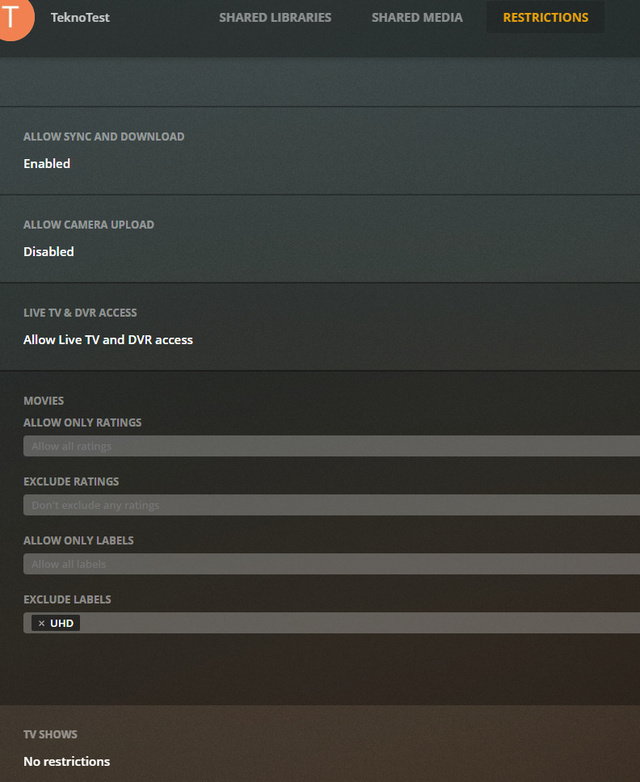
  • if you don’t want to create a separate library, you can use LABELS to restrict your users from seeing 4k content:

Subtitles

Depending on the client and subtitle type, enabling subtitles may cause video transcoding. Since plex does not transcode INTO x265, your 4k video will be transcoded down to x264 SDR, and you will lose all the benefits of 4k hdr.

So if you are having problems with transcoding what you think should be direct play, then double check if you have subtitles enabled, then disable them and see if it works.

In order to direct play subtitles, your CLIENT must be able to direct play those subtitles.

Client capabilities vary greatly, some clients may always require transcoding to have subtitles. Other clients may handle most subtitle types.

For example, Nvidia shield can direct play 4k with most subtitles types, like SRT and PGS.


Plex and 4k transcoding

Ok I want to ignore all the above and still want to transcode 4k; There is no free lunch. If you are transcoding 4k instead of having a direct play solution, then you will pay for it instead with expensive server hardware.

1080 transcoding is like a grain of sand on the beach of 4k transcoding. that is how much more power 4k requires. Great power does not come cheaply or easily.

transcoding 4k with CPU requires an extremely powerful cpu (plex cpu support article)

transcoding 4k with GPU requires active plex pass

audio is never transcoded on GPU so the cpu must be powerful enough to handle the number of streams expected even when GPU is doing the video.

plex does not currently transcode TO x265

any transcoding is also a highly IO intensive operation, this means you need sufficient ram, disk IO, and network bandwidth to get this bits in, converted, and sent out to the client(s).

plex does not currently do color mapping or conversion from HDR to SDR. transcoded HDR will have washed out colors.

  • tone mapping at the transcoder added @ Plex Media Server - #381 by StSimm1
  • some clients can now color correct the washed out colors and display hdr on an sdr display (experimental ios/android players I believe). The server is NOT doing it, the client/player is.

transcoding 4k hdr without a separate gpu requires a 7th generation intel cpu (i3/5/7 7000 series) with a 6th generation quicksync capable igpu. (ie intel uhd 600 series or better)

intel igpu transcoding is fully supported on both windows and linux

nvidia gpu transcoding is fully supported on windows.

nvidia linux gpu transcoding currently only supports ENCODING (the easier part). nvidia linux DECODING (the hard part) is still under development. there is no ETA, do not ask, it will be released when it is ready.

plex 4k/hevc decoding on linux/nvidia now available @ pms server beta @ Plex Media Server - #286 by emilybersin

nvidia 4k transcoding generally needs a 10 series or equivilent gpu. generally minimal 4k working cards would be gtx 960 (gm206) or 1050 or p400 quadro. p2000 quadro is often recommended due to unlocked encoding streams (still the easier part)

  • for linux+nvidia, VIDEO RAM is very important. 4k transcodes require approx ~1.3 gigs of video ram PER 4k transcode. This means in most cases, VRAM will be the limit on the number of 4k transcodes. Non-4k transcodes will typically use less than 500 megs of video ram.
  • cards within the same generation have the same decode/encode chip, ie all pascal cards will have the same quality/speed for transcoding.

a great comparison page for plex GPU transcoding and additional details @ nVidia Hardware Transcoding Calculator for Plex Estimates

there is a driver hack to unlocked some nvidia cards encoding, which may work, but that is obviously not something supported here or by plex. google is your friend.

the gtx 1030 does not have any encoder, so while it can decode 4k (the hard part), the cpu will be used to encode (the easier part).

amd gpu transcoding should work in windows, not sure about linux (I don’t know the details here, will update over time)

related plex support articles
https://support.plex.tv/articles/115002178853-using-hardware-accelerated-streaming/


some questions, answers, solutions


Q: Why does vlc/kodi/infuse/(any other common apps?) direct play my 4k content, while plex player doesn’t?

  • A: those applications are custom designed standalone applications which have their own built in codecs and capabilities and do not require a server, while plex clients are typically a lightweight app that depends more on the DEVICE to do the playback of directly compatible containers/codecs and make use of the SERVER to do the heavy lifting to convert (transcode) content which is not directly handled by the device/player.


Q: Why is my 4k smart tv app transcoding? its 4k it should be direct playing?!!?!? netflix/hulu/amazon/etc play in 4k with no problem?

  • A: smart tvs do not normally support the HD AUDIO that is included with 4k bluray rips/remuxes. when you are ripping your own 4k disks, you can see and choose which audio streams are included, make sure to include an dolby digital or dts 5.1 or stereo stream.
    then when you are going to play a movie, make sure that 5.1 or stereo stream is selcted.
    netflix etc does not use HD audio so it does not have this problem.
    also, netflix etc have greater control over both their APP and the how their CONTENT is encoded, so they can match them up to get the best experience.
    plex has to deal with content from all over the place, with unknown/inconsistent qualities and codec variations. Streaming 4k is also MUCH lower bitrate than 4k bluray remuxes.


Q: Why doesn’t my 4k smart tv direct play hd audio?

  • A: most smart tvs are made as cheaply as possible, have crappy speakers, and only include the bare minimum codecs and functionality required to get the job done.
    so mostly only dolbydigital/dts 5.1 or stereo is directly compatible.
    most smart tvs do allow for hdmi passthrough via something called ARC.
    however ARC does not support the HD audio as explained previously, so again dd/dts 5.1 or stereo is generally the best that can come out of the tv.
    some brand new tvs and receivers support a new version of HDMI which has hd audio support via E-ARC.
    even then, e-arc support is still in its infancy.


Q: Ok how do I get my HD audio along with 4k to direct play ?!?!?

  • A: you must use a plex client that can directly handle the codecs you are using, including the HD audio. This will likely NOT be your smart TV, it will be a separate device. You must also have the HARDWARE (ie receiver) that can handle the hd audio, like an atmos/4k receiver.

I use an nvidia shield with no issues and I highly recommend them, but you still need an atmos/4k receiver to direct play 4k/hdr/hd-audio content.

nvidia shield + 4k/atmos receiver + 4k tv = the simplest full 4k solution (dolby vision support has been added to the plex android clients, not all clients support all the different dolby vision profiles).

dolby vision rips should be created with makemkv version 1.15.3 or newer to have the proper mkv container compatiblity see @ http://www.makemkv.com/

there are other possible solutions, but I don’t have any experience with them and cannot recommend them, perhaps others will list their recommendations.


Q: how can I determine exactly why plex is transcoding?

  • A: go to Plex > settings > console > filter > type “mde” without the quotes
  • play the video on the device in question
  • examine the log entries with the MDE: and TPU: lines, these should help explain why plex is transcoding.

in the logs, look for entries with
mde: will tell WHY something is transcoded
tpu: will tell you WHAT cpu/or gpu transcoder mode is used

you can see/filter the logs @ https://app.plex.tv/desktop > settings > console

or settings > troubleshooting > download logs


What about DOLBY VISION ?
DV is a whole other can of worms. Again the 2019 shield pro is your best bet, but some DV compatible tvs can support DV playback with the plex smart tv app.

Not all TV’s support all the various DV profiles (of which there are several).

Instead of repeating existing good info/discussion, please see these links:

Dolby Vision primer @ https://avdisco.com/t/demystifying-dolby-vision-profile-levels-dolby-vision-levels-mel-fel/95

DV and plex discussion @


I hope this can be helpful.

feel free to post other questions, answers, solutions, corrections, or any other feedback.

this topic is a work in progress and with your help, I’ll attempt to keep updated and corrected as needed.

116 Likes
Diskstation/Roku/AppleTV Best Setup - Advice Please
TRUEHD 7.1 Problem. Other formats are OK
Transcoding with Quadro P2000
Best streaming device for 4K MKV files
GPU Transcoding vs CPU Transcoding
Reinstaled plex server and got totaly diferent interface
4K HDR - will plex ever support it?
Can't transcode 4K, GPU only at 2%
Video playback issues on Shield TV for all formats
TVOS TrueHD to FLAC with enhanced player
Help with Plex Media Player 4K content
4k Streaming
Older Quadro or Xeon
Plex Server Builld
Audio Passthrough support on Xbox beta
4k Playback issues on Samsung Smart TVs
Server transcode 4k -> 1080p on 4k PANASONIC TX-49FXW724
4k Streaming, some work others doesn't
New Plex User Qs
How to play movies in 4K fluid?
Eigener Mini PC für PLEX Server
TV plays 4K HDR for a bit and then turn it off
Requirements for dedicated Server 4k transcoding etc
NETGEAR ReadyNAS RN428
Audio not Hardware Transcoding
TMI and Confused
Transcoding 4k to 1080p all washed out
Plex Transcoding Atmos to AAC
LG Wallpaper TV, what do I need to play 4K using PLEX?
Struggling with 4K HEVC HW Transcoding with GPU
Why can't I direct play 2160p UHD on my TV without buffering issues?
Bluray + 4k UHD Bluray - Roku is my most common player
"Don't bother with 4k transcoding."
How to stop transcoding 4k
Help with Hisense 4K Direct Play
Plex on LG
NAS Synology DS118
Smart TV transcoding audio
Upgrade my library to 4k
Plex - Personal Media Scanner - zeigt nur 1 Jahr an
4K Streaming Help!
4K Direct Play Issue - My first foray into trying to use 4K. FireTV Gen2 @ TV
4K transcoding to 1080p or lower
Stuck at transcode buffering (4K DTS-HD MA movie, Samsung TV)
PMS transcoding audio, how to avoid this?
Driving me insane: Unable to stream 4K, HDR using Plex
MOVIES....4K vs. LOWER QUALITY
I am looking for help deciding what type of NAS to use to run my PMS
Transcode 4k content
CPU 100% Gen 9 i7
4k playback not fluently after turn on subtitle on x86 NAS
Plex Audio playback issue - Sony 2018 TV
Quick Sync vs Passmark
Weird problem streaming 4K with LG Plex App
Sub £300 NAS capable of playing 4k + subtitles
Remote Access - 4k Conversion Options?
Aquaman movie cause AVPlay error on Tizen TV
What kind of NAS to buy supporting 4K movies
4K Movies Are Not Using DirectPlay
Understanding HEVC/x256 Transcoding Although Streaming Maximum
Plex Server Transcodes instead of Direct Play
Atmos pass through, LGC8 to SK10Y
Transcode to HEVC/x265
Issues with unnecessary 4k transcoding
4k playback issue for specific file
Streaming 1080p to an 4K does usually require transcoding?
What is needed to hardware transcode 4K HEVC Main 10 HDR?
4k buffering
PMS NAS recommendations
LG Oled C8 Plex App - Audio Formats
Streaming from Shield as Plex Server to Another Room - 4K/Atmos
Fix HDR tonemapping when transcoding
TrueHD, HDMI on LG OLED
Plex Server HW Requirement 4k TrueHD Transcode
What should I upgrade in my server PC?
Various Quality Settings Stutter, Lack of Contrast
Is my machine strong enough for X265?
Considering adding a quadro card to my system
Subtitles not showing in Plex but ok in VLC
4k hdr10 vs plex on samsung tv
4K HDR Movie on Apple TV 1080p
Need help with building Plex server
Best solution for watching 4K content on internal home network
Limit remote stream bitrate
Proxmox, ubuntu, Nvidia PMS transcoding?
Dolby TrueHD transcode on Shield TV
Plex app + samsung TVs + audio passthrough help
DVD Rip Quality on Plex/Roku Ultra
TrueHD/Dolby Atmos when?
Upgrade recommendations for 4k
Apple tv 4k box
4K Video Files not transcoding but buffering on gigabit network, why?
Plex (player?) missing from list of apps in Asustor Portal
New PMS specs - P2200 or RTX4000?
Best cheap Windows server for Plex?
4K Transcoding Issues -Buffering -Direct Play -LAN -WAN
HW Acceleration / CPU & GPU Recommendation
Transcoding with GPU
Bravia 4k Android TV Freezing on anything with EAC3 7.1 Audio
Dolby Atmos or TrueHD 7.1 via Amazon 4k Fire Stick
Bitstream Passthrough with Plex app on Roku
4K Buffering when NOT transcoding - OK when Transcoding - Advice needed please
LGtv issue with buffering on 4k stream
Transcoding - Advanced Limitations
Should I upgrade my memory
i7-7700K vs Ryzen 7 2700X
Subtitles cause buffering for 4k content
Need 100% CPU Transcoding Fix
4k questions
Devices That Allow DTS-HD and Dolby TrueHD Passthrough?
Plex maxing out CPU while GPU is at 20%
Sony Android TV - Stuttering / buffering when playing 4K footage - Nvidia Shield Solution?
Can a Xeon E3-1270 handle a 4K H.265 stream?
4K buffering but only through Plex
Unable to play/transcode 4K HEVC to 1080p on my Android TV
Any recomendation to client hardware which is capable of playing 4k H.265 video directly?
Need solutions for hevc/uhd 4k transcoding At best resolution
Hardware requirements/suggestions around dedicated GPU? (Nvidia Quadro P2000)
Cannot play DTS/TrueHD on Sony 4k TV
Plex server hardware advice?
Unnecessary 4K transcoding in webOS Plex app
Will this work for 4k transcoding?
4k Content Issues - garbled video
Building a plex server how much power I need?
Synology 418play VS 918
4K/Lossless is buffering all the time
Hardware Transcode
Is there a solution to play every codec natively?
4k Library on Plex SUCCESS and how i did it
Hardware acceleration recommendation
HEVC 4k 10bit Transcoding variations
LG Web Os player 4k issue
Plex is slow!
4K Direct Play - Washed Out Colors
Plex Server Performance Low
4k Stuttering
Plex transcoding audio when audio track was changed
What TV to choose as a Plex platform?
Upgraded to Plex Media Server v1.16.6.1592 in docker container on unraid, can can't direct play 4k anymore
Best approach for 4k and Hardware transcoding
Hardware Transcoding does not work for me properly
Vizio Plex 4k hdr stream issue. 2nd Gen FireTV Cube question
Buy Plex Server "What DELL would be best?" POWERFULL Transcoding!
Apple TV 4K HEVC/265 60FPS No Direct Play
Streaming 4k movies does not show up as 4k on my tv
Audio Passthrough (Dolby Atmos...)
Apple TV and Dolby Atmos
New Plex Server - 4k steaming - 12vCPU at 100%
Best TV-Attached Client for Plex?
4 K 2160p mostly does not work - why?
Vizio Plex 4k hdr stream issue. 2nd Gen FireTV Cube question
[HELP] Upgrade i3 3225 for H265 4K
New Mediacenter Setup, best player for best video 4k dolby vision and best audio dolby atmos
Why isn't Plex streaming/decoding DTS-HD?
Plex is Buffering on some videos
Atmos (or any multi-channel not working during internet streaming + video quality
Problem with some 4K x265 mkv files buffering and then stopping
Nvidia Transcoding on Ubuntu
Fix HDR tonemapping when transcoding
4K Streaming PMS Reviews
Error in transcoding 4K files
What is the best infrastructure in my home
4K HDR 10BIT movies
Shield Pro won't play a 4K HEVC file
Problème lecture vidéos 4K
Looking for advice on Nvida Shield Pro
HEVC/4K playback washed out colors ??
100% HDD Utilization
Help for finding right configuration to avoid Transcoding on 2015 TV (60UF776V)
Forced Transcoding Panasonic
About HW Transcoding
NAS/Plex Server build 4k transcoding will this work?
What setup is best for my situation?
Best Streaming Device for Plex (with AVR)?
Ongoing problem with Sony TV and where the problem is?
Considering Plex - Some General Questions
What is the best graphic card to transcode 4K media with Intel core i7 4790 3.6GHz CPU?
This server is not powerful enough to convert video
Transcoding 4K - Why?
Why the performance of playing original movies in LAN is so bad ?
Best format NVidia Shield Pro TV?
Should I add a GPU to my server to allow transcoding of 4k files?
So can Plex for anything handle 4K or is it only for YouTube videos and 2005 movies?
Requirements to build 4k capable server
Best QNAP for 4K streaming videos
Is my old Desktop or Nvidia Shield Pro(2019) a better place to have my Plex Server?
Dolby Atmos support for LG TV apps (WebOS 4.5)?
3 Different Looks - 3 Different Plex Apps
4K/Lossless is buffering all the time
Movie Quality being downgraded from 4K to 720K?!
I7 3770 + GT 730 Not enough to transcode?
Synology NAS device questions
No X265 Support
Why does my TV need transcoding?
Why Your 1080p and 4K movies run slow. A Sad Discovery
LG webOS TV OLED65C9PUA Subtitle and HDR Issues
4k Transcoding specs
4K Buffering Qnap Nas for PMS and Sony TVs for clients
Sony a9g Plex 4k content video stops
AMD FX 6300 + R9 270. Running 4k on linux question
So finally i have to turn to jellyfin, after i purchased a life time pass
When is Plex going to add tone mapping for 4K HDR transcoding?
Does AMD Ryzen 5 3400G can transcode 4K Hevc 265 10bit (50Mbps+) to 1080P(20Mbps)
Requirements NAS or PC 4k
Good GPU for transcoding 4k Remuxes?
About x265 playback
Should u put a bitrate changer even for 4K Movies
New Build - looking for feedback
Couple of question for a new build
What do you consider to be the best streaming device in 2020 for Plex 4k x265 HDR streaming
HDR 10+ / Buffering / Subtitles Cause Lower Quality
Purchasing new cpu and maybe gpu?
Transcoding
Does Tone Mapping work with original quality?
Sony XG9505 + JBL 9.1 dolby atmos and visio streaming
PLEX Hardware encoding?
ATMOS from Plex Server? Moving to s shield pro?
Plex forces transcode on Dolby Vision?
Plex changing saturation and transcoding x265 to x264 only on pc
Does Plex tv app pass through dolby true HD etc if tv and amp support e-arc
What's the status of Dolby Vision + Atmos on Plex? (re: LG WebOS, Nvidia Shield, Apple TV)
Mac struggling with PMS - want to build affordable new box, Linux or Windows?
Large 4K media with Dolby Atmos etc cause LG Plex to stutter. Would an NVidia Shield TV sort out the issue? And what about getting Dolby Atmos audio to my amp?
Plex not using Intel Quick Sync for 4K HEVC content
4k Stuttering
Fire stick 4K Direct Play 4K HDR 10 as long as not TRUEHD 7.1 audio
My recent experiences with 4K/HDR
Hardware accelerated encoding
4k HEVC/h264 4096x2160p Not Direct Playing on 2019 Shield
Dolby Vision won't trigger on some movies
4k Video is Transcoding to 4k TV
Comprehensive movie audio transcode analysis
Can anyone figure why one 4K movie plays, the other buffers out of control
How to disable transcoding on plex?
Preventing HDR transcoding
Unnecessarily transcoding video when audio needs transcoding
Plex on Alexa - NO ATMOS. PLS Help
25 Simultaneous Hardware Transcodes on the NUC10i7FNH
Best supported/capable Plex player still Nvidia Shield?
Newbee question - Sensible file size for favourite movies
WWYD, Devils advocates on Client/server/$$ Decisions
Transcoding 4K - but why?
Lagging while trying sto stream 4k full blueray mkv
TrueHD Audio seems to be triggering a full transcode not just audio
Is it the transcoder that aborts playback of 1080p files when I try to rwd/ffwd? Do I need a new video card?
Hardware Acceleration - Nvidia Ageia PhysX?
Please help me figure out why 4K wants less bandwidth than 1080P
Dedicated GPU, hardware acceleration not working?
Anyone here compare a recent gen nuc to the shield for playback?
Plex for Mac doesn't support HDR?
4k mkv when streamed through plex don't show up as HDR 10 on my vizio tv
Not getting HW transcoding with Intel i7-8700 Coffee Lake CPU
4k Plex Nas - Asustor AS5304T Nimbustor 4 + Plex pass
Purchase advice: Synology 10G model. Hardware acc. transcoding necessary for AppleTV 4K?
My new LG telivision can't play 4K HDR and no Dolby Atmos
High bitrate issue on TCL R635 TV
I can't directplay TrueHD Atmos, but my equipment allows it
New Machine Setup - Seeking Suggestions! (Hardware, Config, Settings)
Transcoder drops significantly during subtitles
Plex believes my HDR projector can't play HDR
FYI - FreeNAS - Works surprisingly well on poor/old hardware
Plex App on Sony Bravia A80J with DTS, DTS-HD, DTS:X, TrueHD Atmos, HDMI eARC passthrough
Please delete
Will a GPU help? 4K Streaming
Double movies on "continue watching" home page
Is it normal for a movie to require 295mb/s speed? No wonder is buffering
Advice on PMS PC Upgrade
Default All Clients to Max Internet Streaming
1950x + 1070ti and transcoding
Potential Plex Pass buyer seeking advice
Shield TV / Pro or NAS for Plex Server
Adding subtitles changes the Quality type and slows down everything on Synology SD720+
Holy grail - How to stream UHD+Dolby Vision+Atmos lossless to Sony TV+Marantz AVR?
Issues with subtitles and trueHD on samsung TV
Plex Nvidia P2200 Suppose Transcode Everything?
Watching first movies and disappointed
How to avoid transcoding - proper app clients
Dd True HD & dts MA on TCL Roku tv
One device/Plex client to rule them all ? 4K HDR, 3D MVC, lossless audio bitstreaming
Buffering on LAN
Current Status Of Plex & 4K Transcodes
Hardware transcoding on old hardware
What settings for streaming 4k from win10 server to Nvidia Shield (2019)?
Dolby Atmos on XG9505
I want large files play on plex server
Shield Pro Server, HEVC 4K, Fire TV Stick, "an error occurred while attempting to play this video"
Is there a tipping point between hardware and software transcoding?
Dolby Atmos on Samsung TV Plex Client
Mandatory transcoding?
Media server build advice
4K Transcoding with NVIDIA Shield or invest in a powerful CPU/GPU?
Galaxy Tab S7+ No TrueHD support?
Home Ecosystem Migration from WHS to Plex
Frustrated with ATMOS via PLEX
Whats needed for 4K server?
Will PLEX be able to read TrueHD audio?
Would these be good specs for running PMS?
What do you think about this server?
Fresh Ubuntu 20 - 1050ti - NO transcoding
MPC Does a Better Job Playing Videos than Plex
Plex insists on transcoding HEVC>H.264
Choppy TrueHD playback on Vizio SmartCast
Firestick does not play any 4K content
Plex says TrueHD not supported and transcodes video, even when speaker & media player supports it
Add support for PGS embedded closed captions // MOD: support forced frames within a subtitle not tagged as forced
Plex says TrueHD not supported and transcodes video, even when speaker & media player supports it
Play without transcoding DTS-HD-MA but can't play TrueHD
Nvidia Shield (tube) 8.2.1 makes things worse for Dolby Vision and High Bitrate
DTS-HD and Dolby TrueHD Passthrough?
Is NAS brand/model really important?
Plex on Roku HDR, DV, and Dolby Atmos
Buget Plex Server/Video encoder - CPU vs GPU
How do I find what is causing transcode?
Audio Pass Through for Atmos?
Best Plex Client and Device
How to contact support especially after buying a lifetime pass?
Can I play Dolby Atmos MKV movie on Sony A8H
Dolby Vision on Sony X950H
Best solution for Plex Player - TV vs. PS5 vs. Mac Mini with 4k/TrueHD7.1
Do I need a receiver or does the lg oled b9 "passthrough" mean, that the input doesn't need to be E-Arc, just the output the the sonos arc bar?
Video gets borken up when playing on LG TV
HW 4K transcoding
Where is the bottleneck for transcoding 4K?
Da Kodi a Plex
Why does plex transconding my video?
What's the status of Dolby Vision + Atmos on Plex? (re: LG WebOS, Nvidia Shield, Apple TV)
PMS maxes out CPU load and playback hangs
Plex not using All available CPU
Plex 4k content
Plex oddities / newbe challenges
Long delays before content starts
TCL Android TV DTS refuses to work
4K playback stuttering
[Implemented] HDR->SDR Transcoding
HW transcoding isn’t working smoothly with Nvidia GPU
LG WebOS Plex app BUG + 4K hevc HDR > 1080p VS Samsung APP no bug
4790K or 6600K with quick sync?
Transcoder Inquiry
Philips Android 10 2021 model not able play Atmos
TrueHD no longer works?
Atmos 7.1 Transcode Assitance
Trouble with streaming 4k content, should I not stream directly from server?
Stuttering with SRT subtitles on 4k video files on XBox Series X
Nvidia Shield Pro 2019, What codecs work without transcoding?
NAS Build for 4K HTPC
Trouble transcoding x265 content
Video with DTS/DCA audio not playing on PMP on Windows, but playing on Plex app
HELP - Trantranscoder Error
Implement non secure on local lan
Dolby Atmos on Amazon fire stick 4k max with Denon Avr x4200w
Dolby Atmos via Plex app on smart TV
TRUEHD/Atmos audio forces video transcoding?
Best Smart TV for Plex
Audio transcoding forced even on passthrough
4K Direct play always buffering
TrueHD Atmos to EAC3 or OPUS, does it keep Atmos?
Why can't my computer stream 4k to my TV
Synology DS723+ 16 Gb ram + Plex 4k
Plex unable to play Dolby Vision .ts demo file
Dolby atmos help
Does plex support HDR rips?
Video Card number of Sessions vs transcodes
Hardware - Graphic Card for Transcoding and Optimizing
Can't stream UHD video from Plex Media Server to Sony Android TV? True?
Plex on Nividia Shield TV (2017) causing stuttering on 4K Movies Direct Play
High cpu usage transcoding only 1 movie
Plex pausing/stuttering on 4k stream
What are the min. requirements to play 4K videos?
Actual hardware requirements
Can we restrict users from seeing 4K content without creating a separate library or splitting up merged movies?
Best setting for me to stream1080p/ 2160p Movies
TV can't keep up with 4k
Nvidia h265 decode and encode support?
Jerky playback on AppleTV for UHD versions of media
Why can't my computer stream 4k to my TV
PMS & Hardware Transcode - Poor performance
Playback error with True HD 7.1 and subtitles
Plex app on Sony X900H TV and 4K HDR or DV MKV file playback
Martians Destroyed My TV
Plex for BRAVIA 49X7005D Android TV won't passthrough DTS HD-MA or Dolby TrueHD (5/7.1)
Plain and Simple what is required for Streaming 4K Media from your PLEX
Home theater upgrade to UHD
Plex 4K transcoding cpu Xeon
How Stream 4K Content in Home with both wired and wireless TVs
4k Streaming, some work others doesn't

Good post. I’m always amazed at the number of people complaining about transcoding 4K as if that’s something that should ever happen. If you’re transcoding 4K you’re doing it wrong.

8 Likes

Great post, really helpful and mostly correct :slight_smile:

  • DTS-HD MA is your friend, you don’t need HD compatible audio gear so long as your player is able to parse the stream and extract the DTS core. This can then be passed over ARC to your sound equipment

I strip the TrueHD streams from all my rips and use only AC3 (usually present alongside a TrueHD track) or DTS-HD MA tracks as I have a sound bar connected via ARC to my LG 4k set and that works just fine for me.

I’d also add something about subtitles to your piece. I can only speak with experience of the app on LG TVs, but PGS subs will always trigger a transcode as bitmap format needs burning in to the video stream. SRT subs can be streamed separately to the video and audio and overlaid by the client, and do not trigger a transcode.

8 Likes

^^ What Gary says + this also works over toslink/spidf, at least it does in my case.

Still a nice guide, thanks for the effort.

2 Likes

Thanks for the post, TeknoJunky. This post would have saved me quite a few hours in trouble shooting.
That said, I’ve found the best solution is, that if I want to watch my 4K movies, I’ll play locally through VLC via my HTPC. It can (for the most part) handle playing without buffering, and I can output Dolby True HD Audio to my receiver.
I Love Plex and use it constantly, but I’ve decided to only stream via Plex all non-4k movies. Force Direct Stream can work on Plex, for the 4K movies, but I see a lot more issues with buffering.

1 Like

Thanks for the all the comments and feedback.

I totally forgot about subtitles issues, thanks for the reminder, definitely a common problem for otherwise direct play.

the whole dts-hd ma & core thing I was never very clear on; when you say player, are referring to the software (plex) or the hardware (tv/receiver/soundbar/etc) ?

Given a lossless dts-hd ma audio track, will plex send only the dts core, or will it transcode, for example going to a smart tv then over ARC to receiver?

My 4k journey started with a roku tcl 4k tv with the roku plex app.

I was immediately able to get 4khdr working but of course due to the ARC limitations my server was bogging down trying to convert the audio and direct stream (ie not direct playing).

At some point I found out about the ARC limitations, and how to change to compatible audio streams, which worked, but was annoying. And my tv has weird audio sync issues with DTS.

So I thought there was a solution with the xbox one x, which I ended up buying during xmas season.

As I quickly found out, that wasn’t any better than the roku situation since the xbox can’t currently passthrough HD audio.

After much further research and reading many recommendations from here, I finally went for an nvidia shield and got the 500 gig drive model.

If I recall correctly, I think this was just before the big update that allowed for adopted storage, so I went big to avoid the small 16g storage issues.

Once I got the shield up, my 4k has been awesome without further issues.

4k works, hdr works, atmos works. I can even operate the shield and plex with my receiver remote via cec.

Thats is pretty much why I push the nvidia shield so much, because it would have saved me a ton of money and time and frustration if I had simply started there.

3 Likes

I just can tell you how it works for me:

I have a Shield connected via HDMI to the TV (Sony XE9305) and the TV is connected via toslink to the amp. When I play back a UHD remux, irrespective of whether I select DTS-MA or DTS standard, only DTS (core) is passed to my amp and the movie is direct played.

1 Like

@Coxeroni

yea but is the server sending the whole lossless dts stream, and the shield is then decoding the dts core to pass to optical…

or is the server only sending the dts core, because the shield says I can’t play dtshd ma ?

the shield by itself is more capable than most other clients and tvs, so what may be true for shield is not necessarily true for other clients.

I will try to experiment with this later myself, and see how 4k/hdr+ dtshd ma works across plex roku-tv client.

Now I get what you want to know. Honestly I don’t know how it works, but I just care whether my files are direct played or transcoded :slight_smile:

1 Like

As I understand it, PMS is sending the whole DTS-HD MA stream to the Plex Client, the client passes the stream to the TV’s OS, which then makes a decision, based on HDMI handshake and the audio equipment’s capabilities, on what to do next. If your TV is connected by an ARC HDMI link to a DTS capable audio device the TV then extracts the DTS core and sends it to the audio device. As far as PMS and the Plex client are concerned, you’re playing a DTS-HD MA track. Same goes if the TV detects no external audio hardware and just down mixes the DTS core to 2.0 and plays it back through the speakers. DTS-HD MA is pretty neat like that :sunglasses:

6 Likes

gary that makes a lot of sense, otherwise if the server were processing the MA into core, I would think that would be more like a direct stream (remux) or even full audio transcode, (not direct play).

it is too bad that truehd/atmos doesn’t seem to downgrade to dd+ as simply.

1 Like

9th rule: If you want to be able to transcode and are willing to give up HDR, don’t use HEVC with 4k content and just encode with AVC h.264 instead.

I have a bunch of 4K content encoded with h.264 in bitrates ranging from 12mb/s to over 20mb/s. My Plex server is an i5 quad-core NUC and it downsamples to 1080p perfectly fine for remote streaming. Plus I get to enjoy full resolution on my TV when I’m at home. For my eyes, the increase in sharpness with 4K is easier to spot than the color dynamics of HDR, so being able to keep just one copy of the file for every purpose is more worth it to me. If I really, really wanted to watch in both 4K and HDR, I’ll just get my lazy butt off the couch, go grab the disc and stick it in the BD player.

2 Likes

you bring up a great point.

its not so much the resolution that is hard.

its the x265 codec, it simply takes waaaaaay more processing to both decode and encode. which is why without gpu support most generic servers just do not have the processing power to do it.

Yeah, I’ve found that even though we tend to use the word “transcoding” generically, there are different types of transcoding with different effects on CPU usage. If you’re truly transcoding from one codec to another (e.g. HEVC to AVC, or WMV to AVC), then you’re going to need more horsepower. And we all know how much horsepower h.265 needs. But, if you’re simply downsampling and staying within the same codec, you can get away with more modest CPU usage (h.265 notwithstanding).

Anyway, HUGE kudos to @TeknoJunky for the original write-up. It really is worthy of being an official HC article.

3 Likes

Really? What TV do you have? For me it is quite the opposite, HDR is directly evident since the brightness is noticeably increased where it has to be. Have to say, that my Sony XE9305 has a remarkable peak brightness of ~1400 nits, which makes HDR a blast.

3 Likes

I have a Samsung QLED 75". But it’s just the entry level Q6 series so maybe there isn’t quite the color fidelity of their higher end models. I was really excited to see HDR and since most 4K UHD Blu-Rays also come with FHD, I immediately did some back-to-back comparisons. While I do notice more color depth, I was particularly impressed by the sharpness. Granted, I know that many UHD discs are just upscaled FHD content. But I still notice a difference and am happier with not having to deal with performance issues. So sticking with h.264 works better in my situation. Maybe someday my wife will let me upgrade to one of the Q9s.

Everyone has their own goto reference disc but get a copy of Pacific Rim and give that a go. The first 10 minutes has some incredible HDR imagery and sound to make the windows shake.

1 Like

I just want to say thank you, because I was just testing my Optical and ARC connections from my TV to a new receiver, and could not figure out why DTS-MA was direct-playing. Your write-up happily appeared at the top of my first search attempt (woo hoo forum search works!). I forgot that DTA-MA contains the lossy DTS track inside.

1 Like

The first rule of 4k is , don’t bother transcoding 4k

Not true at all.

The third rule of 4k is, If you cannot direct play 4k, then perhaps you should not even be collecting 4k

Also not true at all.

First off, 4k isn’t something that is “hardware supported”. You can have an h264 4k video that plays on existing clients just fine. You can have a 1080p h265 file that does not play well. The difference is in the codec, not in the resolution. The codec is what is or is not supported in hardware.

Second, even as you posted this thread, Plex added support for both decoding and encoding on nVidia GPUs. So you can buy pretty cheap video cards now that allow you to support 20+ 4K h265 transcoding sessions without really utilizing your CPU very much. I average 5+ h265 4k transcodes most nights and sar says my CPU is 99.8% idle.

Please do not spread disinformation.

5 Likes

The ‘rules’ are a reference to fight club, so they are not necessarily being expressed as immutable facts but to inform and explain to everyone who does not know or care about the nittty gritty but simply wants to understand why it doesn’t work as they expect, or to help explain how to get it working.

In either case I did not state you CAN’T transcode 4k (or 265).

In both cases I am simply suggesting that in most situations if you are not going to be direct playing 4k/265 content, then what is the point of even having it !?!? You can save time and expense by simply going with standard x264 1080/720 rips of the quality you desire.

265 may save you some disk space for non-4k content, but if you have to buy more cpu and/or gpu just to convert back to 264 to play it, what does that save you ? disk space, sure ok.

You are absolutely correct, it is the 265 codec that is extremely difficult to decode/encode, not necessarily the resolution.

I will see if I can make this more clear since apparently I did not make it clear enough already.

plex has supported nvidia gpu decode/encode on WINDOWS for awhile and works relatively well. this was never under dispute.

it is the linux nvidia gpu decoding support that everyone has been waiting for.

Talk about misinformation.

There is no reality where you are transcoding 5+ 4k h265 4k streams with a 99.8% idle cpu.

Because the CPU has to be doing all the other processing that encompasses transcoding and is not handled by the GPU, including but not limited to; AUDIO transcoding and DISK/NETWORK IO involved.

2 Likes
